SA-WS350/WSD35
6
Sony CONFIDENTIAL
For Authorized Servicer
WIRELESS CONNECTION (LINK) WORK OF THE BAR
SPEAKER AND THE SUBWOOFER
When replace each BT module or MAIN board of the bar speaker
or the subwoofer with a new part, the wireless connection (LINK)
between the bar speaker and the subwoofer will be disconnected.
Before returning the repaired product to the customer, please wire-
less connect (LINK) the bar speaker and the subwoofer referring to
the following.
Note: If only the bar speaker or the subwoofer is brought in for repair, can-
not wireless connection (LINK). Refer to “What to do if only the bar
speaker or the subwoofer are brought in for repair” on page 7.
Replacement that requires wireless connection (LINK)
work
• Replacing the BT module (CA1 BAR) of the bar speaker
• Replacing the MAIN board of the bar speaker
• Replacing the BT module (SW) of the subwoofer
• Replacing the MAIN board of the subwoofer
Wireless connection (LINK) method
After replacing the BT module or the MAIN board, perform the re-
set of the this unit. After that, when turning the power on, it auto-
matically wireless connect (LINK).
(For the reset method, refer to “RESET METHOD” on page 5)
What to do when not automatically wireless connection
(LINK)
If you do not automatically wireless connection (LINK) even if you
turn the power on, there is a possibility that the bar speaker and the
subwoofer before the repair were connected via the secure link.
In that case, perform a wireless connection (LINK) with reference
to the following.
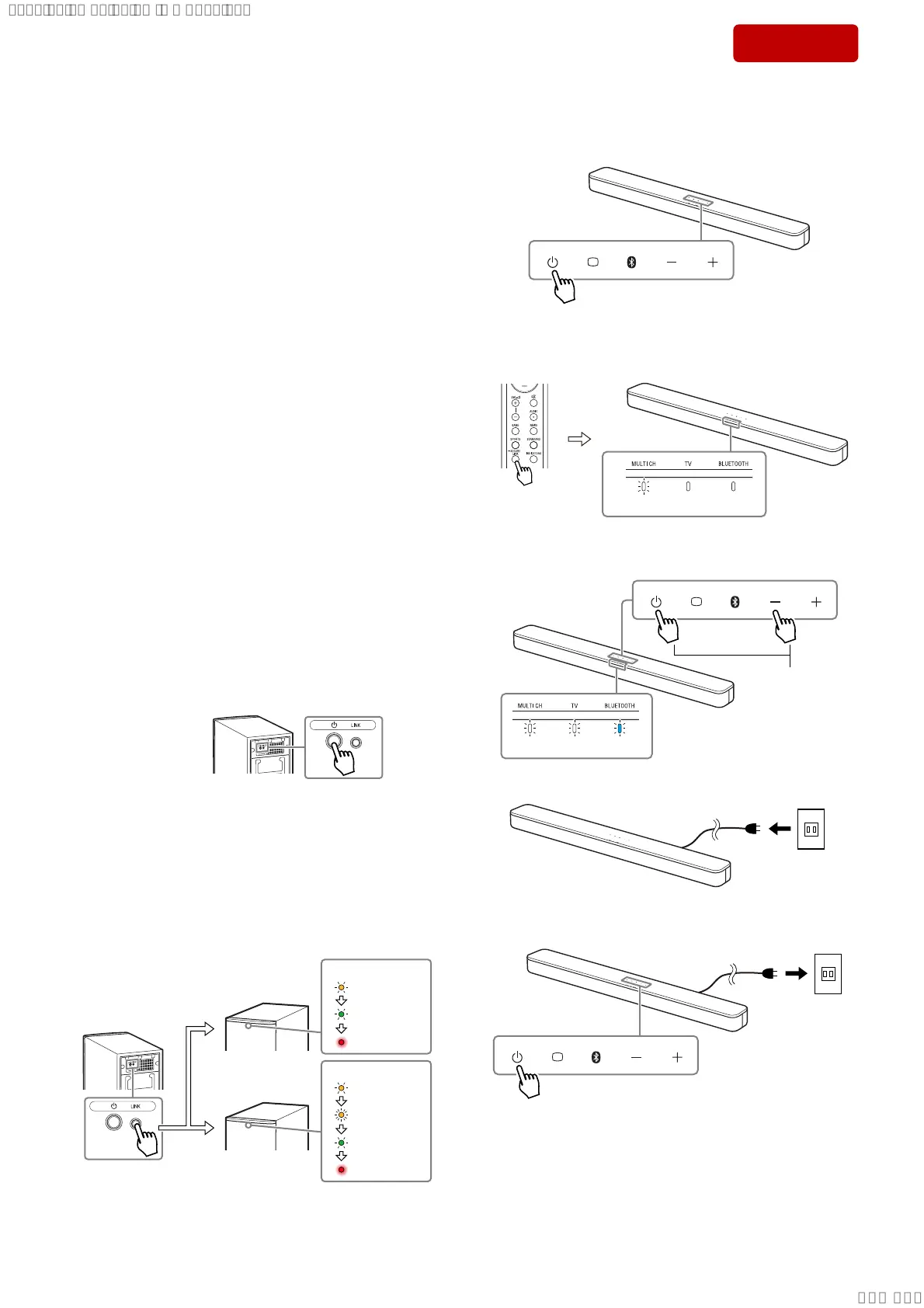
• When the bar speaker is repaired
Procedure:
1. Press the [
1
] button on the subwoofer to turn the power on.
Subwoofer
– Rear view –
2. While the status indicator of the subwoofer fl ashes orange slow-
ly, press and hold the [LINK] button on the rear side for about
5 seconds and check that the status indicator switches to fl ashes
green → red light up (standby).
Alternatively, while the status indicator of the subwoofer fl ash-
es orange slowly, press the [LINK] button on the rear side for
a short and checking that the status indicator has switched to
fl ashes orange quickly, then leave as it is for about 2 minutes and
check that it switches to fl ashes green → red light up (standby).
Subwoofer
– Rear view –
Subwoofer
– Front view –
Status indicator
flashes orange
slowly
press
short
press and
hold 5 sec.
Subwoofer
– Front view –
Status indicator
flashes green
red light up
flashes orange
slowly
flashes orange
quickly (2 min.)
red light up
flashes green
3. Turn the power on of the bar speaker and automatically make a
wireless connection (LINK).
• When the subwoofer is repaired
Procedure:
1. Touch the [
1
] button to turn the power on.
2. Press and hold the [SECURE LINK] button on the remote con-
trol for about 5 seconds, the [MULTI CH] indicator of the bar
speaker fl ashes 2 times and the secure link is released.
ress and hold
5 seconds
flash 2 times
3. Touch the [
1
] button and [–] button at the same time for about 5
seconds, then all indicators fl ash 3 times (resetting).
Touch for about
5 seconds.
flash 3 times
4. Unplug the AC power cord.
Outle
5. Insert the AC power cord, and touch the [
1
] button to turn the
power on.
Outle
6. Turn the power on of the subwoofer and automatically make a
wireless connection (LINK)
– Continued on next page –
SYSSET
2019/02/1301:37:00(GMT+09:00)



 To Next Page