EasyManua.ls Logo

Sony SLV-686HF - Page 35

Sony SLV-686HF
67 pages
Print Icon
To Next Page IconTo Next Page
To Previous Page IconTo Previous Page
Loading...
To
be
continued
>
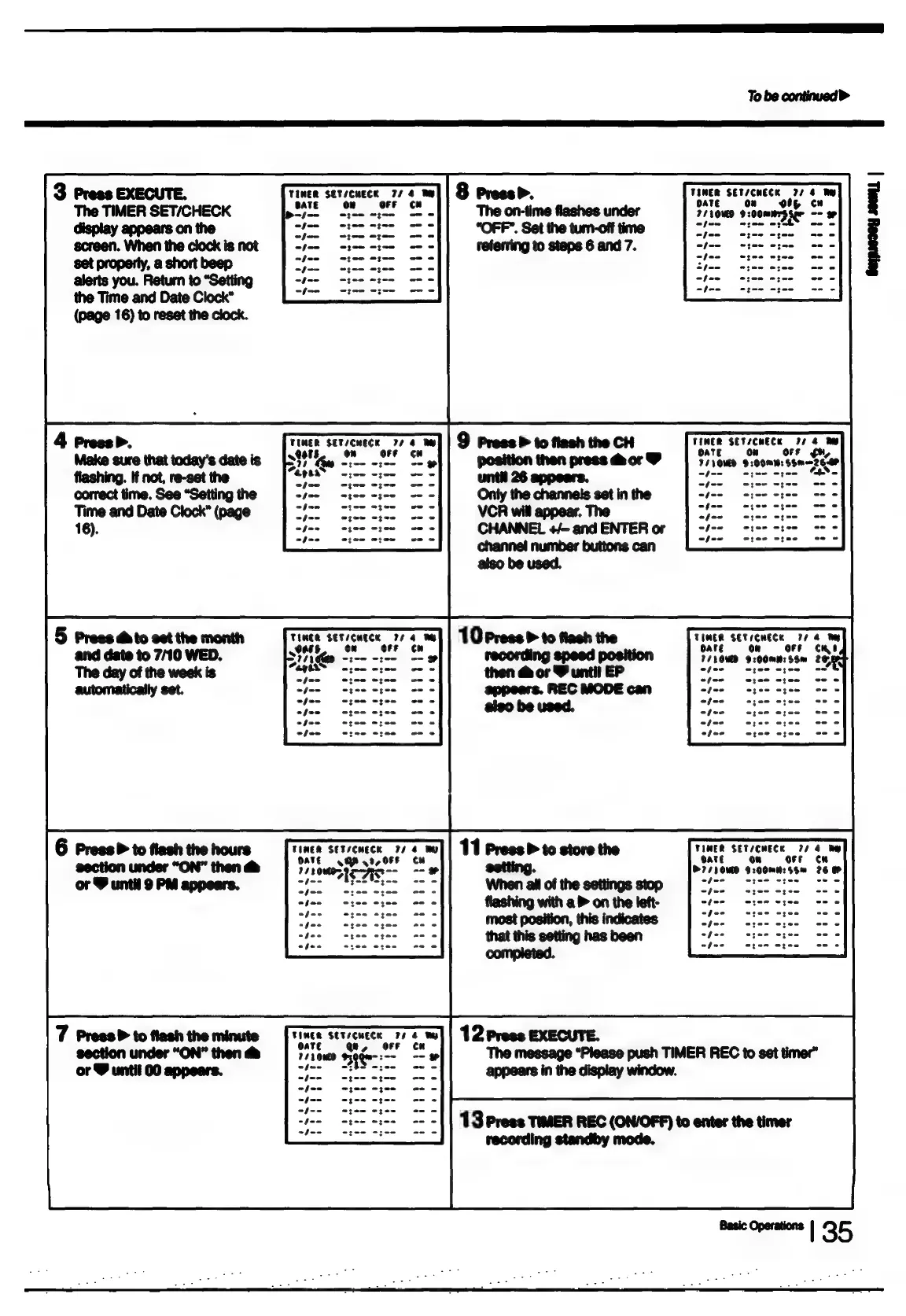
3
Press
EXECUTE.
TIMER
SET/CHECK
774
By
The
TIMER
se
ATE:
Oe:
eran
te
hn
ott
co
display
appears
on
:
ple
tage
aoa.
beeve
screen.
When
the
clock
is
not
R
jase
‘Syanlerse
set
property,
a
short
beep
ph
ca
ry
ae
ee
Naa
alerts
you.
Return
to
“Setting
nies
ae
ae
:
:
the
Time
and
Date
Clock”
Ral
fcsediel
(page
16)
to
reset
the
clock.
Geyprocey
soem
|
TUMER
SET/CHECK
77
:
__
9
Press
P
to
flash
the
CH
TIMER
SETSCHECK
77
4
By
Qos,
On
OFF
OATE
§=0N
OFF
gh,
TdVOMD
209mm
SSm—zeer
foe
oyee
een
“feo
SS
er
appears.
Speco
wgae
Only
the
channels
set
in
the
tee
ice
mae
VCR
will
appear.
The
oS
etee
cree
CHANNEL
+/-
and
ENTER
or
a
a
channel
number
buttons
can
=<
also
be
used.
10
Press
>
to
flash
the
TIMER
SETICHECK
7/4
Te
oare
§=—ORs—i«é«iCC
7/1OMD
9:00mN:S8m
2e
recording
speed
position
then
&
or
&
until
EP
Sies 4155
e102
ete
wyee wyee
etme
ntee
otee
appears.
REC
MODE
can
ates
agen
bps.
“ease
ere
also
be
used.
see
see
“feo
ogee
osee
ofee
epee oze0
6
Press
>
to
flash
the
hours
cute
SETSEMECE
77
rumce
StTseMece
|
wv
:
ay
pee
ital
naga
ag
ae
setting
77
10MD
$:00me:S5m
26
or
9
until
9
PM
appears.
be
re
ceeaiial
oote
ofee
ofee
ofue
hee
ey
3
feo
ole
8
3
efor
ofen
afen
afoe
TIMER
SETICHECK
FF
OaTe
o
¢
1110060
sen:
a
The
message
“Please
push
TIMER
REC
to
set
timer”
5
EH
NRE
AST
foo
eyes
epee
ef--
wee
ogee
ree
Shee
Se
13
Press
TIMER
REC
(ON/OFF)
to
enter
the
timer
eieiaots
recording
standby
mode.
mene
Loo

Table of Contents

Related product manuals