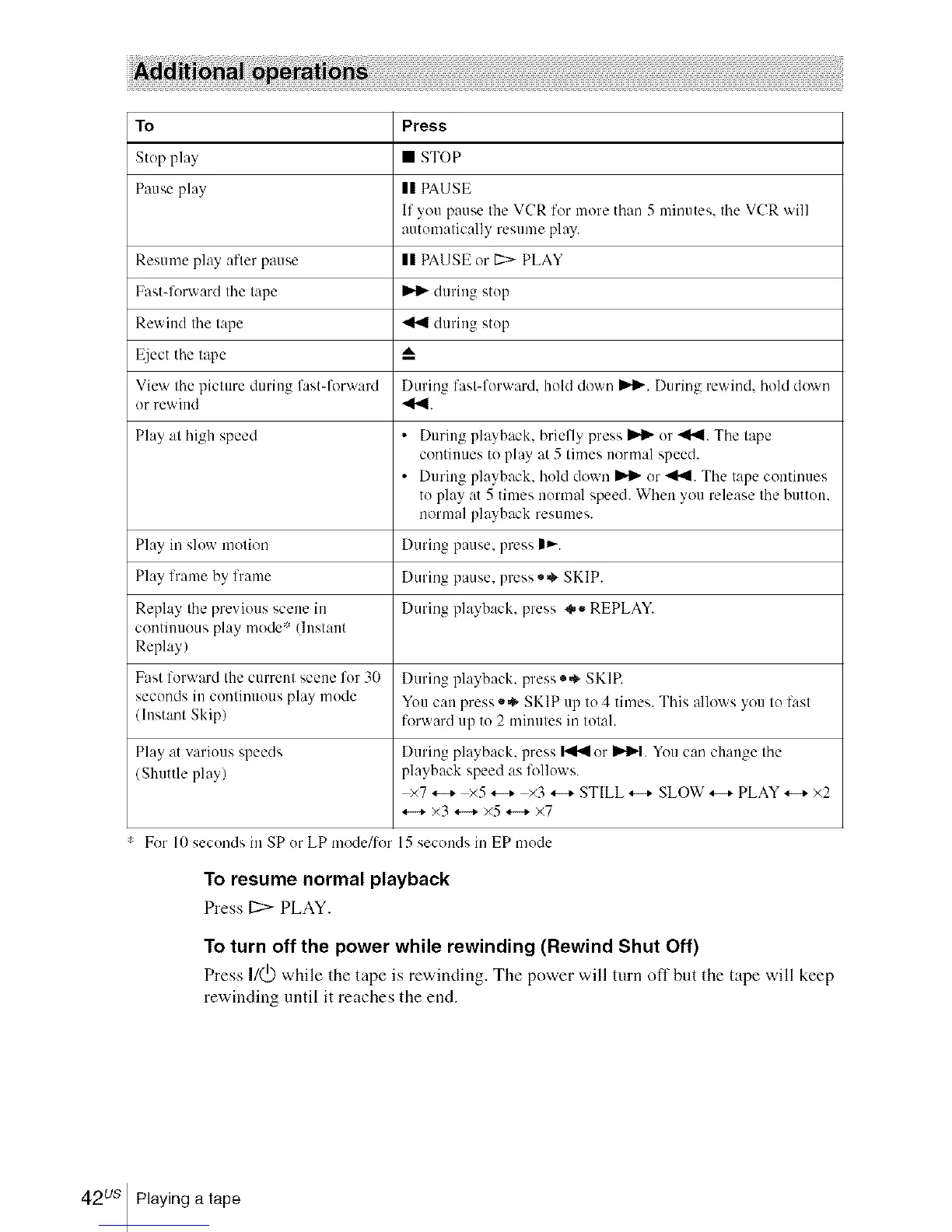
To Press
Stop play • STOP
Pause play II PAUSE
If you pause the VCR for more than 5 minutes, the VCR will
automatically resume play.
Resume play after pause II PAUSE or 1::>-PLAY
Fastq'orward the tape _ during stop
Rewind the tape _ during stop
Eject the tape A
View tim picture during fastqbrward During fast-forward, hold down IIH_,.During rewin& hold do'_ u
or rewind _1"_.
Play at high speed • During playback, briefly press _ or _l'_l. The tape
continues to play at 5 times normal speed.
• During playback, hold down _ or _l"_. The tape continues
to play at 5 times normal speed. When you release the button.
normal playback resumes.
Play in slow motion During pause, press |_-.
Play frame by frame During pause, press ,,,_ SKIP.
Replay the previous scene in During playback, press oo REPLAY.
continuous play mode* (Instant
Replay)
Fast forward the current scene for 30 During playback, press ®* SKIP.
seconds in continuous play mode You can press *,_ SKIP up to 4 times. This allows you to fast
/Instant Skip) forward up to 2 minutes in total.
Play at various speeds During playback, press _ or I_1_,,t.You can change tim
/Shuttle play) playback speed as lbllows.
×7 *-+ ×5 *-+ ×3 *-+ STILL *-+ SLOW *-+ PLAY *-+ ×2
*._ x3 *._ ×5 *._ ×7
For 10 seconds in SP or LP mode/lor 15 seconds in EP mode
To resume normal playback
Press 12:>PLAY.
To turn off the power while rewinding (Rewind Shut Off)
Press I/(_) while the tape is rewinding. The power will turn oft" but the tape will keep
rewinding until it reaches the end.
42us Playing a tape














 To Next Page