Screen Setup
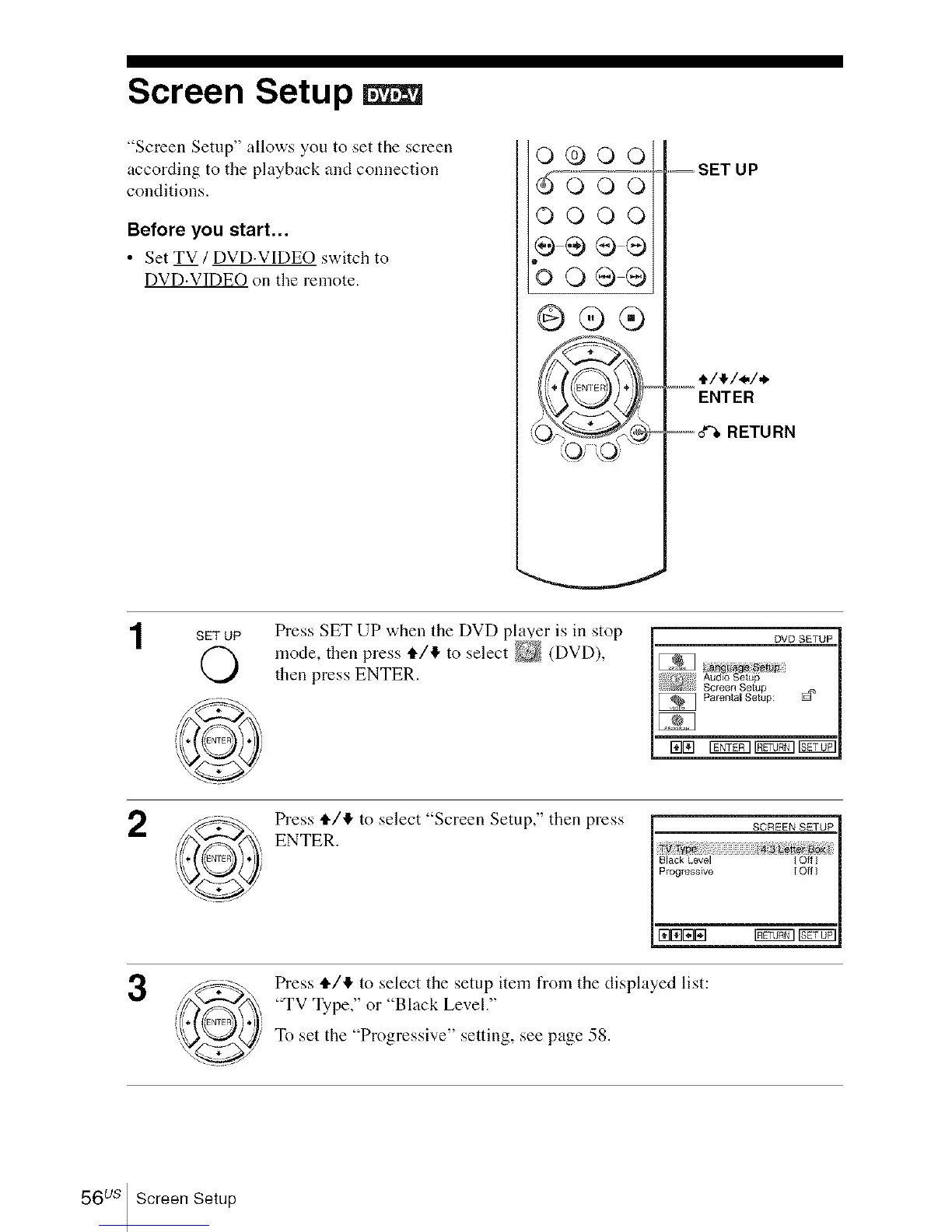
"Screen Setup" allows you to set the screen
according to the playback and connection
conditions.
Before you start...
• Set TV / DVD.VIDEO switch to
DVD.VIDEO on the remote.
o®oo
do oV
OOOO
÷÷®®
'oo®®
@®®
,_, SET UP
.....t/4/_/*
ENTER
--d%RETURN
SETUP Press SET UP when the DVD player is in stop
mode, then press i./4 to select _ (DVD),
then press ENTER.
DVD SETUP
Au_,oso_o¢
Screen Setup
Parental Setup: [_
171171Igfif_l rg_vi rgg_071
2
3
Press 1./4 to select "Screen Setup," then press
ENTER.
SCREENSETUP
Ty_
Black level iOff
_--=_ _r_E_]IProgressive I Off ]
Press 1./4 to select the setup item from the displayed list:
"TV Type," or "Black Level."
To set the "Progressive" setting, see page 58.
56 us Screen Setup














 To Next Page