Playing an MP3 audio track rm w
You can play back DATA CDs (CD-ROMs/
CD-Rs/CD-RWs) or DATA DVDs (DVD-
ROMs/DVD+RWs/DVD+Rs/DVD-RWs/
DVD-Rs) recorded in MP3 (MPEGI Audio
Layer 3) l\_rmat.
Before you start...
• Set TV / DVD.VIDEO switch to
DVD.VIDEO on the remote.
©®®
o®oo
oo_0_
OOOO
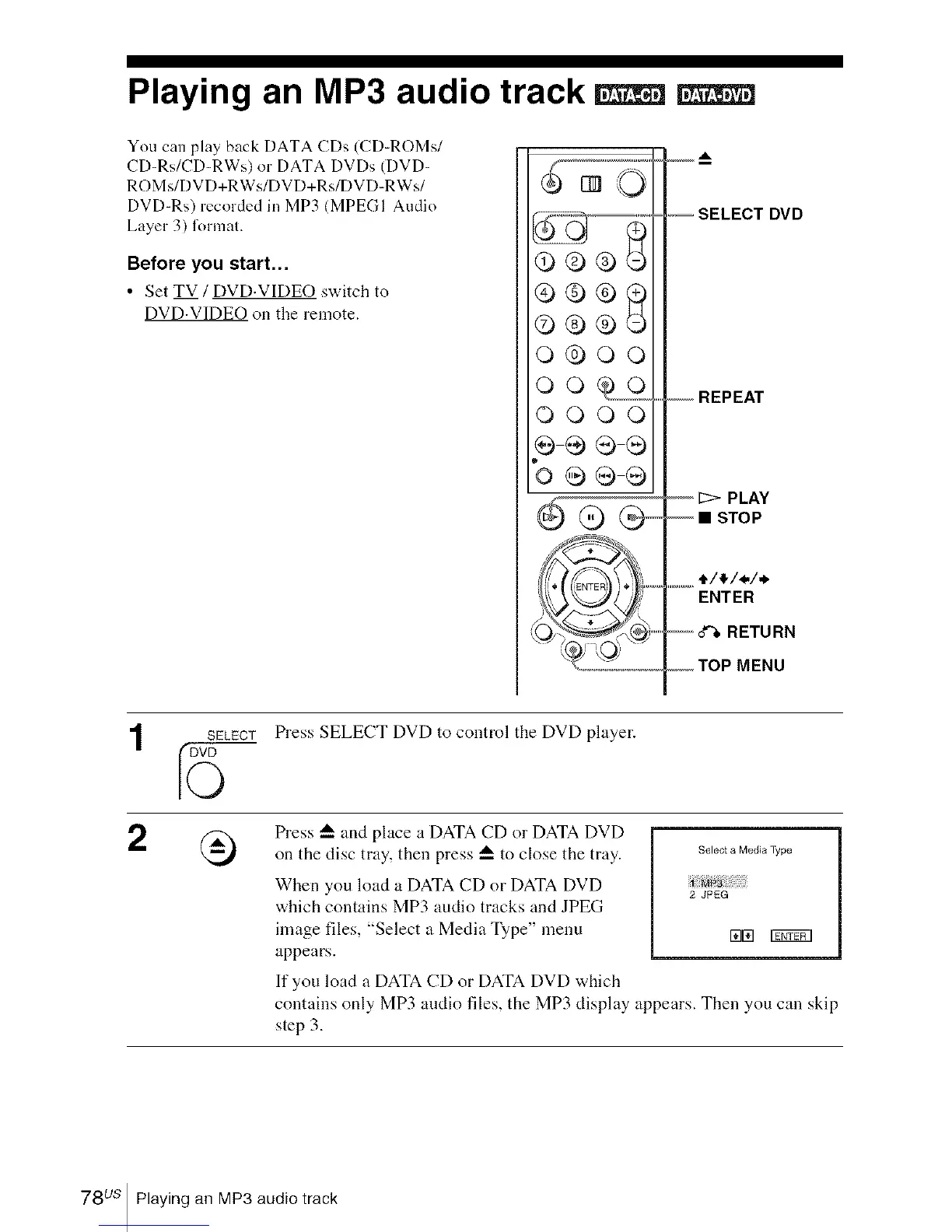
_,-- SELECT DVD
-- REPEAT
-- _> PLAY
-- • STOP
...............t/_/_/_
ENTER
--o'%RETURN
,,.,,,,,,,,TOPMENU
SELECT
5
Press SELECT DVD to control the DVD player.
Press A and place a DATA CD or DATA DVD
on the disc tray, then press A to close the tray.
When you load a DATA CD or DATA DVD
which contains MP3 audio tracks and JPEG
image files, "Select a Media Type" menu
appears.
Select a Media Type
2 JPEG
rata r£fif_q
If you load a DATA CD or DATA DVD which
contains only MP3 audio files, the MP3 display appears. Then you call skip
step 3.
78us Playing an MP3 audio track














 To Next Page