18
STR-DA5000ES
UP CONVERT SIGNAL LEVEL ADJUSTMENT
Enter the test mode
1. In the standby status, press the I/1 button while pressing the
[INPUT MODE] and [DISPLAY] buttons.
2. It enters the test mode, and display as below figure.
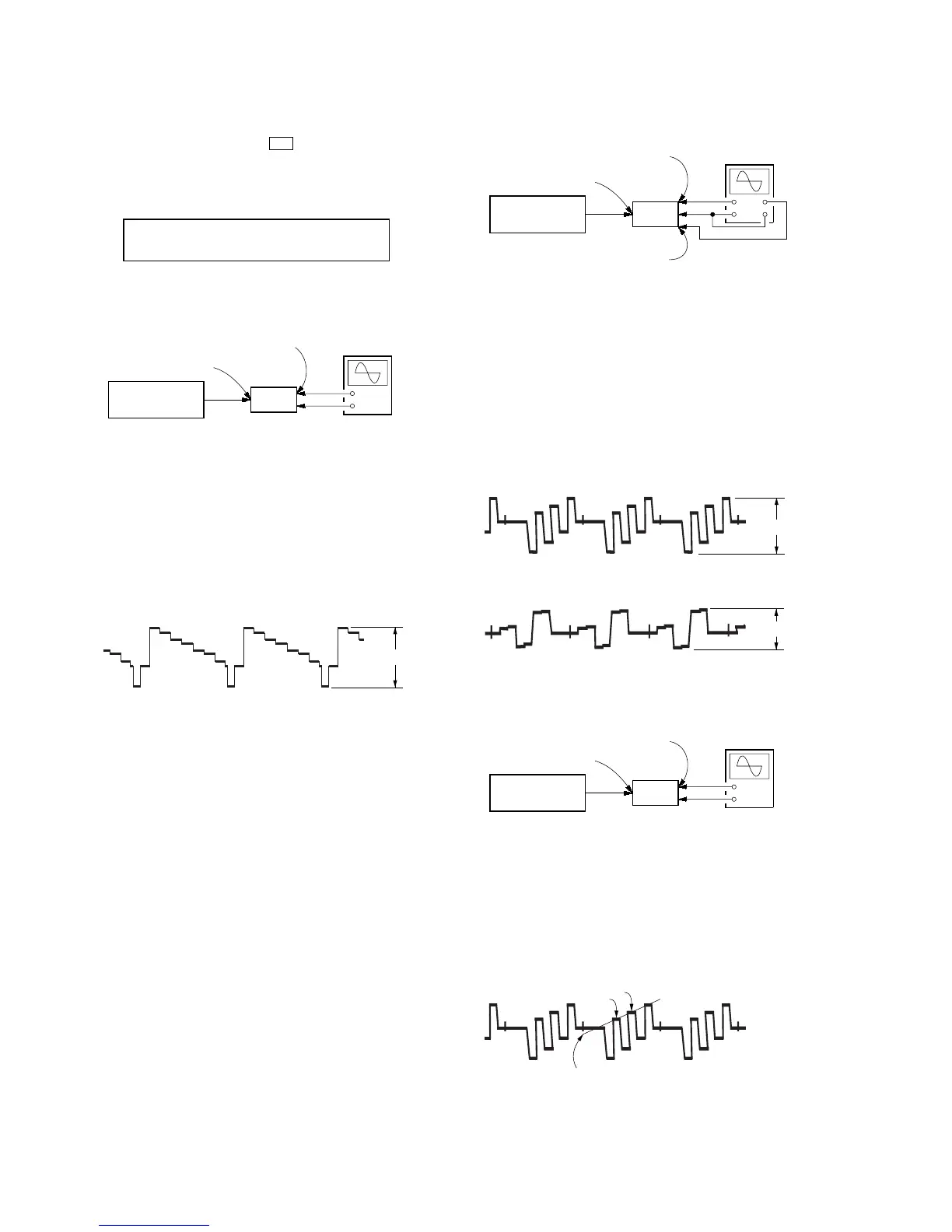
1. Y Level Adjustment
Setting:
Procedure:
1. Connect a color pattern generator to the VIDEO 1 S2 VIDEO
IN jack, and connect an oscilloscope to the COMPONENT
VIDEO Y jack.
2. Enter the test mode.
3. Input color bars signal from the color pattern generator.
4. Adjust the [MENU] knob so that the Vp-p value of waveform
becomes 1 Vp-p.
2. Color Level Adjustment
Setting:
Procedure:
1. Connect a color pattern generator to the VIDEO 1 S2 VIDEO
IN jack, and connect an oscilloscope to the COMPONENT
VIDEO P
B
/C
B
/B-Y jack and COMPONENT VIDEO P
R
/C
R
/R-
Y jack.
2. Enter the test mode.
3. Input color bars signal from the color pattern generator.
4. Display two waveforms of C
B
and C
R
simultaneously.
5. Adjust the [--/+] knob so that the Vp-p value of waveforms of
C
B
and C
R
both may be most set to 0.7V closely.
3. HUE Level Adjustment
Setting:
Procedure:
1. Connect a color pattern generator to the VIDEO 1 S2 VIDEO
IN jack, and connect an oscilloscope to the COMPONENT
VIDEO P
B
/C
B
/B-Y jack.
2. Enter the test mode.
3. Input color bars signal from the color pattern generator.
4. Adjust the [MAIN MENU] knob so that the waveform as bellow.
Display
HUE
[7]
CONTRAST
[7]
COLOR
[7]
+
–
oscilloscope
(AC range)
set
color pattern
generator
color bars 100%
VIDEO 1
S2 VIDEO IN jack
COMPONENT
VIDEO Y jack
1 Vp-p
Y waveform:
+
–
oscilloscope
(AC range)
set
color pattern
generator
color bars 100%
VIDEO 1
S2 VIDEO IN jack
COMPONENT VIDEO
P
B
/C
B
/B-Y jack
COMPONENT VIDEO
P
R
/C
R
/R-Y jack
0.7 Vp-p
C
B
waveform:
0.7 Vp-p
C
R waveform:
+
–
oscilloscope
(AC range)
set
color pattern
generator
color bars 100%
VIDEO 1
S2 VIDEO IN jack
COMPONENT VIDEO
P
B/CB/B-Y jack
C
B
waveform:
B
A
Adjust so that the height of
A and B may be located in a line
on this line.















 To Next Page