22 Installation and set-up manual 208668
3. Installing the unit CRANEX Novus e
3.7 Installing the remote exposure switch (optional)
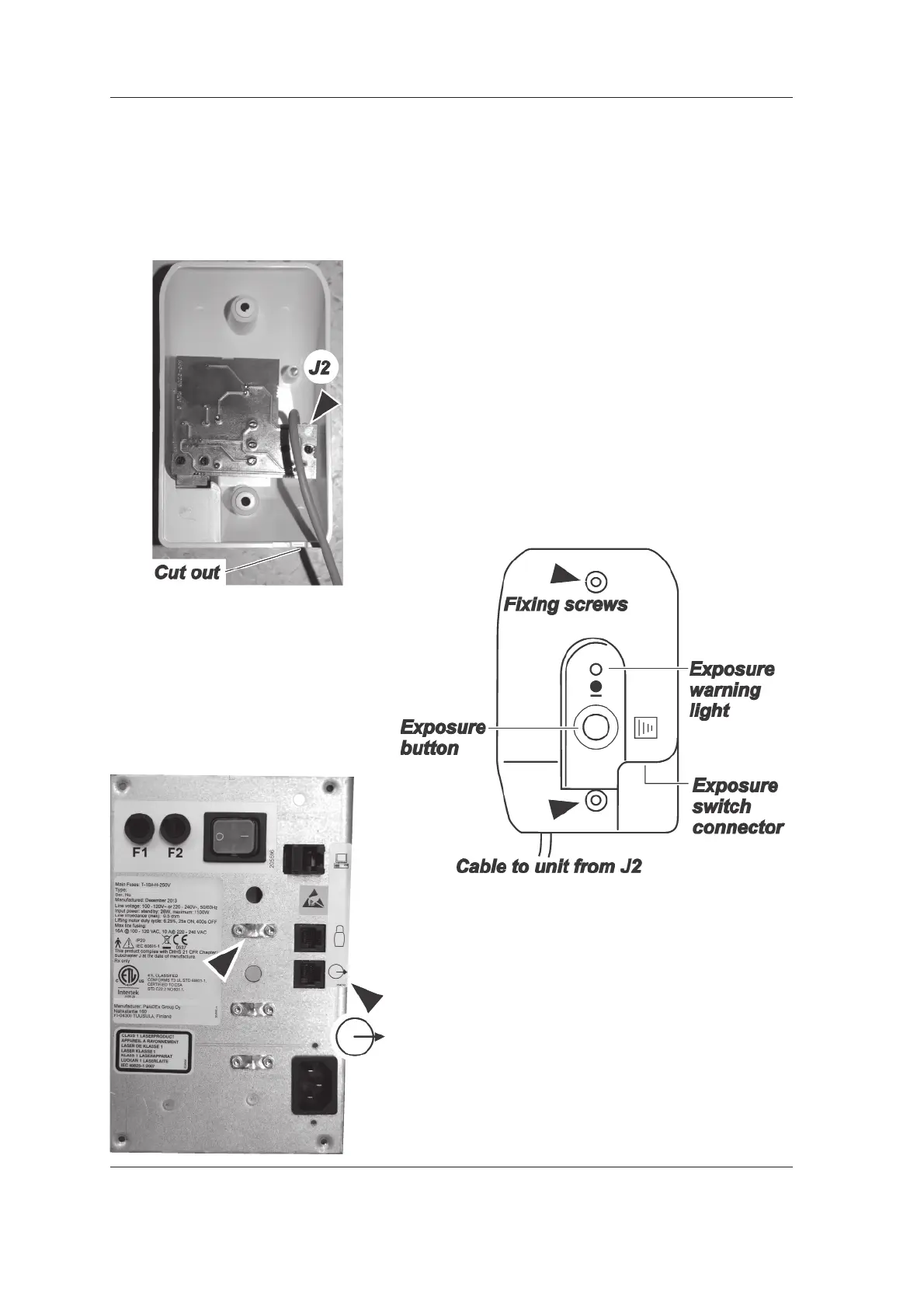
A wall-mountable remote exposure switch with
integrated exposure warning light is available as
an option for the unit. If a remote exposure switch
needs to be used, install it as follows:
1. Connect one end of the remote exposure
switch extension cable to connector J2 inside
the remote exposure switch.
2. Attach the remote exposure switch to the wall
in the required position (2 fi xing screws). Make
sure that the cable from J2 is positioned in
the small cut-out in the bottom of the remote
exposure switch housing. Also make sure that
the cable does not press against the circuit
board when the housing is attached to the
wall.
3. Route the remote exposure switch extension
cable to the rear of the unit and then secure
the cable in position under one of the cable
clamps after connecting the cable to the unit.
This will ensure that the cable cannot be
accidentally disconnected.



 To Next Page