66 Installation and set-up manual 208668
6. The exhibition stand CRANEX Novus e
6. The exhibition stand
6.1 Attaching the unit to the exhibition stand
The exhibition stand is used if the unit cannot be
attached to a wall or needs to be freestanding for
some other reason.
The exhibition stand can be used also for
installations in areas prone to earthquakes if it is
not possible to attach the unit to the fl oor and wall.
CAUTION - HEAVY OBJECT
A minimum of two persons are required for
the following task.
1. Unpack the unit as described in section
3.1 Preparing the unit for installation,
steps 1 - 4.
2. Assemble the Exhibition stand, refer to the
Exhibition stand assembly/disassembly
instructions supplied with the Exhibition
stand.
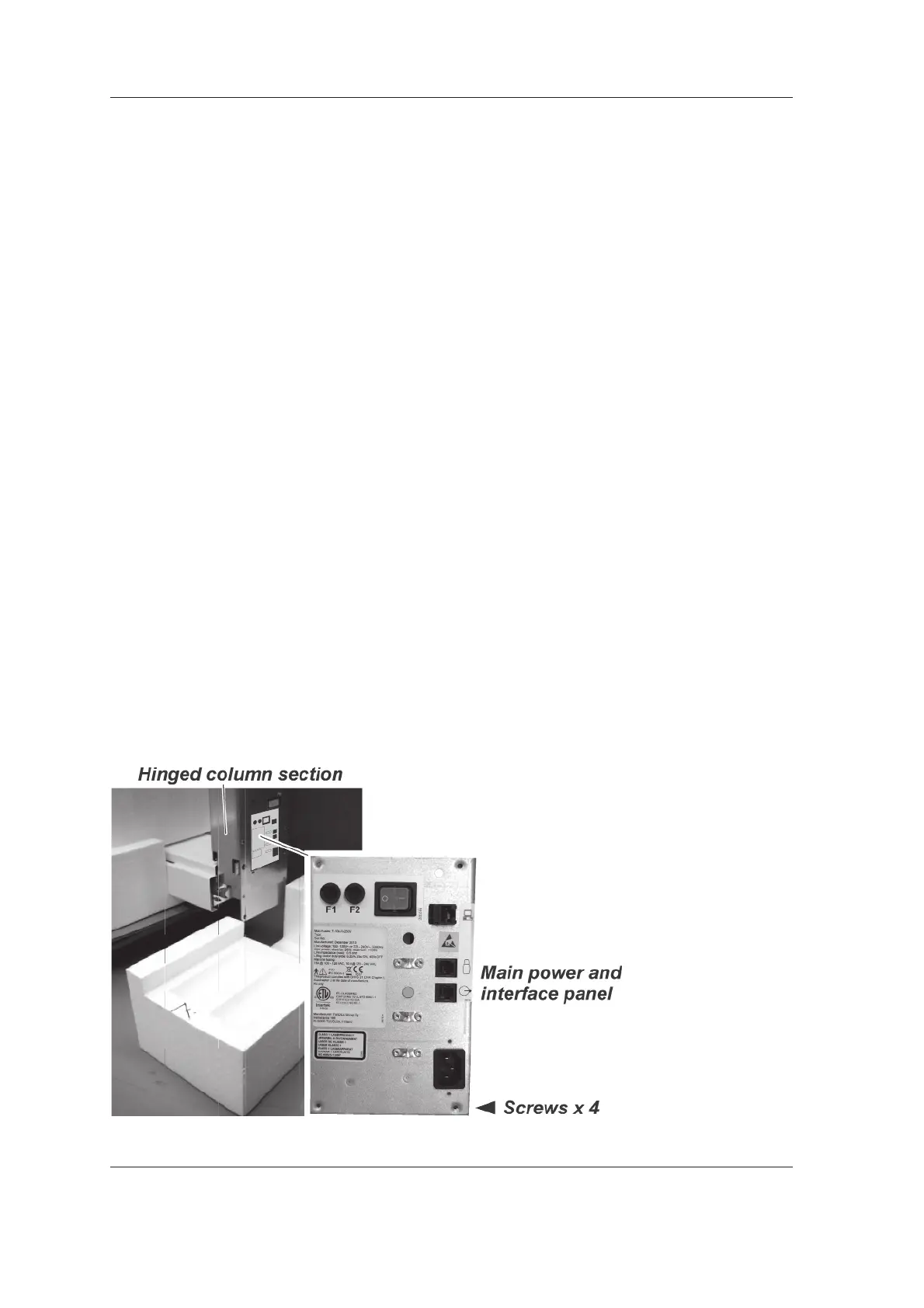
3. Hold the main power and interface panel in
position and then remove the screws (4) that
hold it to the inside of the hinged column
section. Carefully remove the main power
and interface panel from inside of the hinged
column section and place it next to the unit.
Make sure that none of the cables that are
connected to it are damaged or accidently
disconnected.



 To Next Page