3 Getting Started
l To focus the crosshair, rotate the eye-piece.
l To focus the optical plummet to the ground, push in or pull out the optical plummet.
For information on how to adjust the optical plummet, see Optical Plummet, page 77.
Trigger Key
The trigger key functions as an On/Off key (z). A LED in the trigger key indicates if the instrument
is turned on. A solid light indicates On and a flashing light indicates Suspend Mode and waiting for
connection, see also Power Management.
When a field application is running, the trigger key performs the same function as the Measurement1 key
(M) on the Face1 side and the Enter key (P) at the Face2 side.
Keys Description
M z P
Measurement1 - definable
L
Measurement2 - reflectorless measurement and recording
(Except the measurements in QuickShot menu without open job)
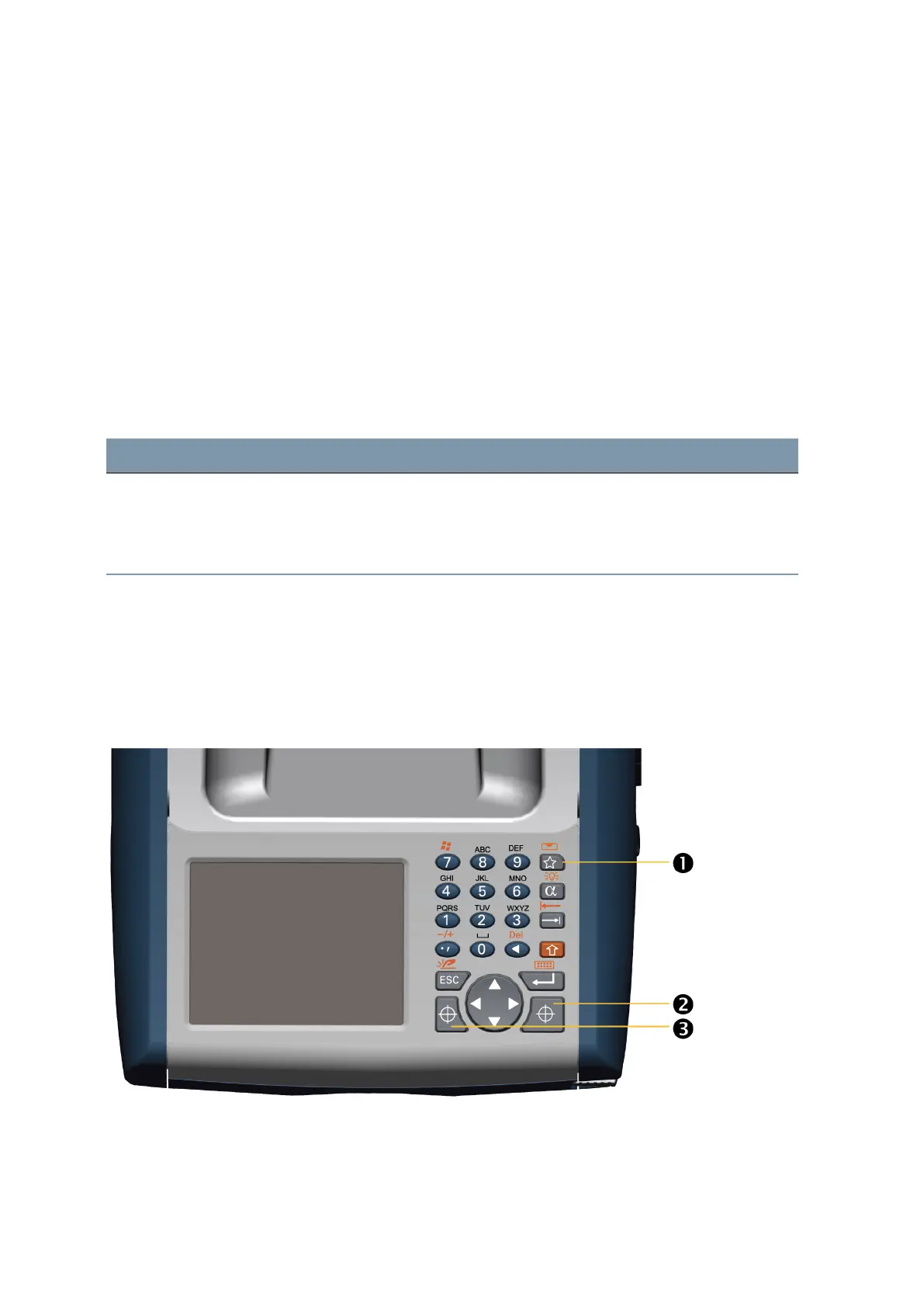
Control Unit Face1 (if fitted)
Data entry on the keyboard is similar to that of a mobile phone. The “A” button scrolls between three
different states of data entry: 123, ABC, and abc. Multiple presses on one key scrolls through the letters
on that key depending on which mode is currently selected.
The image shows the Control Unit Face1.
FOCUS 35 Total Station User Guide | 30



 To Next Page