4 Setup
Tracker Collimation and Compensator Collimation
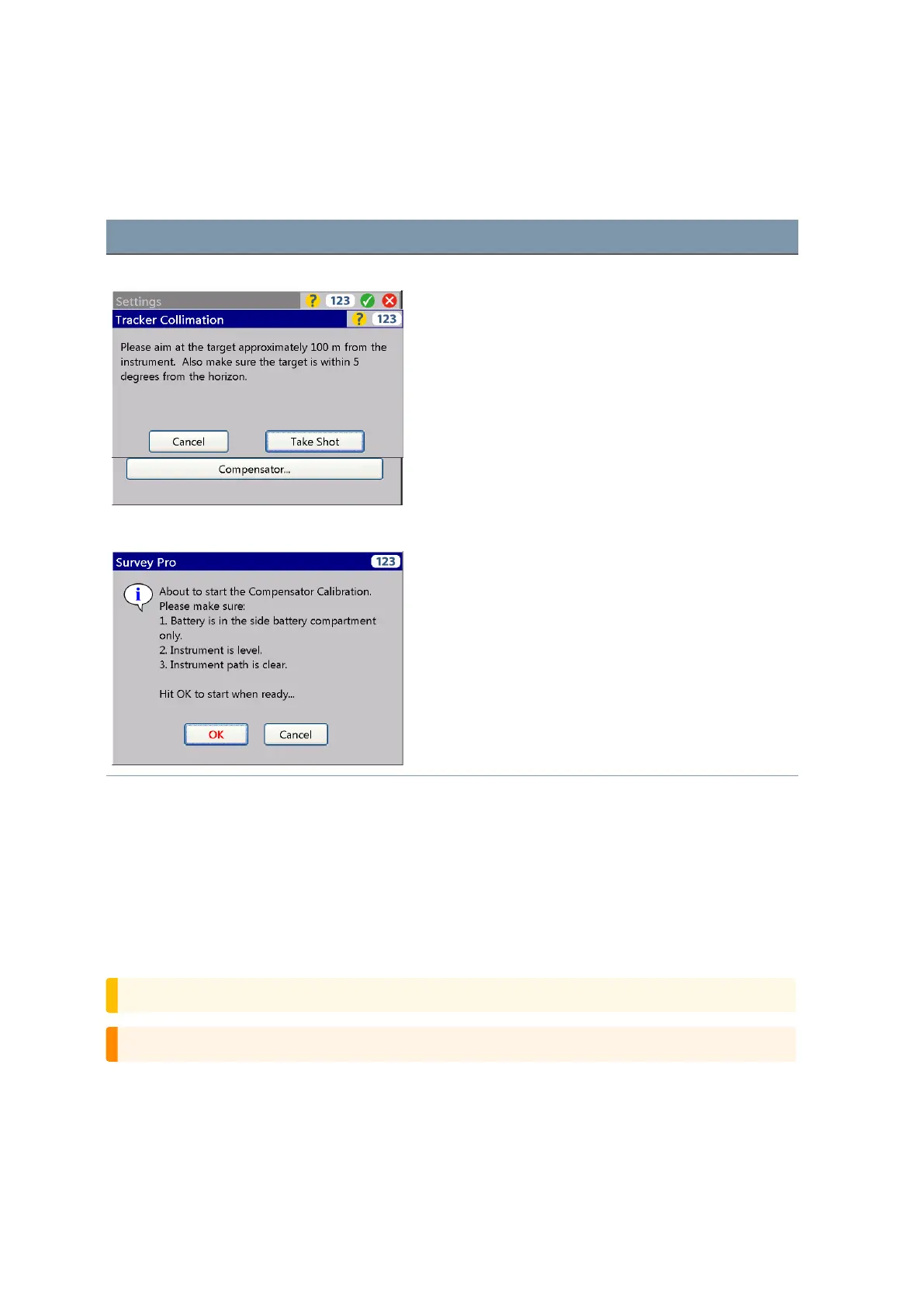
Start screens are:
Screen Actions and Comments
Tracker Collimation start screen Make sure to measure with the stated conditions.
Compensator Collimation start screen Make the measurements per the displayed information.
During the process the instrument should be free from
vibration and untouched by the user.
The Laser Pointer
The FOCUS 35 Total Station uses a red laser beam to measure and as a Laser Pointer. The Laser Pointer
is coaxial with the line of sight of the telescope. If the instrument is well adjusted, the red Laser Pointer
coincides with the line of sight. External influences such as shock or large temperature fluctuations can
displace the red Laser Pointer relative to the line of sight.
Aligning the Laser Pointer
CAUTION – Viewing the laser spot on the adjustment target through the telescope is safe.
WARNING – Do not try to make the adjustment using a prism, see Laser Safety, page 4.
FOCUS 35 Total Station User Guide | 72



 To Next Page