9.4.2 EPP
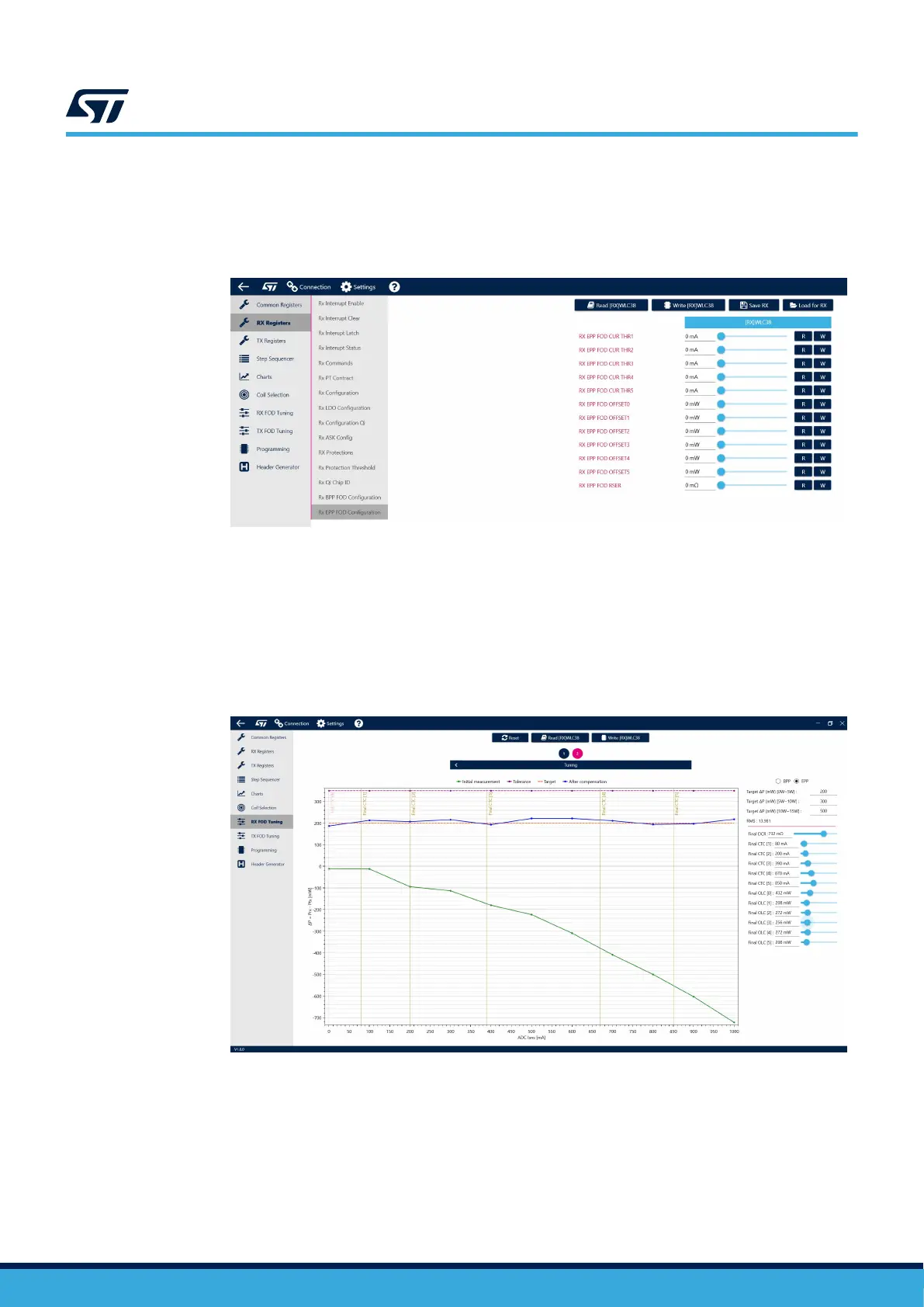
Step 1. Begin by navigating to the Rx EPP FOD Configuration section.
Step 2. Set all the registers to 0 and generate a new Configuration file.
Figure 73. Cleared EPP FOD settings
Step 3. Load the file into the device.
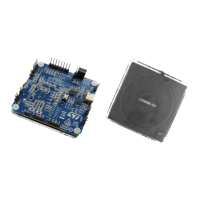
Step 4. Navigate to the FOD tuning tab, switch to EPP mode and capture the data.
The tool allows the user to set a different target ΔP value for low (0-5 W), medium (5-10 W) and high
(10-15) power operation.
Step 5. Using reference Qi compliant transmitter the ADC Isns, Prx and Ptx values shall be manually written in
the table.
Figure 74. Tuning to obtain a flat EPP FOD curve
Step 6. Follow the same procedure as BPP mode to complete the tuning.
UM3154
FOD tuning
UM3154 - Rev 2
page 63/81


 To Next Page