1656 & 1657 Battery Element Tester Owner’s Manual
STS Instruments Page 40 of 88
5.8 System Info
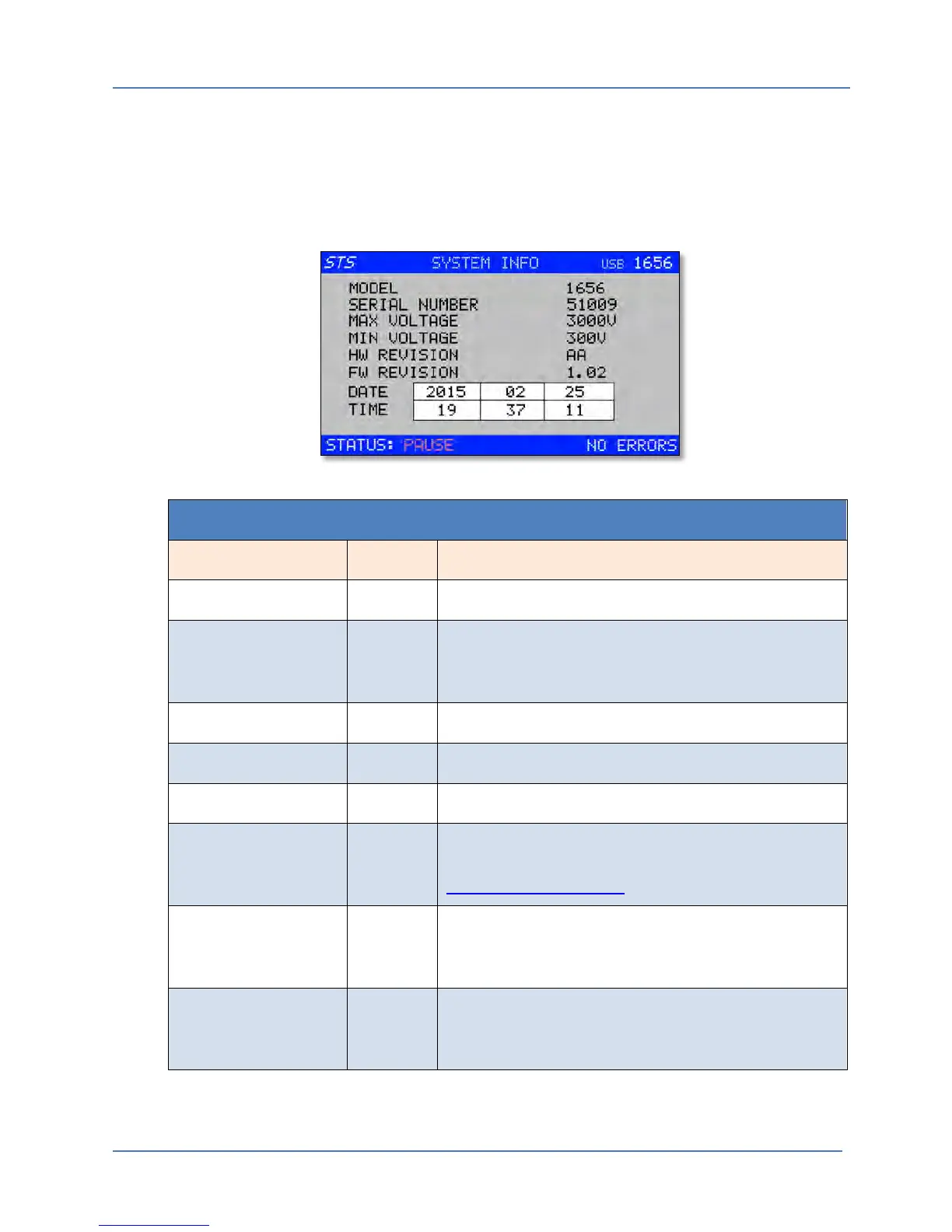
The System Info screen is a primarily a display screen. It contains basic information about the
instrument. The only editable fields are those used to set the Real-time Clock. The date and time
are saved in battery backed memory and may have to be set to the correct date and local time.
This is possible using the EDIT mode.
Q METER CAL MENU
Entry Type Description
MODEL Display Displays the BET Model Number
SERIAL NUMBER
Display
Displays the serial number. This number should match
the serial number on the type tag. If not, contact STS
Instruments customer service.
MAX VOLTAGE
Display
Displays the maximum supported test voltage.
MIN VOLTAGE
Display
Displays the minimum supported test voltage.
HW REVISION
Display
Displays the hardware build revision.
FW REVISION
Display
Displays the installed firmware revision. For firmware
update information, visit the STS Instruments website at
www.stsinstruments.com.
DATE Parameter Displays the current date as YYYY – MM – DD. This date
may be change by selecting any of the date fields and
using the Shuttle to enter EDIT mode.
TIME Parameter Displays the current time as HH:MM:SS. This time may
be change by selecting any of the time fields and using
the Shuttle to enter EDIT mode.



 To Next Page