63
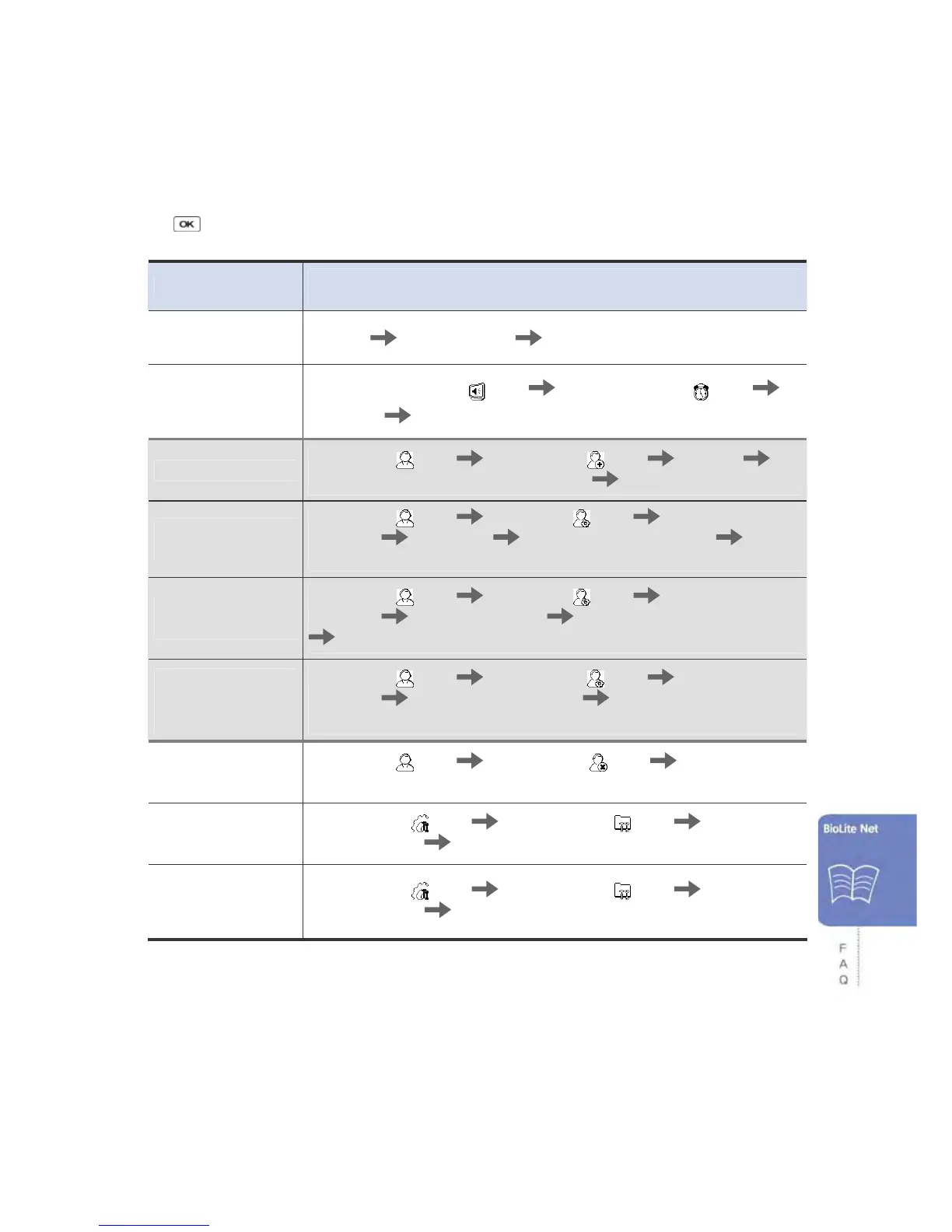
6.3 Usage summary
※ It provides the mainly used functions
.
※ button: Used to select the desired function.
Function
Method for setting
(Sequentially perform the following items.)
Initial administrator
registration
Enter ID
Enter password Enter password again
Date & time setting
Select Screen, Sound (
) icon Select Date, Time ( ) icon
Enter date
Enter time
User registration
Select User ( ) icon Select Enroll ( ) icon Enter ID
Select General or Administrator in Level Enter fingerprint or PIN
User password
modification
Select User ( ) icon Select Edit ( ) icon Enter ID or
fingerprint Select PIN Enter the desired password Enter it
again
User fingerprint
modification
Select User ( ) icon Select Edit ( ) icon Enter ID or
fingerprint Select Fingerprint Enter the fingerprint of the user
Enter it again
User authorization
method
modification
Select User ( ) icon Select Enroll ( ) icon Enter ID or
fingerprint Select Operation Mode Select an authorization
method
User deletion
Select User (
) icon Select Delete ( ) icon Enter ID or
fingerprint to delete
All user deletion
Select Device (
) icon Select System ( ) icon Select
Delete User DB
Select Delete
Initialization
(Environment
settings deletion)
Select Device (
) icon Select System ( ) icon Select
Factory Default
Select Initialize



 To Next Page