8
1.3 Methods for fingerprint input
BioLite Net can easily recognize fingerprints even though the angle and
location of the pattern change. However, it is recommended to properly
input fingerprints for more precise recognition.
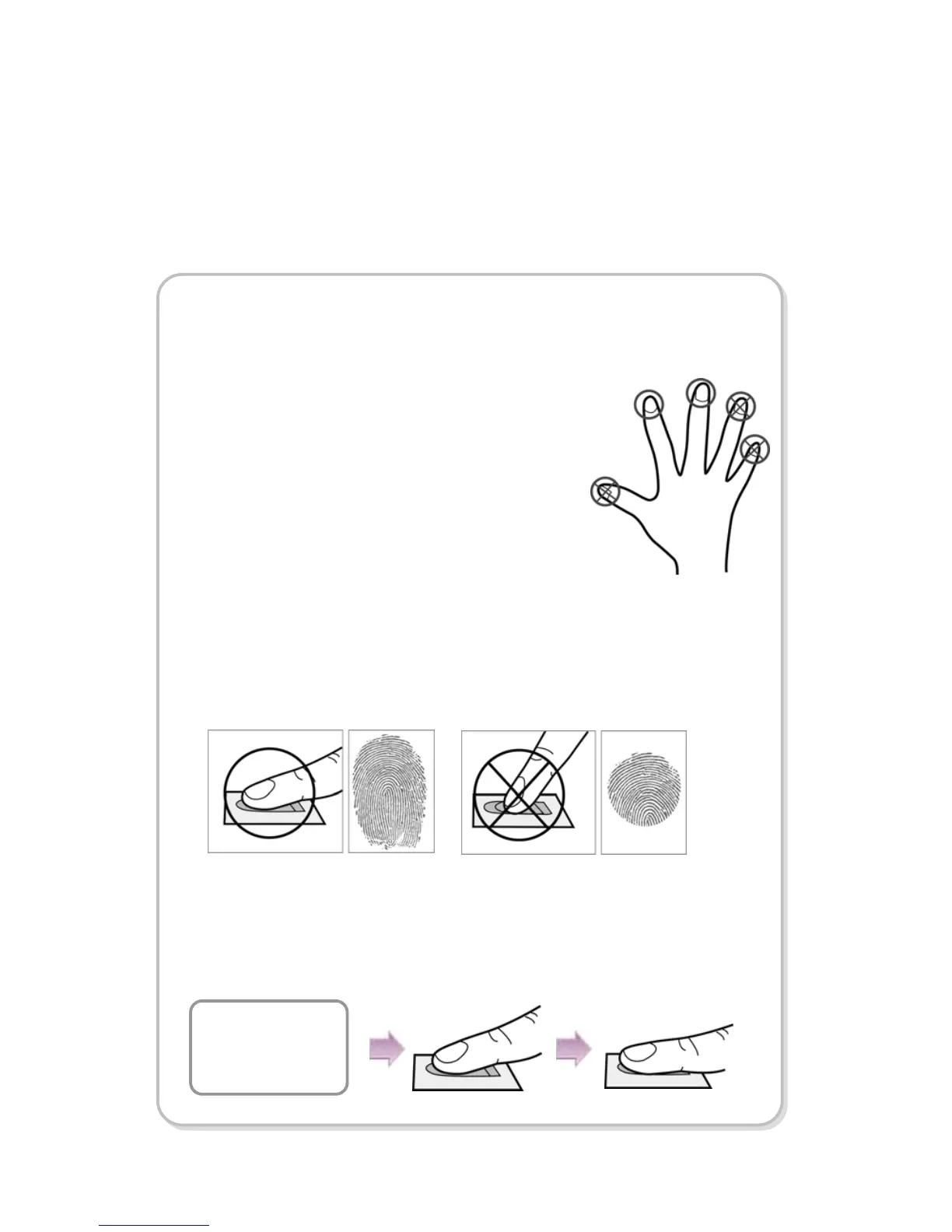
Selecting a finger on fingerprint enrollment
How to proerply place a fingerprint
Place your finger firmly on the sensor area.
Adjust the finger so that its middle position can be located in the center
of the sensor.
When the finger is vertically placed or its angle goes astray, the
recognition may be a failure.
Up to two fingerprints can be enrolled for each user in preparation of
any abnormal situation like having a wounded finger or carrying an
object with a hand.
In the case of a low recognition, the user can register
the same fingerprint twice to increase the recognition
rate.
It is recommended to use the index or middle finger.
In case of other fingers, the recognition rate
decreases because it tends to be more difficult to
place the finger in the center of the sensor area.
Place the first
Fin
When enrolling your fingerprint, the first finger input window prompts.
Then register the desired finger on the terminal as shown in the figure
below.
When the re-entry window appears with a “tick” sound, re-enter the
previously enrolled finger. The fingerprint input is made twice.
(Gently push your finger on the sensor to have a full fingerprint.)



 To Next Page