26
2. User Management
The user management and other environment settings can be updated after authorizing
the registered administrator (see 1.4.1 “Registering the initial administrator”).
2.1 Enrolling a user
2.1.1 Registration on the terminal
The information of a new user can be saved on the terminal.
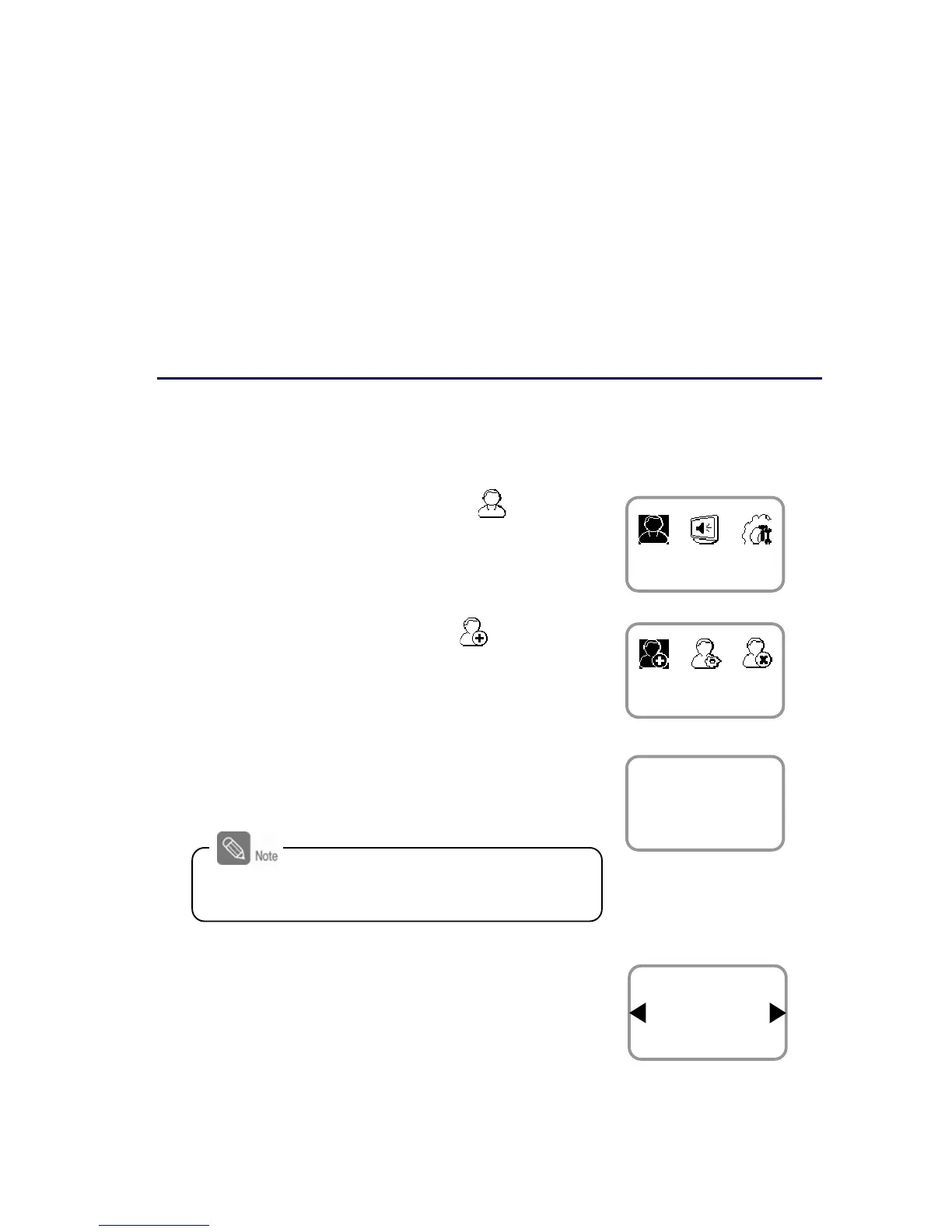
1. Use ◀/▶ buttons to select the User ( ) icon
and press OK.
2. Use ◀/▶ buttons to select Enroll ( ) icon and
press OK.
3. The ID that can be used appears. Use it or enter
another ID and press OK.
(1–8 digit number)
4. Use ◀/▶ buttons to select Device on the Enroll
To and press OK.
※ You can save the user information
(including finger print) on your terminal or
card.
User
Enroll
Enter ID
3
Enroll
ID is used to edit or delete the user data so
please keep it carefully.
Enroll To
Device
Enroll


 To Next Page