15
1.4.3 Stand-alone configuration
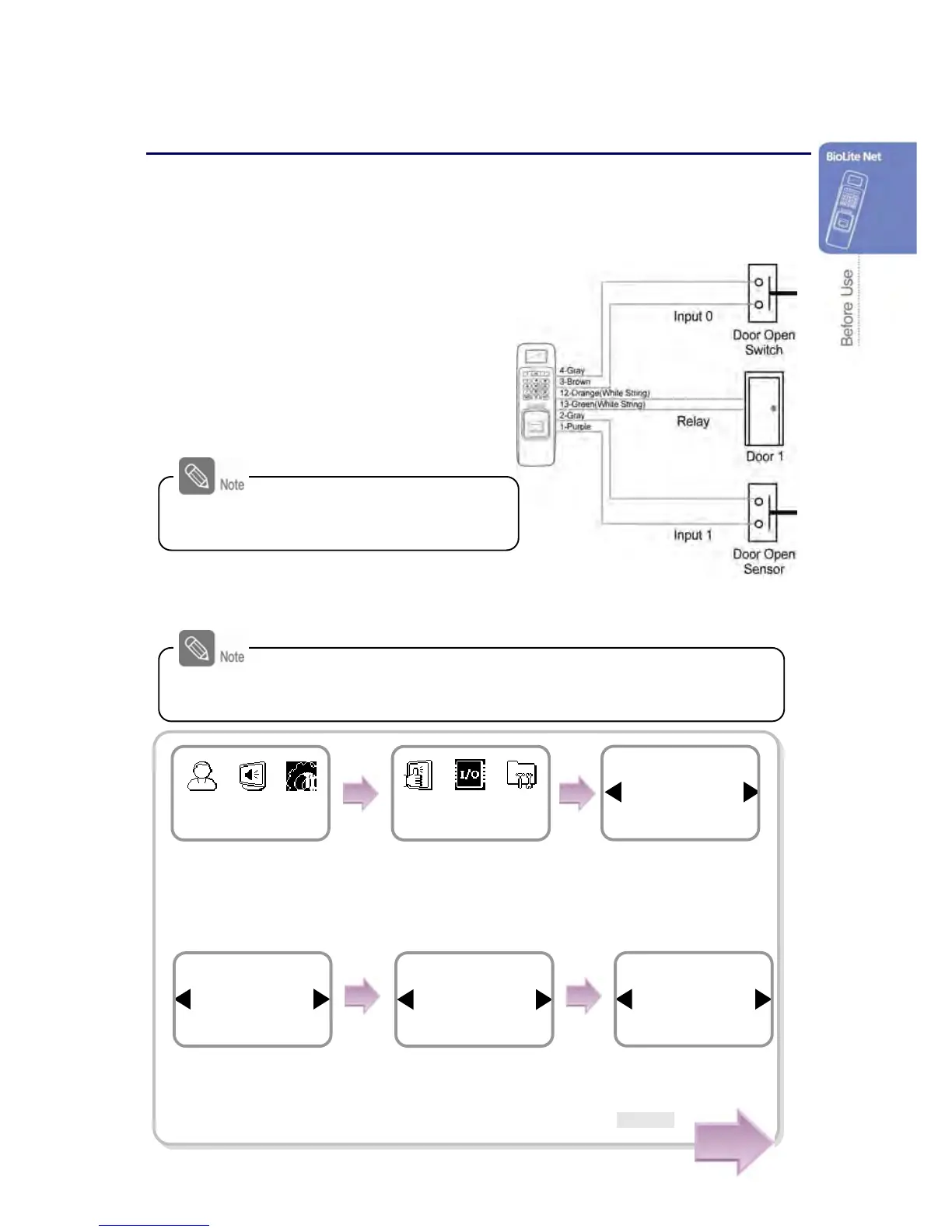
This configuration is required to use the device for stand alone purpose, which requires
no communication with PC or other devices.
1. As shown in the figure, connect BioLite Net to respective switches.
2. Configure the internal relay settings as shown below. (It is explained based on the
figure above.)
For actual wring method,
see “6.4 System Installation.”.
Follow the instructions below only when the dedicated PC software is not
used. When using the software, refer to the software manual.
Use ◀/▶ buttons to
select Internal and
press OK.
Use ◀/▶ buttons to
select Input 0 and press
OK.
Use ◀/▶ buttons to
select N.O and press
OK.
*N.O/N.C
Relay
Internal
Door
Exit Button
Input 0
Internal
Type
N.O
Exit Button
Use ◀/▶ buttons to
select the In/Out icon
and press OK.
Press MENU -> Enter ID
-> Enter the password ->
Use ◀/▶ buttons to
select the Device icon and
press OK.
Use ◀/▶ buttons to
select Door and press
OK.
Device
In/Out
Item
Door
In/Out
Cont.


 To Next Page