EasyManua.ls Logo

suprema BioLite Net - Page 15

suprema BioLite Net
74 pages
Print Icon
To Next Page IconTo Next Page
To Previous Page IconTo Previous Page
Loading...
14
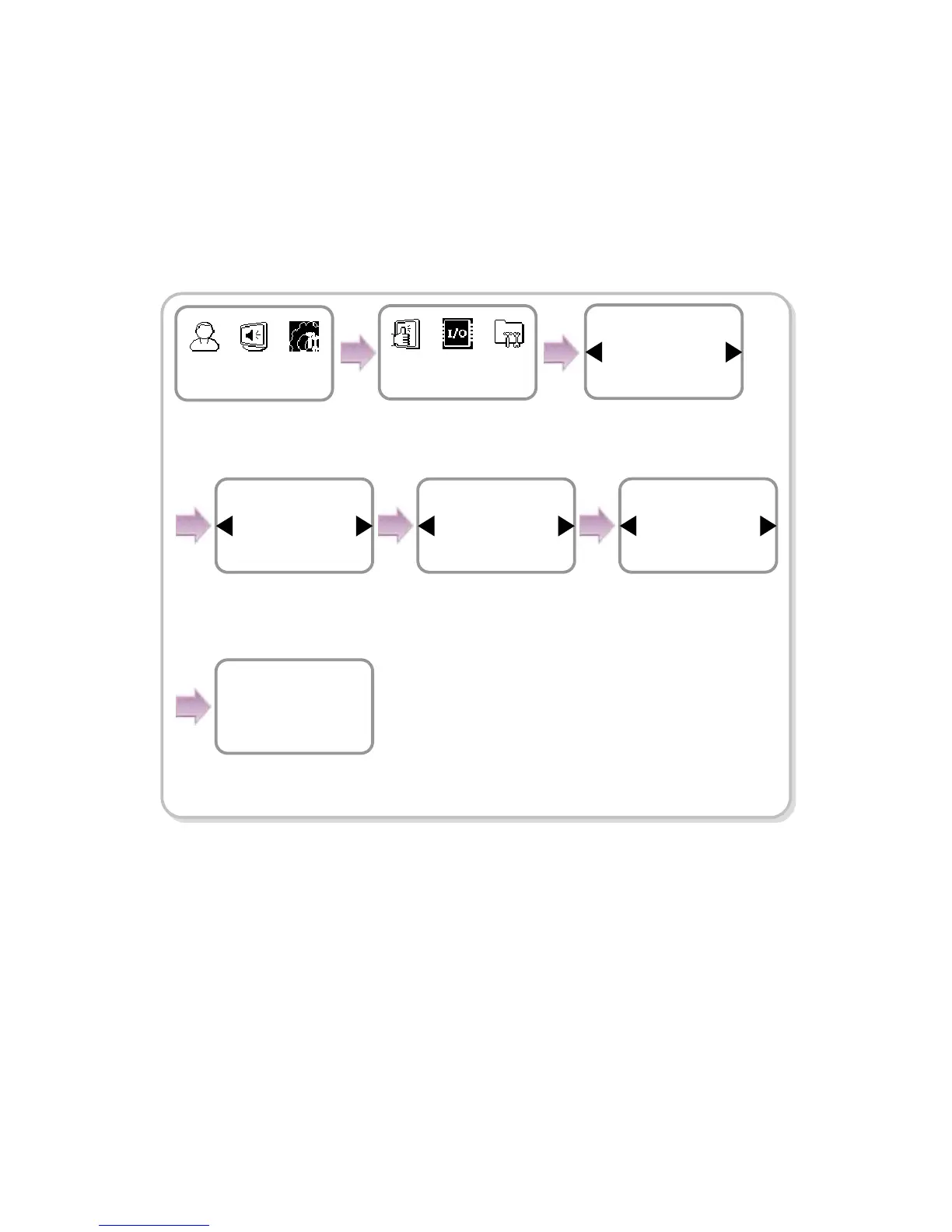
[In case of configuring the network via RS-485]
1. Connect the terminal to the computer that has the dedicated PC software or to
another device according to the network environment after seeing “6.4.3 Connecting
Power & RS-485.”
2. Configure the settings for RS-485 according to the installation environment.
Device
In/Out
Item
Serial Conn.
In/Out
The completion message
window appears.
Com
p
leted
Use / buttons to◀▶
select 115200 for PC
connection speed and
press OK.
Use / buttons to◀▶
select Not Use for
termination and press
OK.
Baudrate
115200
Serial Conn.
Type
PC Conn.
Serial Conn.
Termination
Not Use
Serial Conn.
Use ◀/▶ buttons to
select the Device icon
and press OK.
Use ◀/▶ buttons to
select the PC Conn.
and press OK.
Use ◀/▶ buttons to
select the In/Out icon
and press OK.
Use ◀/▶ buttons to
select the Serial Conn.
and press OK.

Other manuals for suprema BioLite Net

Related product manuals