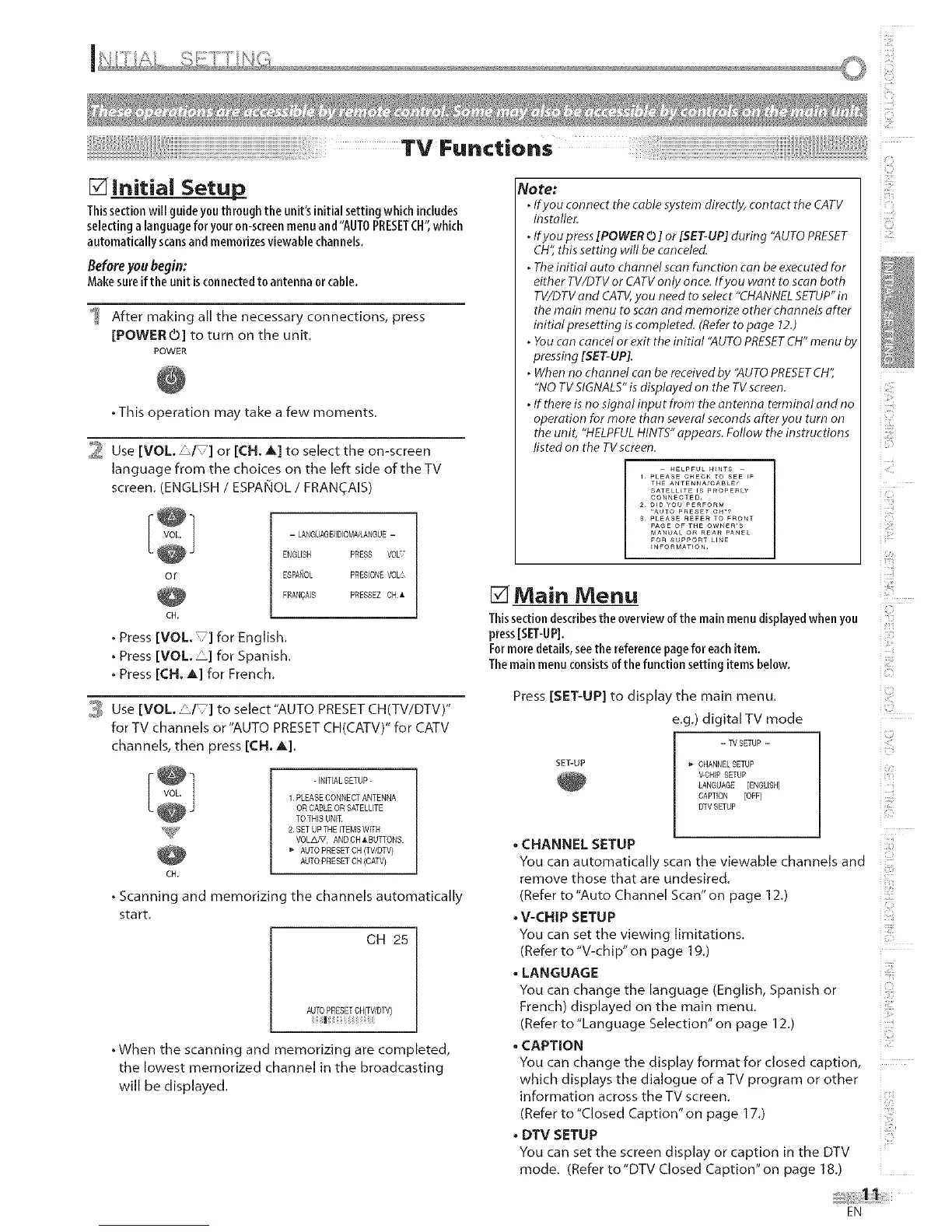
[] Initial Setup,
Thissectionwill guideyouthrough the unit's initialsetting which includes
selecting a languagefor youron-screenmenuand "AUTOPRESETCH",which
automaticallyscansandmemorizesviewable channels.
Before youbegin:
Makesureifthe unit isconnectedto antenna orcable.
After making all the necessary connections, press
[POWERO] to turn on the unit
POWER
• This operation may take a few moments.
_l Use[VOL _/ ] or [CH. A] to select the on-screen
language from the choices on the left side of the TV
screen. (ENGLISH / ESPANOL / FRANCAIS)
- LANGUAGDIDIOMA/LANGUE -
ENGLISH
or ESPANOL
FRANQA]S
CH.
• Press [VOL ] for English.
• Press [VOL _] for Spanish.
• Press [CH. A] for French.
PRESS VOL'
PRESIONEVOL
PRESSEZCH_
3 Use [VOL. "1 ] to select"AUTO PRESET CH(TV/DTV)"
forTV channels or"AUTO PRESETCH(CATV)" for CATV
channels, then press [CH. A].
-INITIAL SETUP -
1 PLEASE CONNECT ANTENNA
OR CABLE OR SATELLITE
TO THIS UNIT
_U_P 2SET UPTHE ITEMS WffH
VOLA,_7, AND CH &BUTTONS
AUTO PRESET CH (TV,©TV)
AUTO PRESET CH (CAW)
CH.
° Scanning and memorizing the channels automatically
start
CH 25
AUTOPRESETCN(TV,DW)
|
• When the scanning and memorizing are completed,
the lowest memorized channel in the broadcasting
will be displayed.
No te:
. If you connect the cable system directly, contact the CATV
installer.
. If you press [POWER 0 ] or [SET-UP] during "AUTO PRESET
CH", this setting will be canceled.
. The initial auto channel scan function can be executed for
either TV/D TV or CATV only once. If you want to scan both
TV/DTV and CATV, you need to select "CHANNEL SETUP" in
the main menu to scan and memorize other channels after
initial presetting is completed. (Refer to page 1£)
. You can cancel or exit the initial "AUTO PRESETCH" menu by
pressing [SET-UP].
° When no channel can be received by "AUTO PRESETCH',
"NO TV SIGNALS"is displayed on the TV screen.
° If there is no signal input from the antenna terminal and no
operation for more than several seconds afteryou turn on
the unit, "HELPFUL HINTS" appears. Follow the instructions
listed on the TVscreen.
HELPFUL H_NTS --
1 PLEASE CHECK TO SEE rF
THe ANTENNA/CABLE'
SATEKKE rS P£OPERLY
CONNECTED_
2_ _rD YOU PE£FORM
"AUTO PRESET CH"?
3_ PLEASE REFE£ TO FRONT
PAGE OF THE OWNEmS
MANUAL OR REAP PANEL
FOR SUPPORT UNE
[] Main Menu
Thissectiondescribestheoverviewofthe mainmenudisplayedwhen you
press[SET-UP].
Formore details,seethe referencepagefor eachitem.
Themain menuconsistsofthe function setting items below.
Press [SET-UP] to display the main menu.
e.g.) digital TV mode
- TV SETUP -
SET-UP _ CHANNEL SETUP
V-CHIP SETUP
LANGUAGE [ENGLISH]
CAPTION [OFF]
DTV SETUP
E_
H ,,,
HZ] ¸
_s
2
• CHANNEL SETUP
Youcanautomaticallyscanthev ewaNechannelsand
remove those that are undesired.
(Refer to "Auto Channel Scan" on page 12.)
• V-CHIP SETUP
You can set the viewing limitations,
(Refer to "V-chip" on page 1g,)
• LANGUAGE
You can change the language (English, Spanish or
French) displayed on the main menu.
(Refer to "Language Selection" on page 12.)
•CAPTION
You can change the display format for closed caption,
which displays the dialogue of a TV program or other
information across the TV screen,
i
(Refer to "Closed Caption" on page 17.)
• DTV SETUP
You can set the screen display or caption in the DTV
mode, (Refer to"DTV Closed Caption"on page 18,)
EN



 To Next Page