©
[]TV Screen Display Mode [] Sleep Timer
2typesofdisplay modescanbeselectedinthe digital mode. Thesleeptimercanbesetto automaticallyturn off the unit after an
incrementalperiod of time,
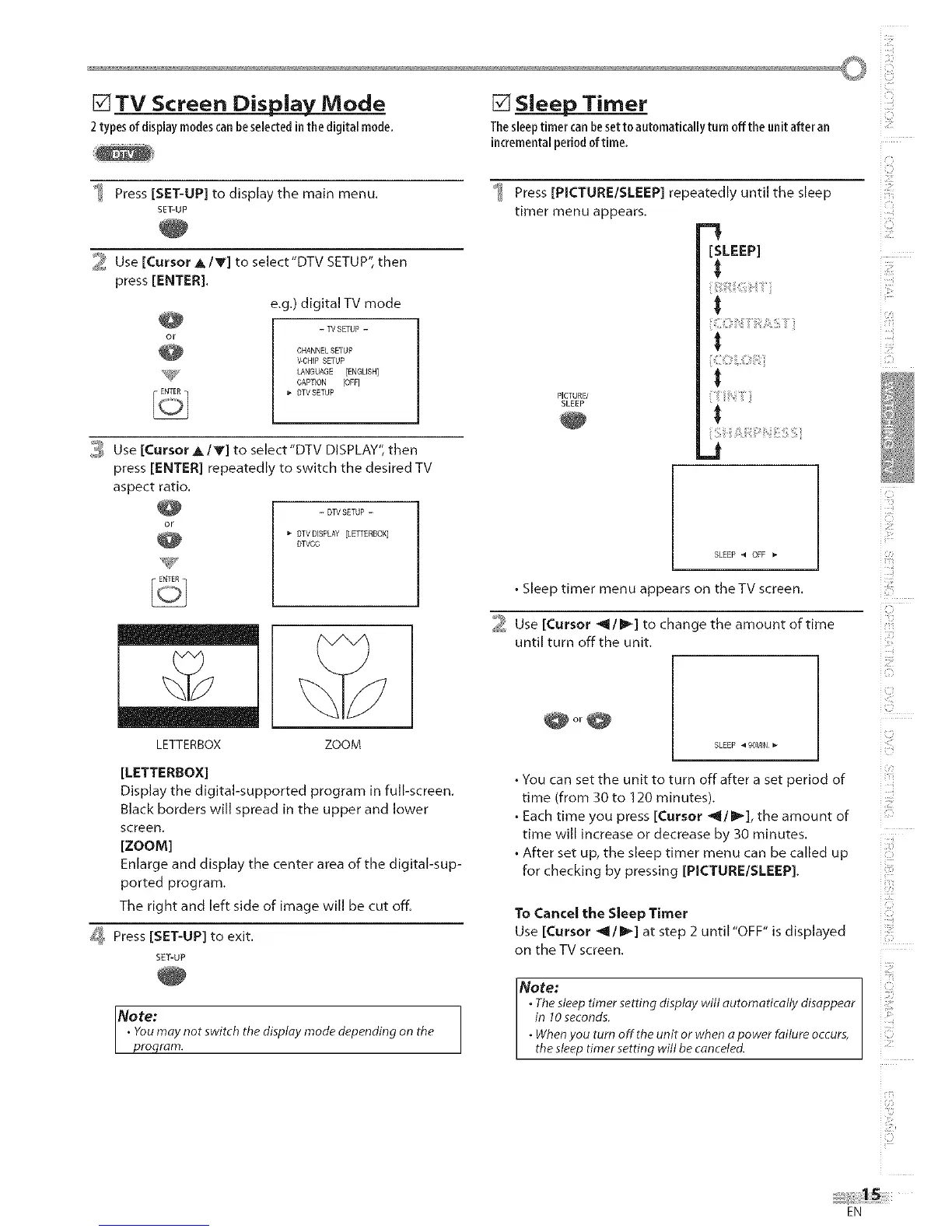
Press [SET-UP] to display the main menu.
SET-UP
2 Use [Cursor A/Y] to select'DTV SETUP",then
press [ENTER].
e,g.) digital TV mode
- W SETUP -
CHANNELSETUP
V-CHIP SETUP
LANGUAGE [ENGLISH]
CAPTION [OFF]
DTVSETUP
3 Use [Cursor _/V] to select"DTV DISPLAY", then
press [ENTER] repeatedly to switch the desired TV
aspect ratio.
- DTVSETUP -
DTVDISPLAY [LETTERBOX]
DTVCO
LETTERBOX ZOOM
[LETTERBOX]
Display the digital-supported program in full-screen,
Black borders will spread in the upper and lower
screen.
[zooM]
Enlarge and display the center area of the digital-sup-
ported program,
The right and left side of image will be cut off.
_ Press [SET-UP] to exit.
SET-UP
Note:
• Youmay not switch the display made depending on the
proqram.
+_ Press [PICTURE/SLEEP] repeatedly until the sleep
timer menu appears,
.-.#
[SLEEP]
i
t
PiCTUa_i
SLEEP
_t
SLEEP 4 OFF
• Sleep timer menu appears on theTV screen.
2 Use [Cursor _/_1 to change the amount of time
until turn offthe unit.
@or@
SLEEP 4 9OMIN
• You can set the unit to turn off after a set period of
time (from 30 to 120 minutes).
• Each time you press [Cursor _/1_], the amount of
time will increase or decrease by 30 minutes.
• After set up, the sleep timer menu can be called up
for checking by pressing [PICTURE/SLEEP],
io
ill:!
i:[f_¸
US
IZ:!
i,,ii_i_'
i!Ci;_
£:!!
i!iii_,il
z:!ili
G:L!:
i ¸i i
CJ
:S
iZ
To Cancel the SleepTimer i!iill
Use [Cursor _/_] atstep 2 until'OFF" isdisplayed ili!ii!i
on the TV screen.
Note:
• The sleep timer setting display will automatically disappear
in 10 seconds.
• When you turn offthe unit or when a power failure occurs,
the sleep timer setting will be canceled.
i
IZ!:
iiii:i_!
EN




 To Next Page