©
V=chil
V-chipreadsthe ratingsfor programs,then deniesaccesstothe programs
whichexceedthe ratinglevelyouset.With this function,youcanblock
certain programminginappropriatefor children.
CAPTION SiZE
FONT STYLE
CHARACTER EDGE
FORE OPACITY
FORE COLOR
BACK OPACITY
BACK COLOR
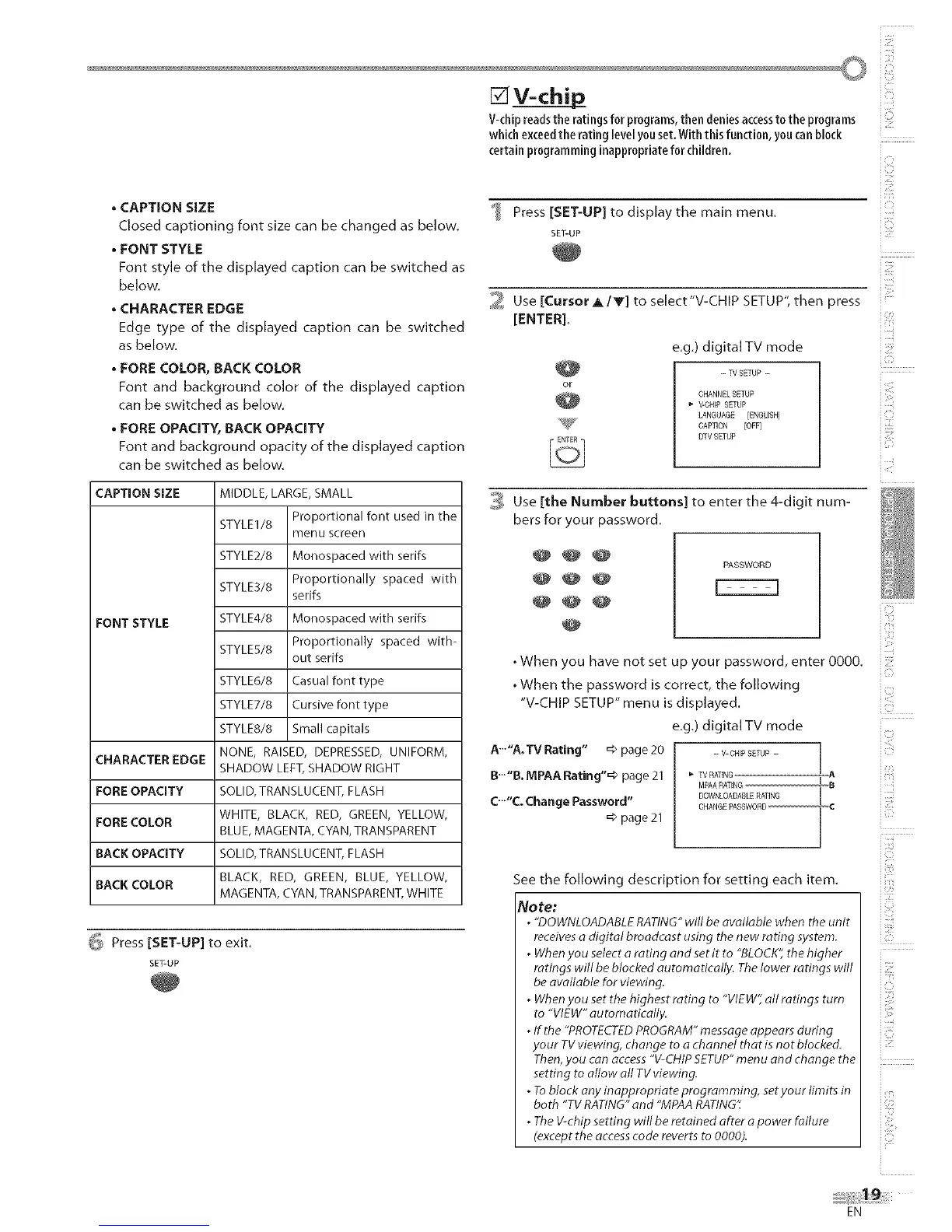
• CAPTION SIZE
Closed captioning font size can be changed as below.
• FONT STYLE
Font style of the displayed caption can be switched as
below.
• CHARACTER EDGE
Edge type of the displayed caption can be switched
as below.
• FORE COLOR, BACK COLOR
Font and background color of the displayed caption
can be switched as below.
• FORE OPACITY, BACK OPACITY
Font and background opacity of the displayed caption
can be switched as below.
MIDDLE, LARGE, SMALL
STYLE1/8 Proportional font used in the
menu screen
STYLE2/8 Monospaced with serifs
STYLE3/8 Proportionally spaced with
serifs
STYLE4/8 Monospaced with serifs
STYLES/8 Proportionally spaced with-
out serifs
STYLE6/8 Casual font type
STYLET/8 Cursive font type
STYLE8/8 Small capitals
NONE, RAISED, DEPRESSED, UNIFORM,
SHADOW LEFT, SHADOW RIGHT
SOLID, TRANSLUCENT, FLASH
WHITE, BLACK, RED, GREEN, YELLOW,
BLUE, MAGENTA, CYAN, TRANSPARENT
SOLID, TRANSLUCENT, FLASH
BLACK, RED, GREEN, BLUE, YELLOW,
MAGENTA, CYAN, TRANSPARENT, WHITE
_ Press [SET-UP] to exit.
SET-UP
Press [SET-UP] to display the main menu.
SET-UP
2 Use [CursorA/Y] to select"V-CHIP SETUP", then press
[ENTER].
e.g.) digital TV mode
-W SETUP -
CHANNELSETUP
V-CHIP SETUP
LANGUAGE [ENGUSH]
CAPTION _FF]
DTVSETUP
_ Use [the Number buttons] to enter the 4-digit num-
bers for your password.
@@@
@
PASSWORD
• When you have not set up your password, enter 0000.
• When the password is correct, the following
"V-CHIP SETUP" menu is displayed.
e.g.) digital TV mode
A..."A. TV Rating" _ page 20 - V-CHFPSETUP- i
/
B'""B.MPAARating"=> page 21 _TVRATING I A
MPAARATENG 8,
C.-"c. Change Password" DOWNLOADASLERATING
/
CHARGE PASSWORD-- C
=>page 21
/
See the following description for setting each item.
No re:
, "DOWNLOADABLERATING"will be available when the unit
receivesa digital broadcast using the new rating system.
, Whenyou select aradng and set it to "BLOCK"the higher
ratings will beblocked automatically. Thelower ratings will
be available for viewing.
, Whenyou set the highest rating to "VIEW1all ratings turn
to "VIEW" automatically.
, If the "PROTECTEDPROGRAM"message appears during
your TVviewing, change to a channel that is not blocked.
Then,you can access"V-CHIPSETUP"menu and change the
setting to allow all TVviewing.
, Toblock any inappropriate programming, setyour limits in
both "TV RATING"and "MPAARATING".
, TheV-chipsetting will be retained after a power failure
(except the accesscode reverts to 0000).
i!iiii!!!
iC.'
iZ!i
i iiii!i
iZi
i li££
i iili!!'
i'b
i Li
i iiii,!!_
i_Z'}
iCii _
iU!i
i:_:il
i_ii_iii!!;
zz
EN











 To Next Page