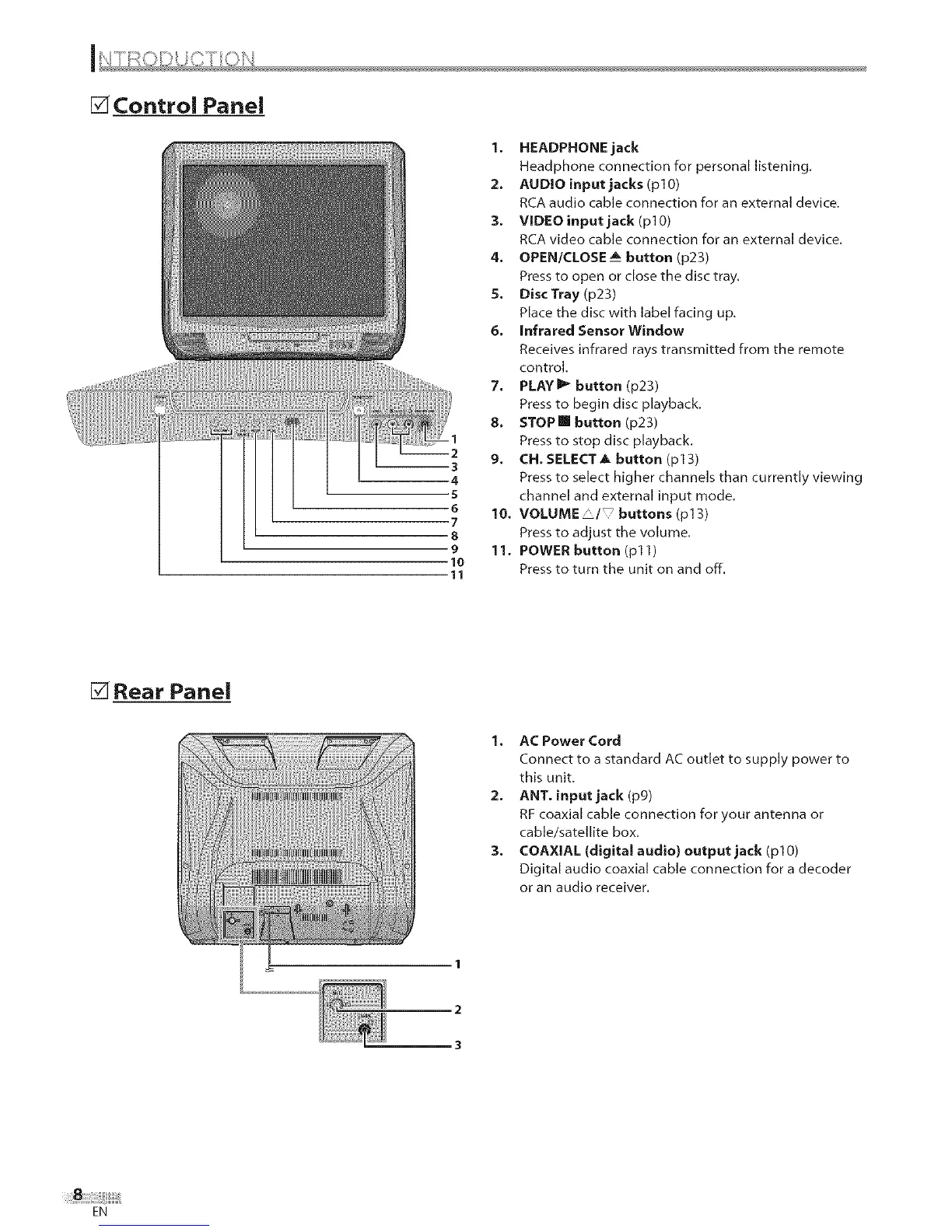
[] Control Panel
1. HEADPHONE jack
Headphone connection for personal listening,
2. AUDIO input jacks (pl0)
RCA audio cable connection for an external device,
3. VIDEO input jack (pl0)
RCA video cable connection for an external device.
4. OPEN/CLOSE__ button (p23)
Press to open or close the disc tray.
S. DiscTray (p23)
Place the disc with label facing up,
6. Infrared Sensor Window
Receives infrared rays transmitted from the remote
control.
7, PLAYI_ button (p23)
Press to begin disc playback,
8. STOPm button (p23)
Press to stop disc playback.
9, CH. SELECT A button (p13)
Press to select higher channels than currently viewing
channel and external input mode.
10, VOLUME'/ buttons(p13)
Press to adjust the volume,
11. POWER button (pl 1)
Press to turn the unit on and off.
[] Rear Panel
1, AC Power Cord
Connect to a standard AC outlet to supply power to
this unit.
2. ANT. input jack (pg)
RF coaxial cable connection for your antenna or
cable/satellite box.
3, COAXIAL (digital audio) output jack (plO)
Digital audio coaxial cable connection for a decoder
or an audio receiver.
2
3
EN











 To Next Page