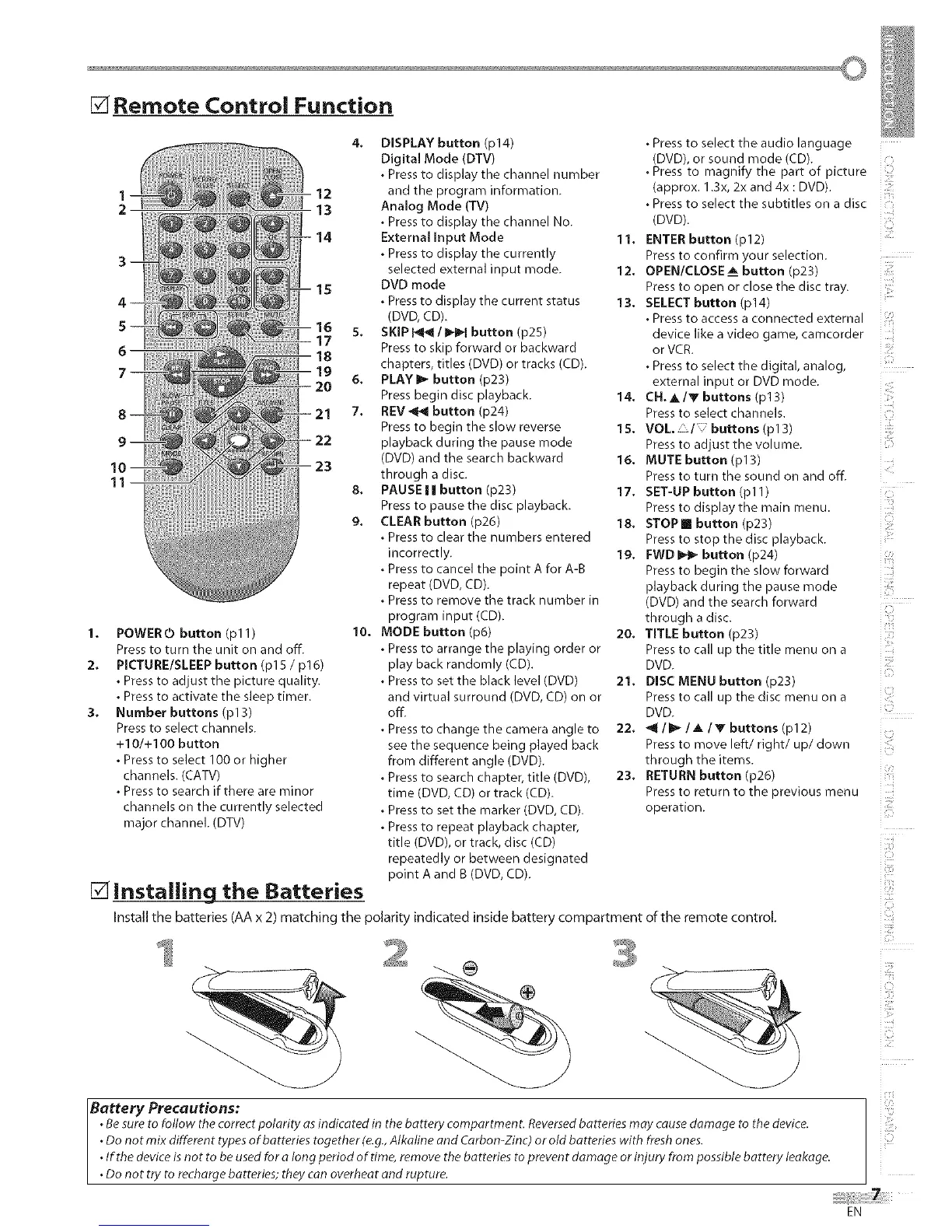
[] Remote Control Function
11
14
1,
2,
3,
POWERO button (pl 1)
Press to turn the unit on and off.
PICTURE/SLEEP button (p15 / p16)
• Press to adjust the picture quality.
• Press to activate the sleep timer.
Number buttons (p13)
Press to select channels.
+10/+100 button
• Press to select 100 or higher
channels. (CATV)
• Press to search if there are minor
channels on the currently selected
major channel. (DTV)
[] Installing the Batteries
4. DISPLAY button (p14)
Digital Mode (DTV)
• Press to display the channel number
and the program information.
Analog Mode (TV)
• Press to display the channel No.
External Input Mode
• Press to display the currently
selected external input mode.
DVD mode
• Pressto display the current status
(DVD, CD).
SKIP _/IH_q button (p25)
Press to skip forward or backward
chapters, titles (DVD) or tracks (CD).
PLAY I_ button (p23)
Press begin disc playback.
REV _1 button (p24)
Press to begin the slow reverse
playback during the pause mode
(DVD) and the search backward
through a disc.
8. PAUSEI| button (p23)
Press to pause the disc playback.
9, CLEAR button (p26)
• Press to clear the numbers entered
incorrectly.
• Press to cancel the point A for A-B
repeat (DVD, CD).
• Press to remove the track number in
program input (CD).
10, MODE button (p6)
• Press to arrange the playing order or
play back randomly (CD).
• Press to set the black level (DVD)
and virtual surround (DVD, CD) on or
off.
• Press to change the camera angle to
see the sequence being played back
from different angle (DVD).
• Press to search chapter, title (DVD),
time (DVD, CD) or track (CD).
• Press to set the marker (DVD, CD).
• Press to repeat playback chapter,
title (DVD), or track, disc (CD)
repeatedly or between designated
point A and B (DVD, CD).
• Press to select the audio language
(DVD), or sound mode (CD).
.Press to magnify the part of picture
(approx. 1.3x, 2x and 4x : DVD).
• Press to select the subtitles on a disc
(DVD).
11, ENTER button (p12)
Pressto confirm your selection.
12. OPEN/CLOSE_. button (p23)
Pressto open or close the disc tray.
13. SELECT button (p14) .....
• Press to access a connected external
device like a video game, camcorder
or VCfi.
• Press to select the digital, analog,
external input or DVD mode.
14. CN, A/Vbuttons(p13)
Pressto select channels.
15, VOL, buttons (pl 3)
Pressto adjust the volume.
16. MUTE button (p13)
Pressto turn the sound on and off.
17, SET-UP button (pl 1)
Pressto display the main menu.
18. STOP [] button (p23)
Pressto stop the disc playback.
19. FWDI_ button (p24)
Pressto begin the slow forward
playback during the pause mode
(DVD) and the search forward
through a disc.
i i
20, TITLE button (p23)
Pressto call up the title menu on a
DVD.
21. DISC MENU button (p23)
Pressto call up the disc menu on a
DVD.
22. _ / I_ / _. ! Y buttons (pl 2)
Pressto move left/right/up/down
through the items.
23, RETURN button (p26)
Pressto return to the previous menu
operation
Install the batteries (AA x 2) matching the polarity indicated inside battery compartment of the remote control.
Battery Precautions:
.Besure to follow the correct polarity as indicated in the battery compartmen LReversedbatteries may cause damage to the device.
.Do not mix different types of batteries together (e.g.,Alkaline and Carbon-Zinc) or old batteries with fresh ones.
.If the device isnot to be usedfor a long period of time, remove the batteries to prevent damage or injury from possible battery leakage.
•Do not try to recharge batteries; they can overheat and rupture.
i!ii_ii!,_'
EN











 To Next Page