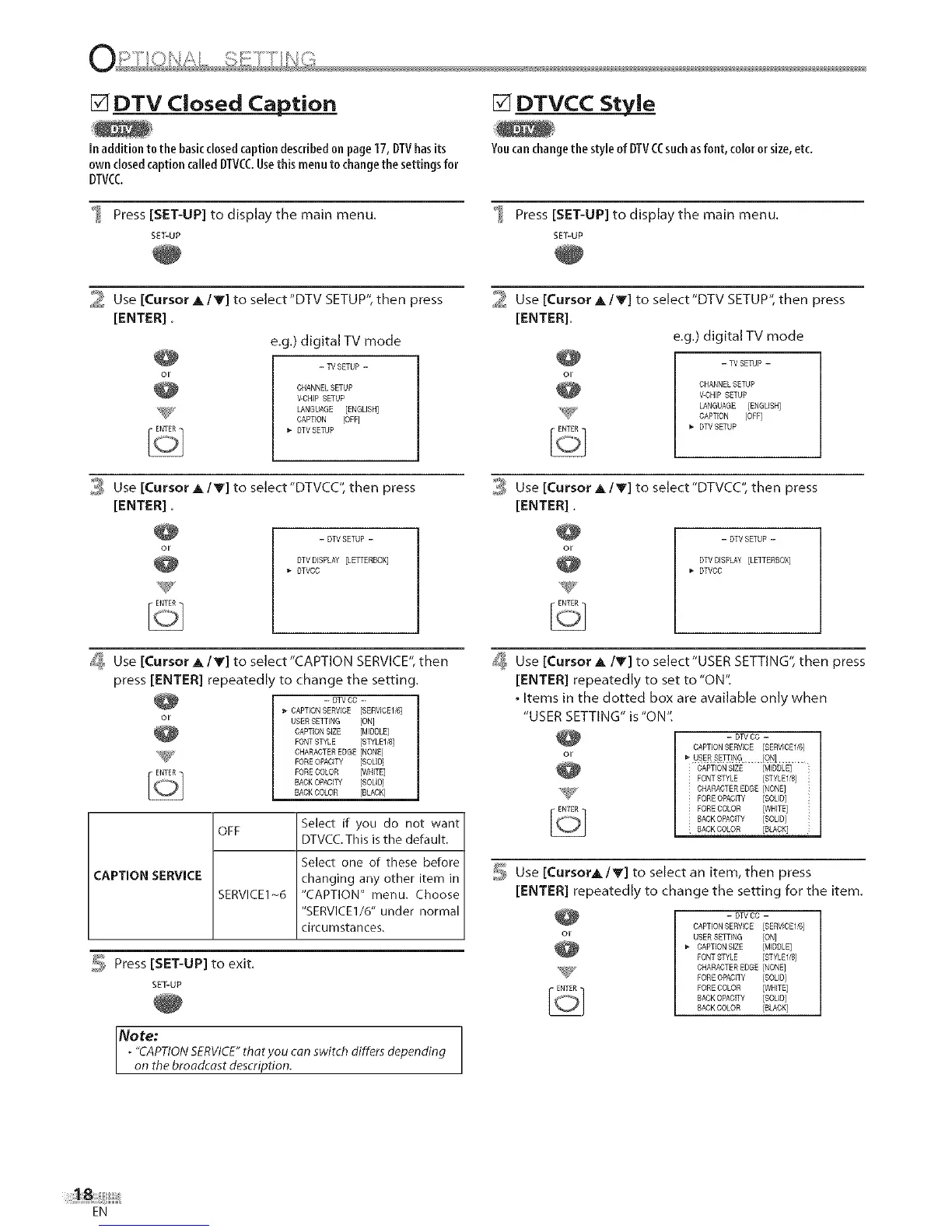
[] DTV Closed Caption
Inaddition tothe basicclosedcaption describedon page17,DTVhasits
own closedcaption called DTVCCUsethis menuto changethe settingsfor
DTVCC
Press [SET-UP] to display the main menu.
SET-UP
[] DTVCC Style
Youcanchangethe styleof DTVCCsuchasfont,coloror size,etc.
Press [SET-UP] to display the main menu.
SET-UP
21 Use [Cursor A IV] to select'DTV SETUP", then press
[ENTER].
e.g.) digital TV mode
- W SETUP -
CHANNELSETUP
V-CHIP SETUP
%_S_ LANGUAGE [ENGLISH]
CAPTION [OFF]
DTVSETUP
21 Use [Cursor A IV] to select"DTV SETUP", then press
[ENTER],
e,g.) digital TV mode
- TV SETUP -
CHANNELSETUP
V-CHIP SETUP
LANGUAGE [ENGLISH]
CAPTION [OFF]
DTV SETUP
0,_#Use[Cursor A/Y] to select"DTVCC", then press
[ENTER].
- DTVSETUP -
DTVDISPLAY [LETTERBOX]
DTVCC
0,_#Use [Cursor A/Y] to select"DTVCC", then press
[ENTER],
-DTVSETUP-
DTV DISPLAY [LETTERROX]
DTVCC
J_ Use [Cursor A IV] to select"CAPTION SERVICE", then
press [ENTER] repeated y to change the setting.
-- DTV DG --
_-CAPTION SERVICE [SERVICE16]
USER SETTING [ON]
CAPTION SIZE [MDDLE]
PONT STYLE [STYLEUR]
_@_, CHARACTER EDGE [NONE]
POREOPACITY [SOLID]
FORE COLOR [WHITE]
BACK OPACITY [SOLID]
BACK COLOR [BLACK]
CAPTION SERVICE
OFF
SERVICE1 _6
Select if you do not want
DTVCC. This is the default.
Select one of these before
changing any other item in
"CAPTION" menu. Choose
"SERVICE1/6" under normal
circumstances.
_, Press [SET-UP] to exit.
SET-UP
Note:
. "CAPTIONSERVICE"thotyou con switch differs depending
on the broodcost description.
_ Use [Cursor A/Y] to select"USER SETTING", then press
[ENTER] repeatedly to set to "ON",
. Items in the dotted box are available only when
"USER SETTING" is "ON",
- DW CO -
CAPTION SERVICE [SERWCED'6]
_-USERSg_ING ION].........
CAPTION SIZE [MIDDLE]
FONT STYLE [STYLEI/8]
CHARACTER EDGE [NONE]
POREOPACffY [SOLID]
PORECOLOR [WHITE]
RACK OPACITY [SOLID]
Use [CursorA IV] to select an item, then press
[ENTER] repeatedly to change the setting for the item.
- DW CO -
CAPTION SERWCE [SERWCEI/6]
USER SETTING [ON]
CAPTION SIZE [MIDDLE]
PONT STYLE [STYLE1/6]
CHARACTER EDGE [NONE]
POREOPACITY [SOLID]
PORECOLOR [WHITE]
RACK OPACITY [SOLID]
RACK COLOR [BLACK]
EN











 To Next Page