[] Channel Add/Delete
Thechanneladd/delete functionletsyouadd the channelthat wasnot
addedby theauto channelscandueto the receptionstatusat the initial
setting. Youcanalso deletethe unnecessarychannels.
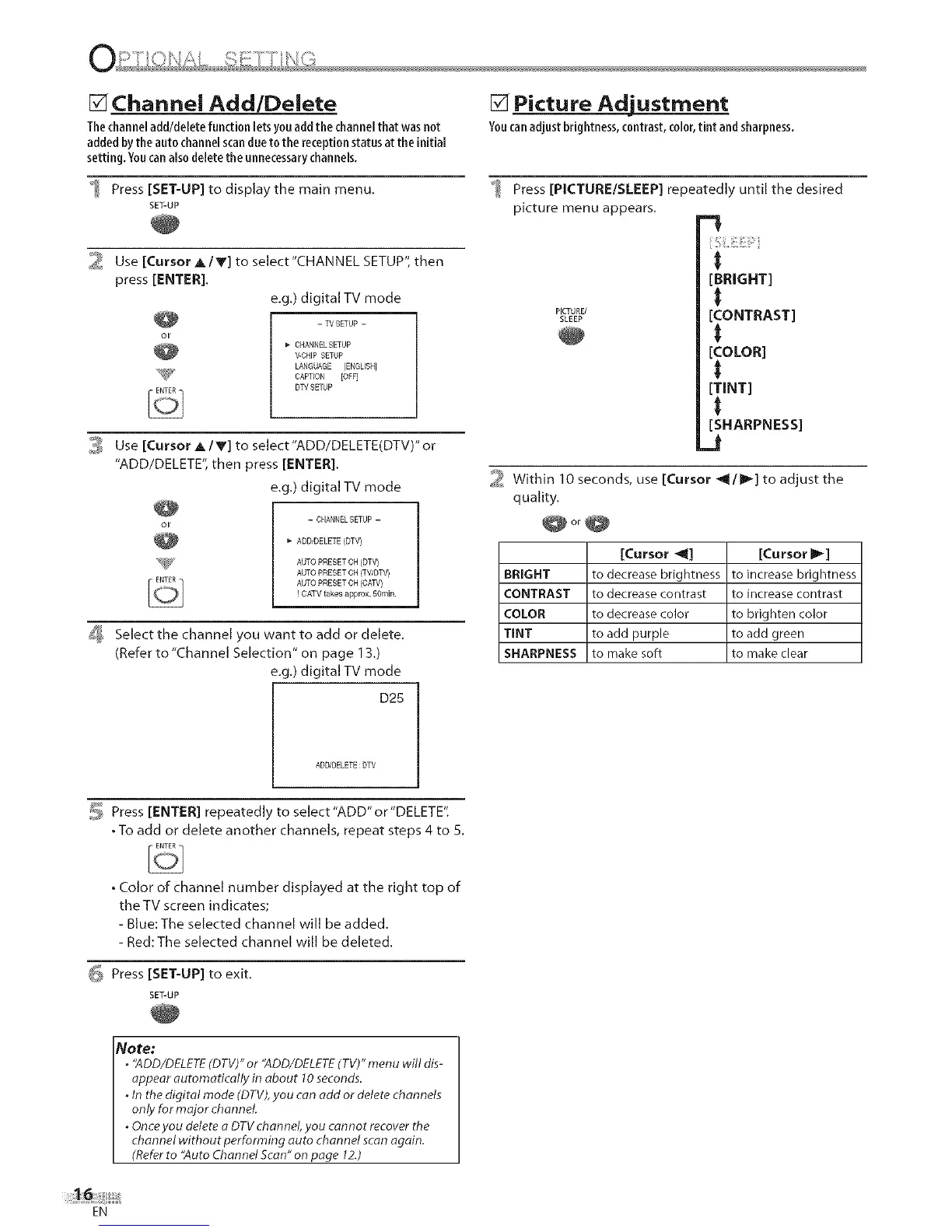
Press [SET-UP] to display the main menu.
SET-UP
_ Use [Cursor A/V] to select"CHANNEL SETUP", then
press [ENTER].
e.g.) digital TV mode
- TV SETUP --
CHANNEL SETUP
V_CHIPSETUP
LANGUAGE [ENGLISH]
_;_ CAPTION [OFF]
DTV SETUP
3 Use [Cursor A IV] to select"ADD/DELETE(DTV)" or
"ADD/DELETE", then press [ENTER].
e.g.) digital TV mode
- CHANNELSETUP -
ADDJDELETE(DTV)
AUTO PRESET CH (DTV)
AUTO PRESET CH (TWDTV)
AUTO PRESET CH (CAW)
! CATV takes approx. 50min.
[_ Select the channel you want to add or delete.
(Refer to "Channel Selection" on page 13.)
e.g.) digital TV mode
D25
[] Picture Adjustment
Youcanadjust brightness,contrast,color,tint andsharpness,
Press [PICTURE/SLEEP] repeatedly until the desired
picture menu appears.
-!
[BRIGHT]
PICTURE/
S_EEP [CONTRAST]
[COLOR]
[TINT]
[SHARPNESS]
J
2 Within 10 seconds, use [Cursor _'_/1_] to adjust the
quality.
@or@
[Cursor _] [Cursor _]
BRIGHT to decrease brightness to increase brightness
CONTRAST to decrease contrast to increase contrast
COLOR to decrease color to brighten color
TINT to add purple to add green
SHARPNESS to make soft to make clear
ADD/DELETE:DTV
5 Press [ENTER] repeatedly to select"ADD"or"DELETE".
• To add or delete another channels, repeat steps 4 to 5.
• Color of channel number displayed at the right top of
the TV screen indicates;
- Blue: The selected channel will be added.
- Red: The selected channel will be deleted.
G Press [SET-UP] to exit.
SET-UP
Note:
° '`ADD/DELETE(DTV)"or '`ADD/DELETE(TV)"menu will dis-
appear automatically in about 10seconds.
° In the digital mode (DTW,you can odd or delete channels
only for major channel
° Onceyou delete o DTVchannel, you cannot recover the
channel without performing auto channel scan again.
(Referto "Auto Channel Scan" on page 12.)
EN











 To Next Page