On-screen Dis_plaJL
Youcancheckthe informationabout thecurrentdiscby pressing[DISPLAY] on
the remote control.
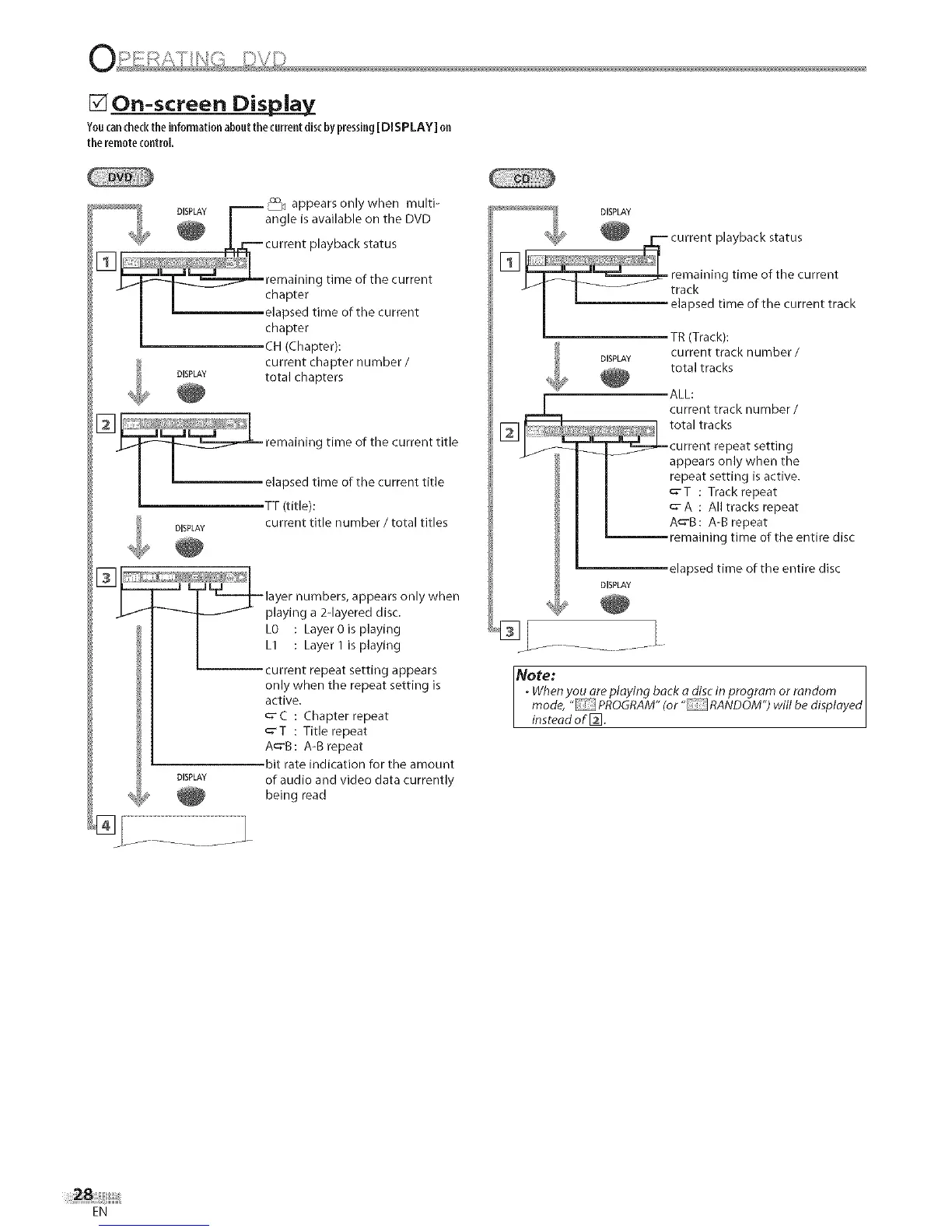
_ appears only when multi-
DLSPLAYI angle is available on the DVD
J
,,_--current playback status
[]
remaining time of the current
f I I chapter
I elapsed time of the current
chapter
CH (Chapter):
current chapter number/
DISPLAY total chapters
[]
_ remaining time of the current title
I ' _:lT_t::de):ime °f the current title
current title number / total titles
DISPLAY
layer numbers, appears only when
playing a 2-layered disc.
L0 : Layer 0is playing
L1 : Layer I is playing
current repeat setting appears
only when the repeat setting is
active.
C : Chapter _epeat
_-T : Title repeat
A_'B: A-B repeat
bit rate indication for the amount
DISPLAY of audio and video data currently
being read
DISPLAY
TR (Track):
current track number /
total tracks
ALL:
current track number /
total tracks
current repeat setting
appears only when the
repeat setting is active.
_'T : Track repeat
c" A : All tracks repeat
A_-B: A-B repeat
remaining time of the entire disc
elapsed time of the entire disc
DISPLAY
Note: ]
. When you are playing back a disc in program or random I
mode, "PROGRAM" (or "RANDOM") will be displayed|
instead of []. |
EN











 To Next Page