jS'%
_J
[] Search Functions
i ilLii
Using [MODE]
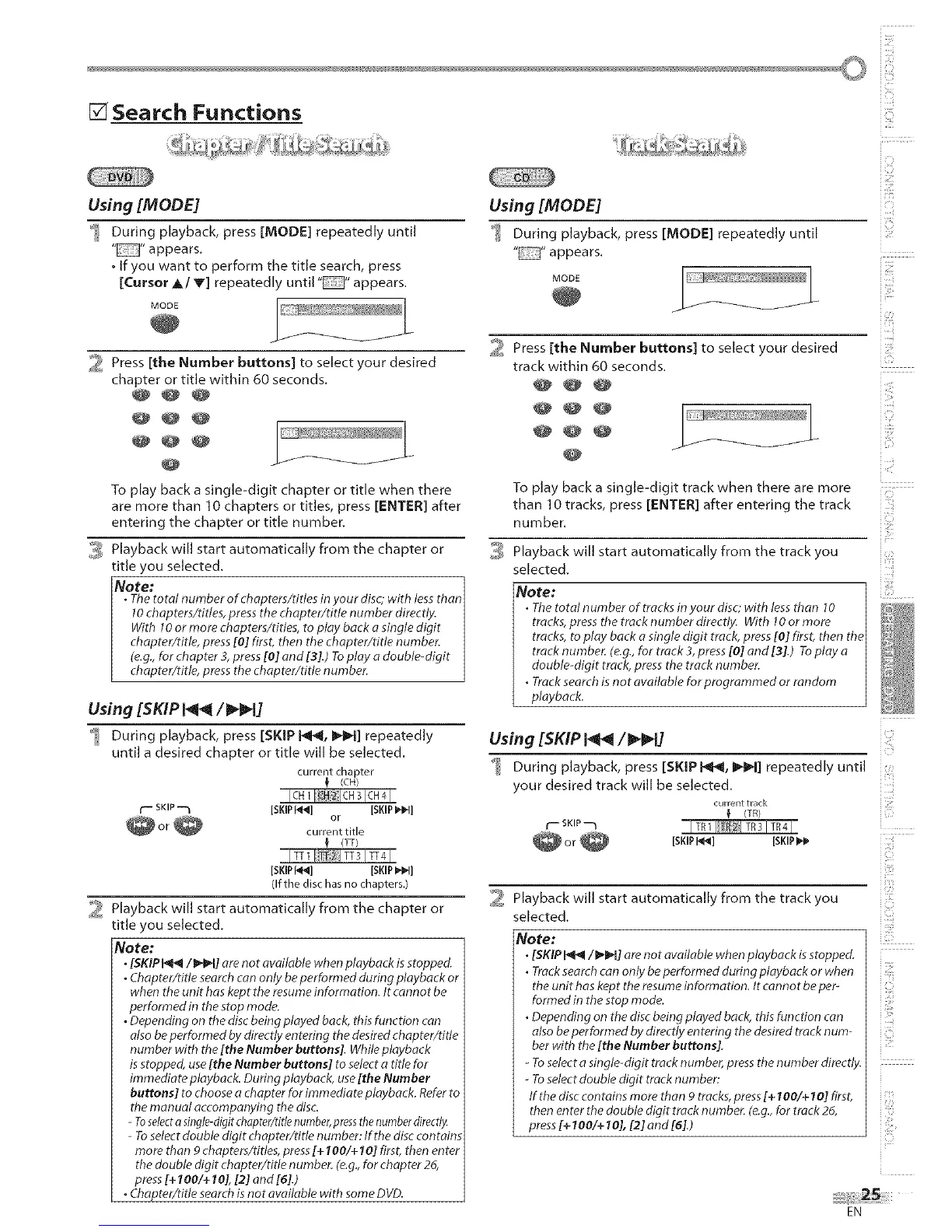
_ During playback, press [MODE] repeatedly until
"" appears.
• If you want to perform the title search, press
[Cursor _/V) repeatedly until "D" appears.
MODE
2 Press [the Number buttons] to select your desired
chapter or title within 60 seconds.
@@@
@@@
@@@
@
To play back a single-digit chapter or title when there
are more than 10 chapters or titles, press [ENTER] after
entering the chapter or title number.
,_ Playback will start automatically from the chapter or
title you selected.
Note: ]
• Thetotal number ofchapters/ddes in your disc; with lessthan]
10chapters/titles, press the chapter/tide number directly.
With 10 or more chapters/tides, to play back asingle digit I
chapter/title, press[0[ first, then the chapter/tide number. I
(e.g.,for chapter 3, press[0[ and [3].) Toplay a double-digit
chapter/ride, pressthe chapter/title number, j
Using [SKIP _ /_1]
_ During playback, press [SKIP Pq_l, IIHI_I] repeatedly
until a desired chapter or title will be selected.
current chapter
! (ell)
ICH11CH21CH31CH41
r ,_ SKIP --'1 [SKIP [_] [SKIP B_]]
or
current title
(TT)
I TT 1 I T[2%1TT3 I TT41
[SKIPI_] [SKIP I_"_1]
(If the disc has no chapters.)
_ Playback will start automatically from the chapter or
title you selected.
Note:
•[SKIP_/f_l] are not available when playback is stopped.
•Chapter/title searchcan only be performed during playback or
when the unit has kept the resume information. Itcannot be
performed in the stop mode.
•Depending on the discbeing played back,this function can
also beperformed bydirectly entering the desired chapter/dtle
number with the [the Number buttons[. While playback
isstopped, use[the Number buttons] to selecta title for
immediate playback. During playback, use[the Number
buttons] to choose a chapter for immediate playback. Referto
the manual accompanying the disc.
- Toselecta single-digitchapter/titlenumber,pressthenumberdirectly.
- Toselectdouble digit chapter/title number: If the disccontains
more than 9 oh@tars/titles, press[+100/+10[ first,then enter
the double digit chapter/tide number. (e.g.,for chapter 26,
press[+ 100/+ 10], [2] and [6].)
•Ch@ter/tide search isnot available with some DVD.
Using [MODE]
_ During playback, press [MODE] repeatedly until
" "appears.
MODE .... s,*,,_,>#,_,
2 Press [the Number buttons] to select your desired
track within 60 seconds.
@@@
@@@
@
ii:iiiii!
iZ!_
(
To play back a single-digit track when there are more
than 10 tracks, press [ENTER] after entering the track
number.
_ Playback will start automatically from the track you
selected.
Note:
• The total number of tracks in your disc;with lessthan 10
tracks, press the track number directly. With 10or more
tracks, to play back a single digit track, press[0[ first, then the
track number. (e.g., for track 3,press[0] and [3[.) Toplay a
double-digit track,press the track number.
• Track search is not available for programmed or random
playback.
Using [SKIP P4_ /_
i
During playback, press [SKIP I_r_, I_1] repeatedly until
i i!
your desired track will be selected.
current track
(TR)
_- skinm ITR I [R)I TR 31 TR 41
[SKIPI_1 [SKIP
Playback will start automatically from the track you
selected.
Note:
• [SKIP_/I_IH] arenot available when playback isstopped.
• Tracksearchcan only be performed during playback or when
the unit has kept the resume information. Itcannot be per-
formed in the stop mode.
• Depending on the disc beingplayed back, this function can
alsobe performed by directly entering the desiredtrack num-
ber with the [the Number buttons[.
- Toselecta single-digit track number, pressthe number directly.
- Toselectdouble digit track number:
Ifthe disccontains more than 9 tracks,press[+ 100/+ IO[first,
then enter the double digit track number. (e.g.,for track 25,
press[+ 100/+ I0], [2[ and [6].)
EN
iO
i;!%
JCil
_F











 To Next Page