S=SpecialSettin ls
i
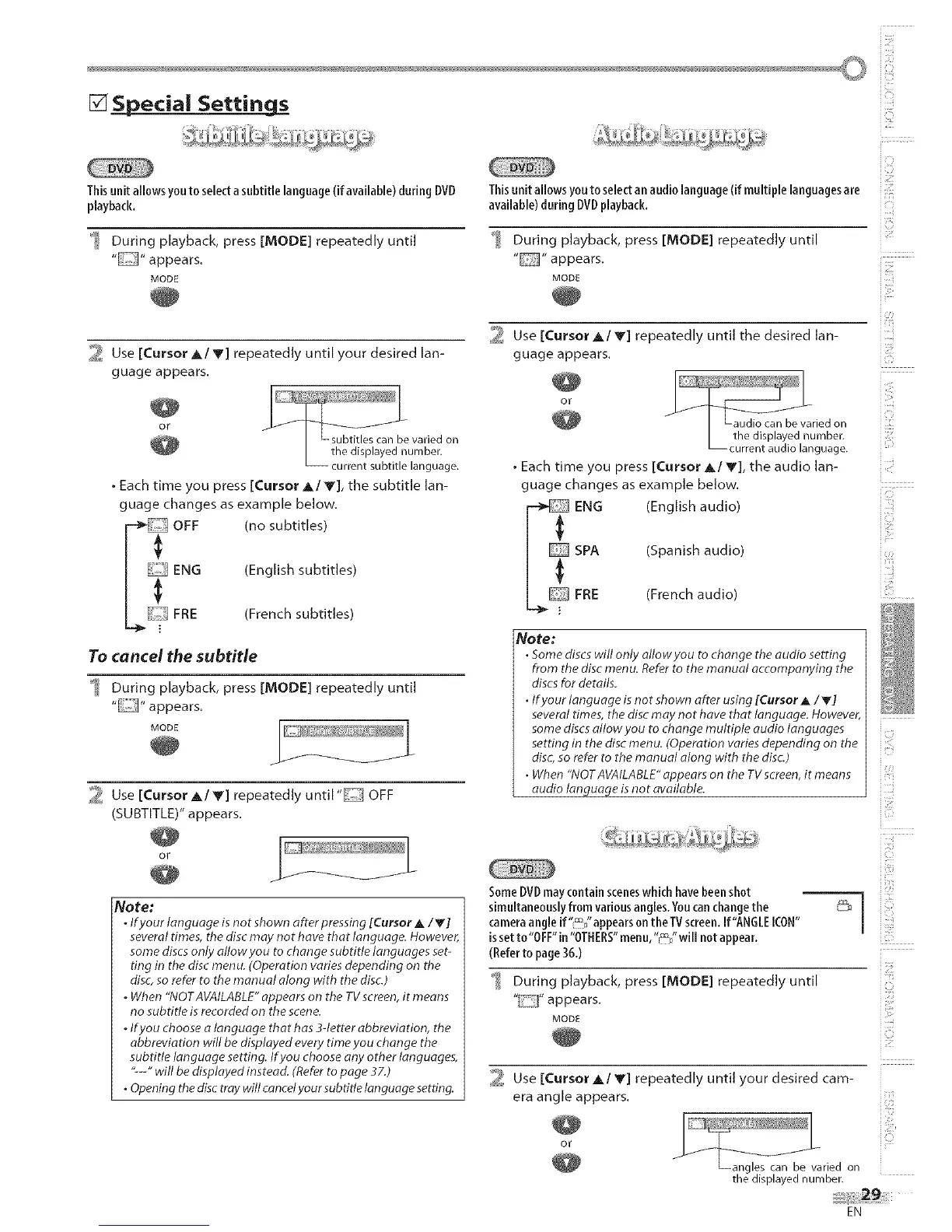
Thisunit allows youto selectasubtitle language(if available) during DVD
playback.
_ During playback, press [MODE] repeatedly until
MODE
2 Use [Cursor Ak/V] repeatedly until your desired lan-
guage appears.
or
• Each time you press [Cursor _,/V], the subtitle lan-
guage changes as example below.
OFF (no subtitles)
FRE
(English subtitles)
(French subtitles)
To cancel the subtitle
During playback, press [MODE] repeatedly until
" "appears.
MODE
2 Use [Cursor A/_'] repeatedly until "IIC[[I OFF
(SUBTITLE)" appears.
or
/
Note:
. If your language is not shown after pressing [Cursor A iV]
several times, the disc may not have that language. However,
some discs only allow you to change subtitle languages set-
ting in the disc menu. (Operation varies depending on the
disc, so refer to the manual along with the disc.)
. When "NOTAVAILABLE" appears on the TV screen, it means
no subtitle is recorded on the scene.
. If you choose a language that has 3-letter abbreviation, the
abbreviation will be displayed every time you change the
subtitle language setting. If you choose any other languages,
"---" will be displayed instead. (Refer to page 37.)
• Opening the disc tray will cancelyour sub title language setting.
Thisunit allowsyouto selectan audiolanguage(if multiple languagesare
available)during DVDplayback.
During playback, press [MODE] repeatedly until
" "appears.
MODE
_ Use [Cursor A/V] repeatedly until the desired lan-
guage appears.
O_
. Each time you press [Cursor A/V], the audio lan-
guage changes as example below.
ENG (English audio)
SPA
FRE
(Spanish audio)
(French audio)
Note:
• some discswill only allowyou to change the audio setting
from the disc menu. Referto the manual accompanying the
discsfor details.
• Ifyour language is not shown after using [Cursor A /V]
several times, the discmay not have that language. However,
some discsallow you to change multiple audio languages
setting in the disc menu. (Operation varies depending on the
disc,so refer to the manual along with the disc)
• When "NOTAVAILABLE"appears on the TVscreen,it means
audio language isnot available.
SomeDVD maycontainsceneswhich havebeenshot 1
simultaneouslyfrom variousangles.Y0ucanchangethe
I
cameraangle if"_/'appears on theTV screen.If"ANGLEICON"
issetto"OFF"in "OTHERS"menu,"_"will not appear.
(Referto page3&)
_ During playback, press [MODE] repeatedly until
" "appears.
MODE
Use [Cursor _,/Y] repeatedly until your desired cam-
era angle appears.
OF
Langles can be varied on
the displayednumber.
i_!:::ii!
i]7
(
iiii:,_;il
i _:!i
i¸:ii;:: : ::
i!;!:ii:;_
i i£i_
i i ¢i
EN











 To Next Page