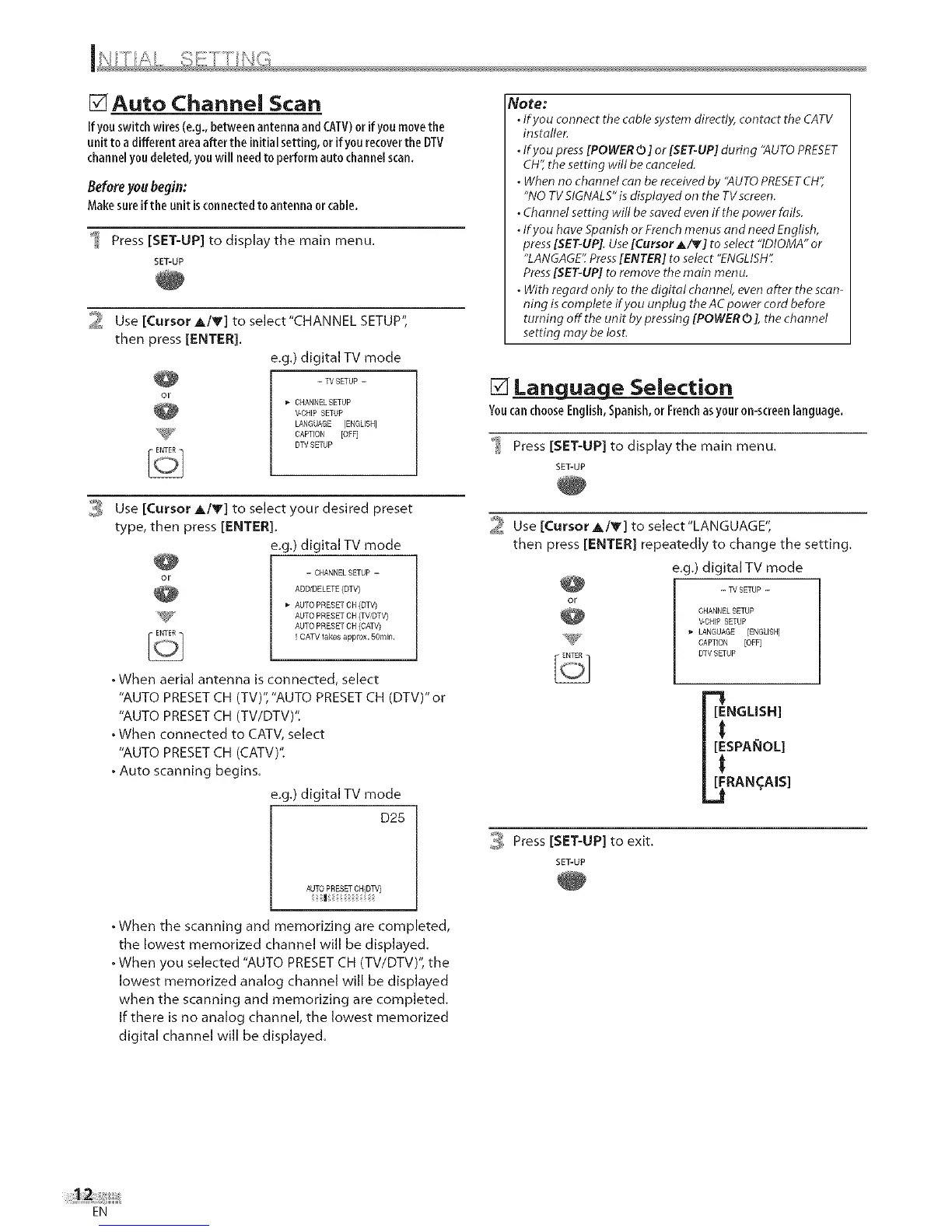
Auto Channel Scan
Ifyouswitch wires(e.g.,betweenantennaand CATV)or ifyoumovethe
unit to a different areaafter the initial setting, or if yourecoverthe DTV
channelyoudeleted, youwill needto performauto channelscan.
Beforeyoubegin:
Makesureifthe unit isconnectedto antenna orcable.
Press [SET-UP] to display the main menu.
SET-UP
2 Use [Cursor A/Y] to select"CHANNEL SETUP",
then press [ENTER].
e.g.) digital TV mode
- TV SETUP --
CHANNEL SETUP
V-CHIP SETUP
LANGUAGE [ENGLISH]
'_ CAPTION [OFF]
DTV SETUP
0,:_ Use [Cursor A/y] to select your desired preset
type, then press [ENTER].
e.g.) digital TV mode
- CHANNEL SETUP -
ADDtDELETE (DTV)
AUTO PRESET OH (DTV)
AUTO PRESET OH (TWDTV}
AUTO PRESET CH (CATV)
I CATV _akes approx. ROmin.
• When aerial antenna is connected, select
"AUTO PRESET CH (TV)", "AUTO PRESET CH (DTV)" or
"AUTO PRESET CH (TV/DTV)'t
• When connected to CATV, select
"AUTO PRESET CH (CATV)'t
• Auto scanning begins.
e.g.) digital TV mode
D25
AUTO PRESETCH(DTV)
I
. When the scanning and memorizing are completed,
the lowest memorized channel will be displayed.
. When you selected "AUTO PRESET CH (TV/DTV)", the
lowest memorized analog channel will be displayed
when the scanning and memorizing are completed.
If there is no analog channel, the lowest memorized
digital channel will be displayed.
Note:
• Ifyou connect the cable system directly, contact the CATV
installer.
. If you press[POWER0 ] or [SET-UP] during "AUTOPRESET
CH",the setting will be canceled.
. When no channel can be received by "AUTOPRESETCH",
"NO TVSIGNALS"is displayed on the TV screen.
. Channel setting will be saved evenif the power fails.
• Ifyou have Spanish or Frenchmenus and need English,
press[SET-UP].Use[Cursor A/V] to select "IDIOMA" or
"LANGAGE'_Press[ENTER] to select "ENGLISH".
Press[SET-UP] to remove themain menu.
. With regard only to the digital channel, evenafter the scan-
ning is complete ff you unplug the AC power cord before
turning off the unit by pressing [POWER0], the channel
setting may be lost.
[] Language Selection
YoucanchooseEnglish,Spanish,or Frenchasyour on-screenlanguage.
Press [SET-UP] to display the main menu.
SET-UP
2 Use [CursorA/Y] to select"LANGUAGE",
then press [ENTER] repeatedly to change the setting.
e.g.) digital TV mode
-- W SETUP -
CHANNEL SETUP
V-CHIP SETUP
LANGUAGE [ENGLISH]
CAPTION [OFF]
DTV SETUP
NGLISH]
SPAI_OL]
RAN_AIS]
_ Press [SET-UP] to exit.
SET-UP
EN











 To Next Page