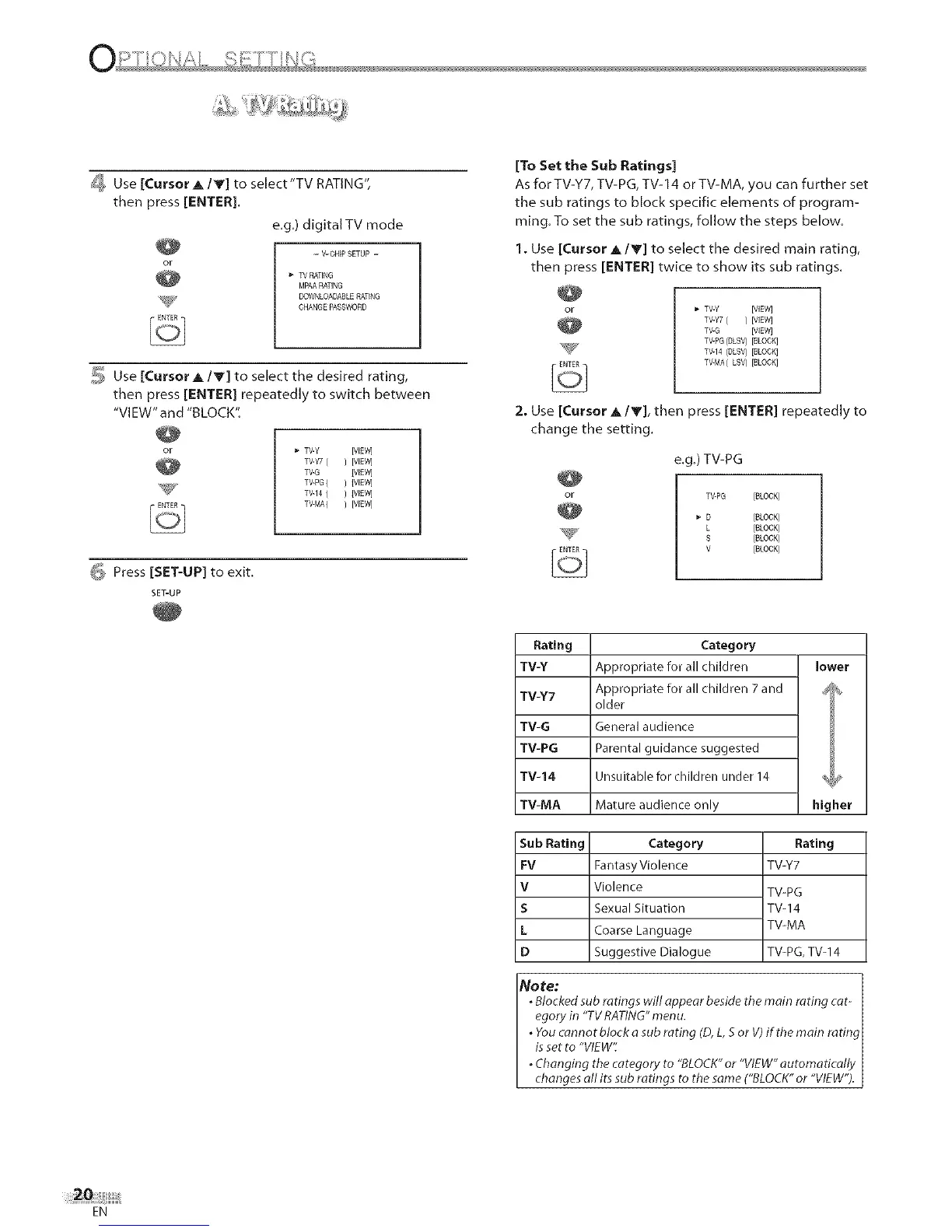
_ Use[CursorA/T]toselect"TVRATING",
thenpress[ENTER].
e.g.)digitalTVmode
- V-CHIP SETUP -
TV RATING
MPAARATING
DOWNLOADABLERATING
CHANGE PASSWORD
_, Use [Cursor A IT] to select the desired rating,
then press [ENTER] repeatedly to switch between
"VIEW" and "BLOCK".
W7
TV-Y [WEW]
TV-Y7 ( ) [WEW]
TV-G {WEW]
TV-PG ( ) IWEW]
TV-14 ( ) IWEW]
TV-MA( ) [VIEW]
_ Press [SET-UP] to exit.
SET-UP
[To Set the Sub Ratings]
As for TV-Y7, TV-PG, TV-14 or TV-MA, you can further set
the sub ratings to block specific elements of program-
ming. To set the sub ratings, follow the steps below.
1. Use [Cursor A/T] to select the desired main rating,
then press [ENTER] twice to show its sub ratings.
'_- TV-Y [VIEW]
TV-Y7( ) [VIEW]
TV-G [VIEW]
TV-PG(DLSV) [BLOCK]
TV-14 (DLSV) [BLOCK]
TV-MA(LSV) [BLOCK]
2. Use [Cursor A/T], then press [ENTER] repeatedly to
change the setting.
e,g,) TV-PG
TV-PG [BLOCK]
D [BLOCK]
L [BLOCK]
S [BLOCK]
V [BLOCK]
Rating Category
TV-Y Appropriate for all children lower
TV-Y7 Appropriate for all children 7and _
older
TV-G General audience
TV-PG Parental guidance suggested
TV-14 Unsuitable for children under 14 _
TV-MA Mature audience only higher
Sub Rating
FV
V
S
L
D
Category
Fantasy Violence
Violence
Sexual Situation
Coarse Language
Suggestive Dialogue
Rating
TV-Y7
TV-PG
TW14
TV-MA
TV-PG, TV-14
No re; ]
. Blocked sub ratings will appear beside the main rating cat-
egory in "TV RATING" men u.
. You cannot block a sub rating (D, L, S or V) if the main rating_
is set to "VIEW':
. Changing the category to "BLOCK" or "VIEW" automatically
changes all its sub ratings to the same ("BLOCK" or "VIEW"). j
EN











 To Next Page