3 - 2 DS3578 With FIPS Digital Scanner Product Reference Guide
Troubleshooting
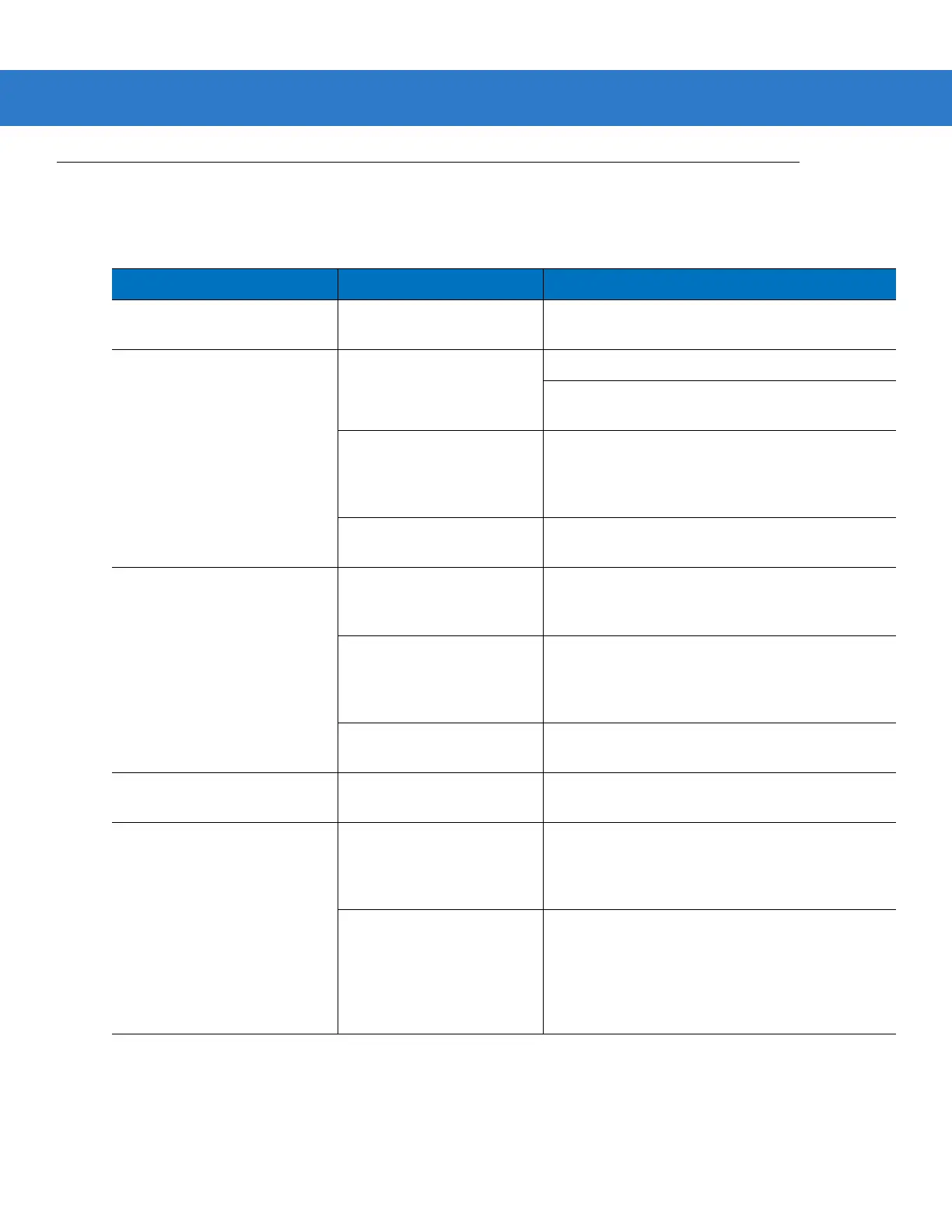
Table 3-1
Troubleshooting
Problem Possible Causes Possible Solutions
Digital scanner emits low/
medium/high beep sequence.
Digital scanner is powering
up.
Normal when digital scanner battery is inserted.
Nothing happens when scan
trigger is pressed.
No power to the digital
scanner.
Check battery.
Ensure that end cap to battery chamber is
secured.
Digital scanner is disabled. For IBM-468x or USB IBM modes, enable the
digital scanner via the host interface. Otherwise,
call
Motorola Solutions Support
(see
page xviii
)
for contact information).
If using RS-232 Nixdorf B
mode, CTS is not asserted.
Assert CTS line.
Laser comes on, but digital
scanner does not decode the
bar code.
Digital scanner is not
programmed for the correct
bar code type.
Ensure the digital scanner is programmed to read
the type of bar code being scanned.
Bar code symbol is
unreadable.
Check the symbol to ensure it is not defaced. Try
scanning test bar codes of the same bar code
type. See
Appendix C, Sample Bar Codes
for test
bar codes.
Bar code is out of range of
the digital scanner.
Move digital scanner closer to or further from bar
code.
Digital scanner emits four short
high beeps.
Battery is low. Charge the battery. See
Charging the Scanner
Battery in the Cradle on page 1-9
.
Digital scanner emits a
disconnect (high-low) beep
sequence.
Digital scanner has
disconnected from cradle
because it is too far from the
cradle.
Move closer to the cradle and listen for a
reconnection beep (short low-short high).
Digital scanner has
disconnected from the
cradle because the cradle
has lost power or been
placed in USB suspend
mode.
Check power connections to cradle, and if using a
USB cable, check to make sure PC has not
entered a power save mode.



 To Next Page