Maintenance and Technical Specifications 3 - 3
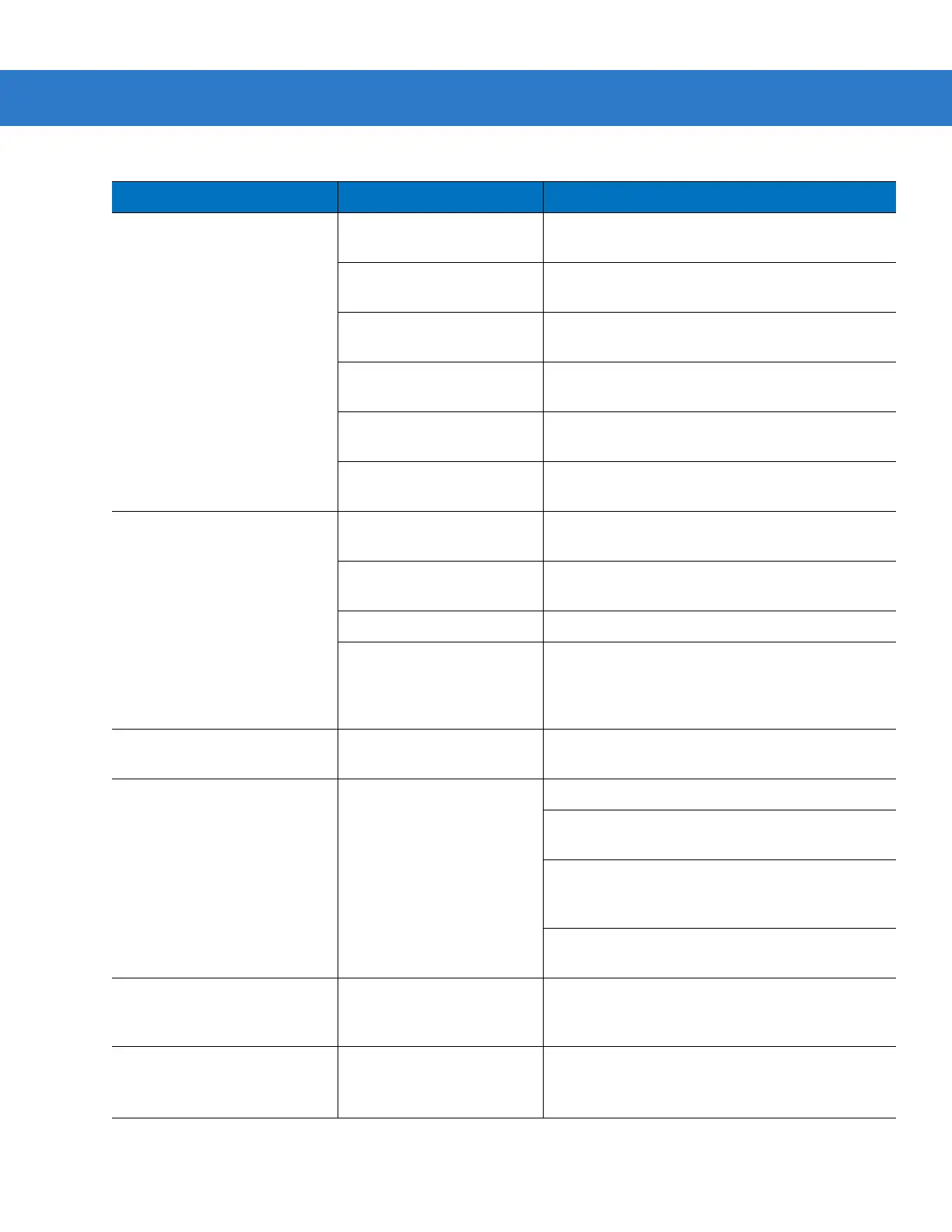
Digital scanner emits four long
low beeps after scanning a bar
code.
Incorrect host interface
cable is used.
Ensure that correct host interface cable is used.
Interface/power cables to
cradle are loose.
Ensure all cable connections are secure.
Digital scanner is not paired
to a cradle.
Scan the
PAIR
bar code on the cradle that is
connected to the host that is to receive data.
Digital scanner has
disconnected.
See disconnect beep sequence above.
A transmission error was
detected.
Ensure the cradle’s communication parameters
match the host's setting.
Cradle has not completed
USB initialization.
Wait several seconds and scan again.
Bar code is decoded, but data
is not transmitted to the host.
Digital scanner not paired to
host-connected cradle.
Pair the digital scanner to the cradle (using
PAIR
bar code on the cradle).
Cradle not programmed for
correct host interface.
Check digital scanner host parameters or edit
options.
Interface cable is loose. Ensure all cable connections are secure.
Cradle has lost connection
to host.
In this exact order: disconnect power supply;
disconnect host cable; wait three seconds;
reconnect host cable; reconnect power supply;
reestablish pairing.
Five long low beeps sound
after a bar code is decoded
A conversion error or format
error has been detected.
Ensure the digital scanner’s conversion
parameters are properly configured.
Scanned data is incorrectly
displayed on the host.
Cradle host communication
parameters do not match
host’s parameters.
Ensure proper host is selected.
For RS-232, ensure the cradle’s communication
parameters match the host’s settings.
For a Keyboard Wedge configuration, ensure the
system is programmed for the correct keyboard
type, and the CAPS LOCK key is off.
Ensure editing options (e.g., UPC-E to UPC-A
conversion) are properly programmed.
Digital scanner emits
low/low/low/extra-low beep
sequence when it is not in use.
RS-232 receive error. Normal during host reset. Otherwise, ensure the
digital scanner’s RS-232 parity setting matches the
host setting.
Digital scanner emits low-high
beep sequence during
programming.
Input error or
Cancel
bar
code was scanned.
Ensure the correct numeric bar codes, that are
within range for the parameter being programmed,
are being scanned.
Table 3-1
Troubleshooting (Continued)
Problem Possible Causes Possible Solutions



 To Next Page