3 - 4 DS3578 With FIPS Digital Scanner Product Reference Guide
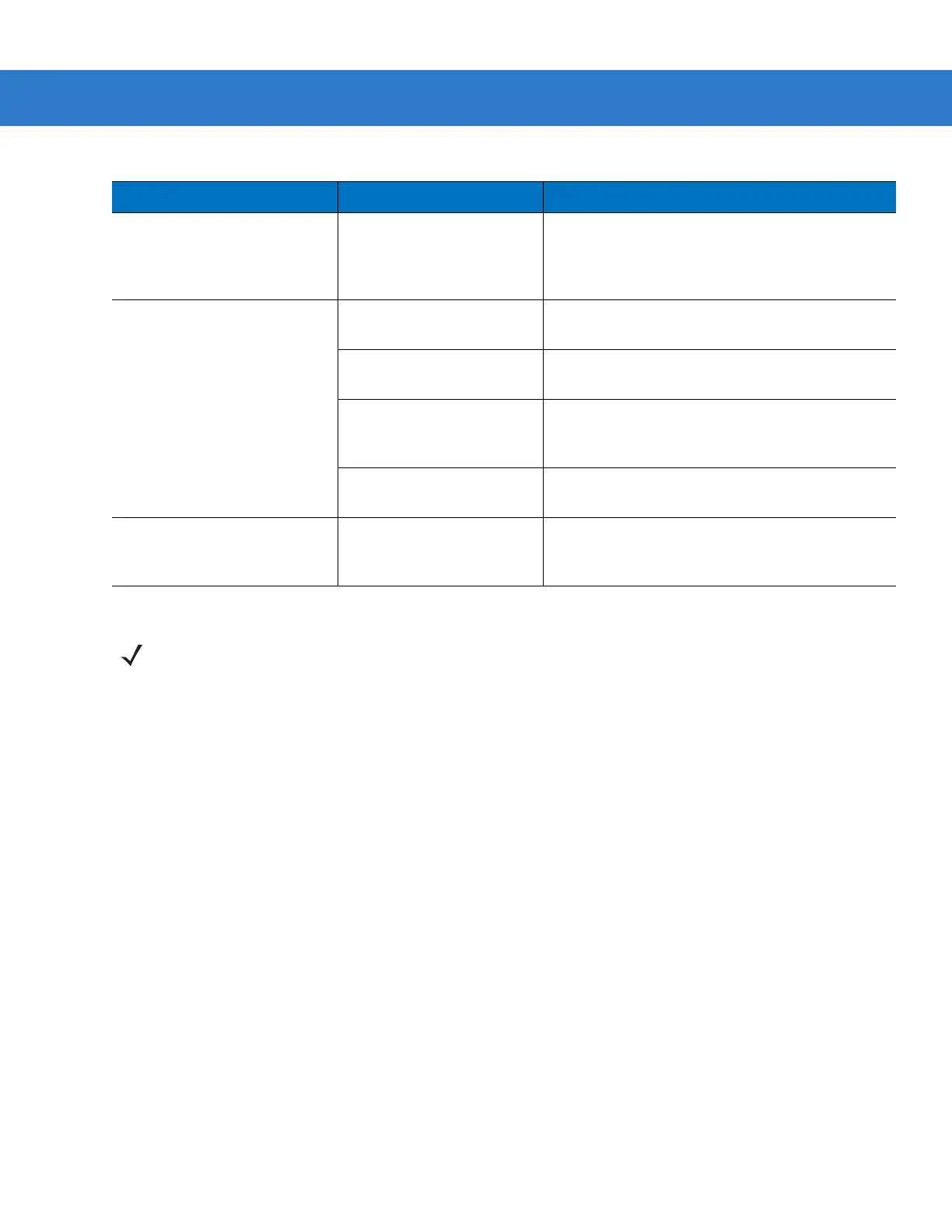
Digital scanner emits one short
high beep when it is not in use.
In RS-232 mode, a <BEL>
character is received and
Beep on <BEL> option is
enabled.
Normal when Beep on <BEL> is enabled and the
digital scanner is in RS-232 mode.
Cradle does not work after
following installation
procedures.
Cradle is not receiving
power.
Check system power.
Cable connections are not
secure.
Reinsert cables properly.
The digital scanner is not
inserted properly in the
cradle.
Reinsert digital scanner.
Cradle is not properly
connected to the host.
Check that host settings are correct, and connect
the cradle to the appropriate port on the host.
Battery does not charge. Cradle is outside the
charging temperature range.
Charge within the recommended temperature of
32° to 104° F (0° to 40° C) nominal, 41° to 95° F
(5° to 35° C) ideal.
Table 3-1
Troubleshooting (Continued)
Problem Possible Causes Possible Solutions
NOTE If problems still occur, contact the distributor or Motorola Solutions Support. See page xviii for contact
information.



 To Next Page