EasyManua.ls Logo

SYSMEX SP-50 - SP-50 IPU Layout; SP-50 IPU Main Screen Overview

SYSMEX SP-50
69 pages
Print Icon
To Next Page IconTo Next Page
To Previous Page IconTo Previous Page
Loading...
Main Screen SP-50 IPU Layout
Sysmex House, Garamonde Drive, Wymbush, Milton Keynes, MK8 8DF, United Kingdom · Phone +44 333 320 3460 · Fax +44 1908 267 901
academy.training@sysmex.co.uk· www.sysmex.co.uk
14
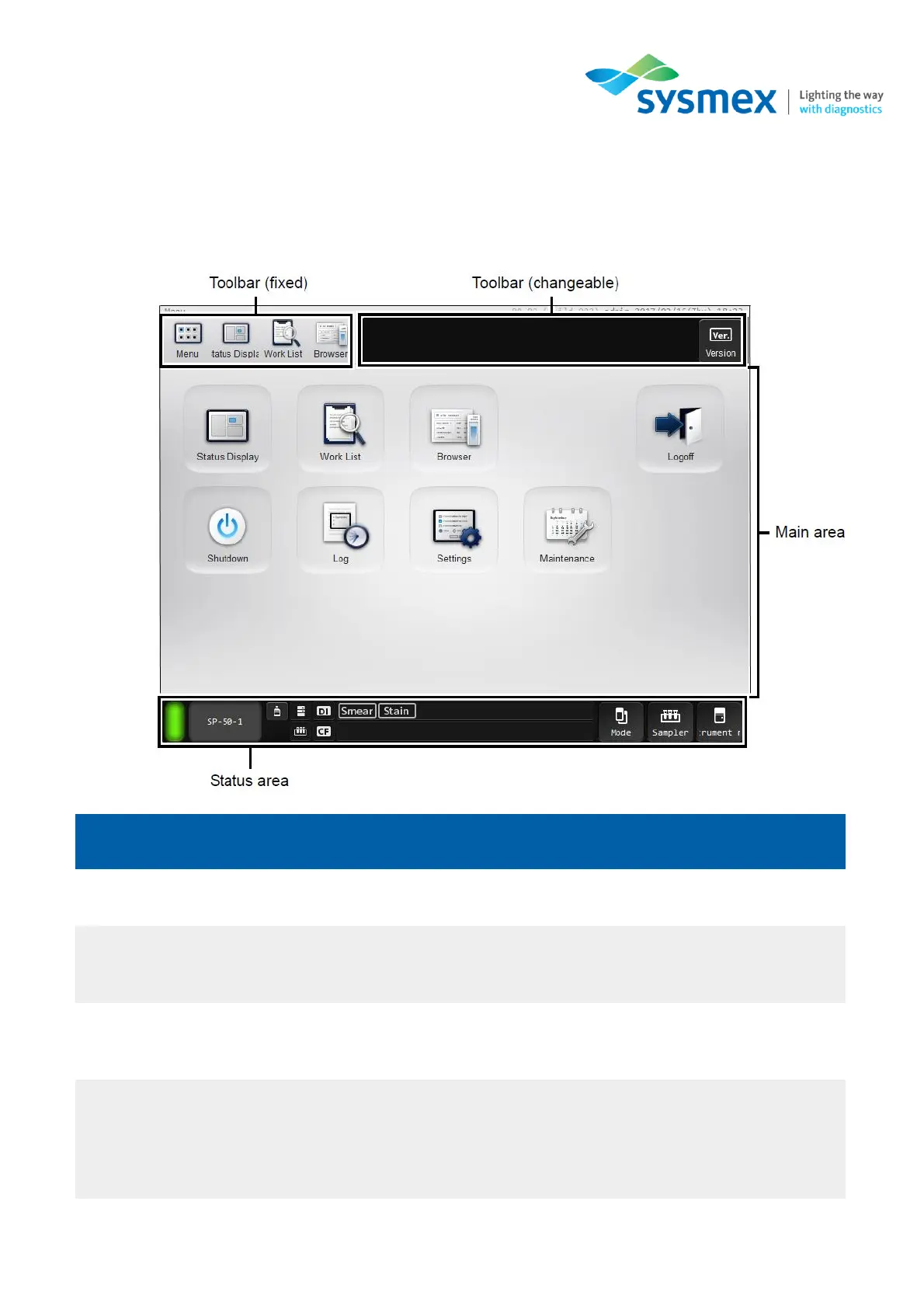
SP-50 – IPU Layout
Main Screen
Area
Function
Toolbar (fixed)
Most frequently used functions are displayed here.
Toolbar (Changeable)
Displays options that can be used in the currently displayed
screen.
Main area
The various options and areas for use within the SP-50 are
displayed here.
Status area
Displays the current status of the instrument. In addition, you
can perform operations such as slide preparation and
maintenance.

Related product manuals