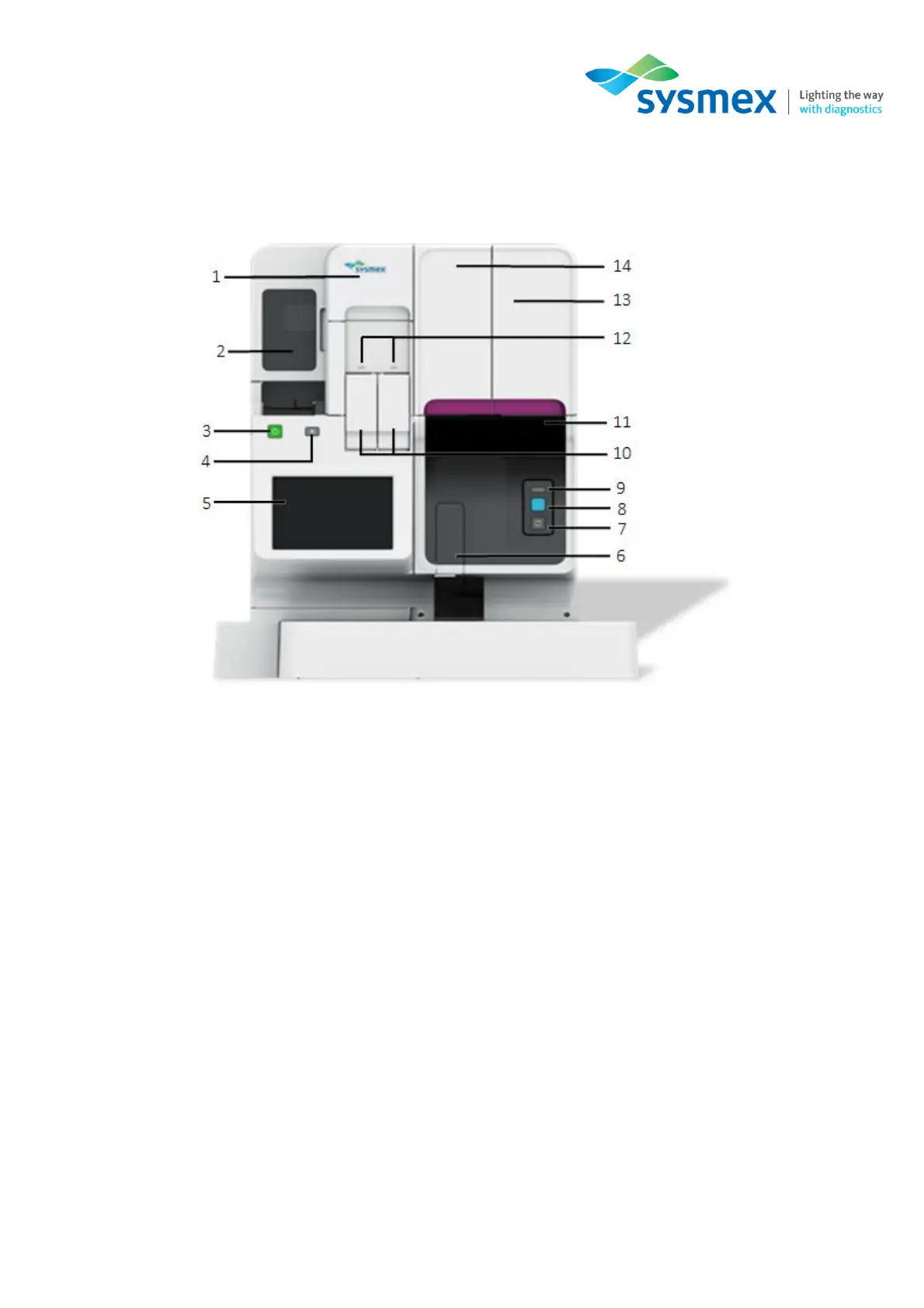
Analyser components – SP-50 Overview
Sysmex House, Garamonde Drive, Wymbush, Milton Keynes, MK8 8DF, United Kingdom · Phone +44 333 320 3460 · Fax +44 1908 267 901
academy.training@sysmex.co.uk· www.sysmex.co.uk
Analyser components
Outside the analyser
1. Main Power Switch Cover – Open this cover to turn the main power switch ON/OFF, and to
regulate the pressures if required.
2. Stain Unit Cover – Open this cover to inspect the interior of the stain unit. Access can be gained
for cleaning or maintenance tasks. Locked during operation.
3. Start-up (Power) Switch – Press to start up the instrument.
4. Eject Switch – Press to eject magazines from the stain unit.
5. IPU Touchscreen – Use to operate the instrument and configure settings.
6. Sample Tube Holder – Used to set samples for manual analysis.
7. Mode Switch – Press to switch between manual analysis and sampler analysis. Pressing it
opens and closes the sample holder.
• When the sample holder is open: Manual preparation
• When the sample holder is closed: Sampler preparation



 To Next Page