Monthly Maintenance – Quick Guide: Maintenance
Sysmex House, Garamonde Drive, Wymbush, Milton Keynes, MK8 8DF, United Kingdom · Phone +44 333 320 3460 · Fax +44 1908 267 901
academy.training@sysmex.co.uk· www.sysmex.co.uk
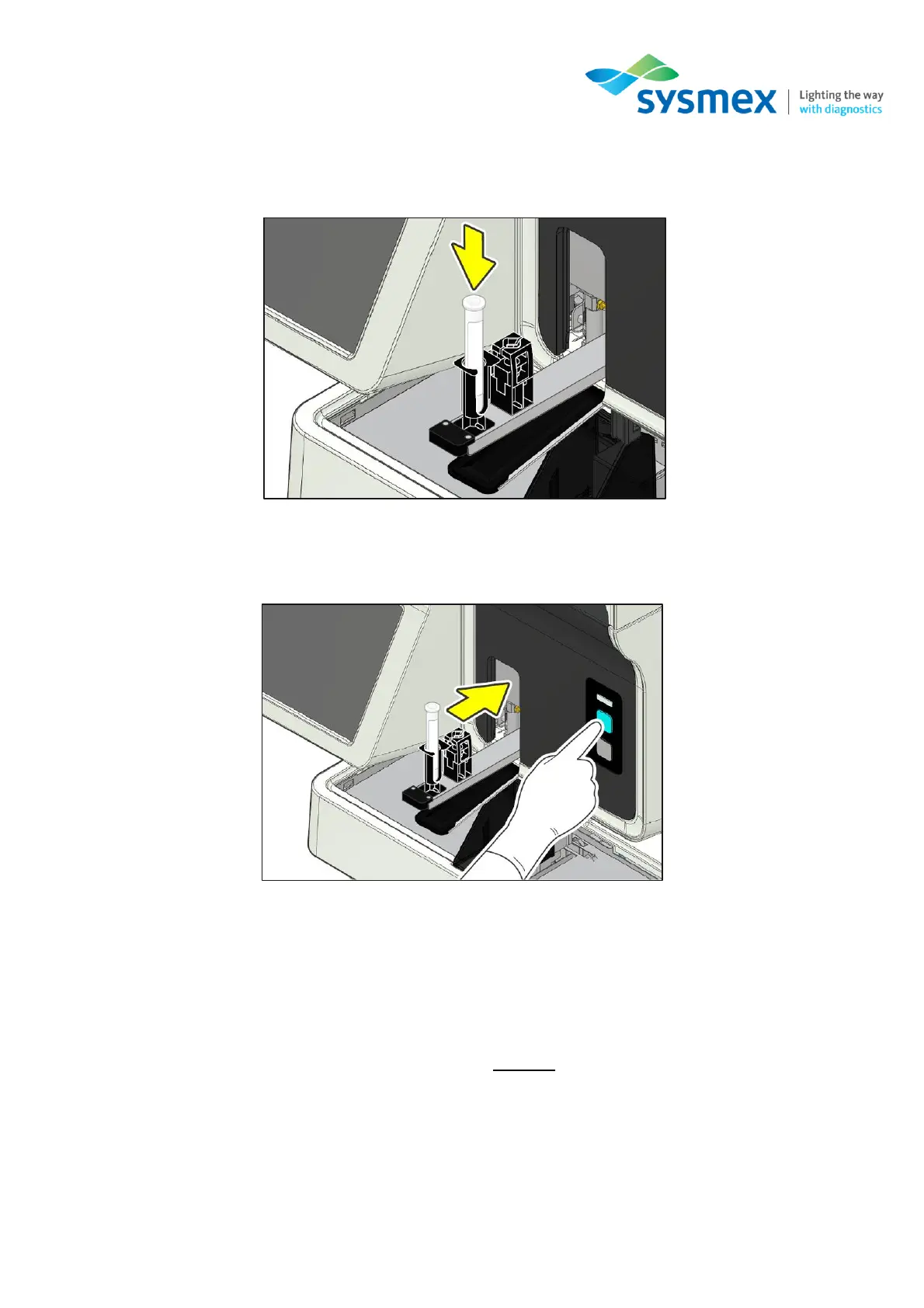
3. Follow the instructions on the IPU - Place 4mL CELLCLEN AUTO into the tube holder (cap
removed).
4. Press the Manual Analysis Start Switch. The sample tube holder retracts into the analyser and
aspiration begins.
5. Shutdown 2 takes approximately 30 minutes depending upon the settings. The sample holder
will eject forward once the CELLCLEAN AUTO aspiration finishes. Remove and discard
CELLCLEAN AUTO tube once the sample holder ejects the empty tube. When all operations
are finished, the sample holder automatically retracts into the main unit and the instrument shuts
down.
6. Turn the instrument main power OFF using the main power switch located at the top of the
instrument. Leave the instrument off for at least 2 hours before performing the start-up.
Note: If the CELLCLEAN AUTO is not removed before shutdown finishes, a notification that a sample
tube remains in the sample holder will appear at the next startup.



 To Next Page