TAC AB, 1998-10-23 0-004-7614-0 (GB), 5:3 (8)
TAC 2413 Handbook Installation
Fastening
device
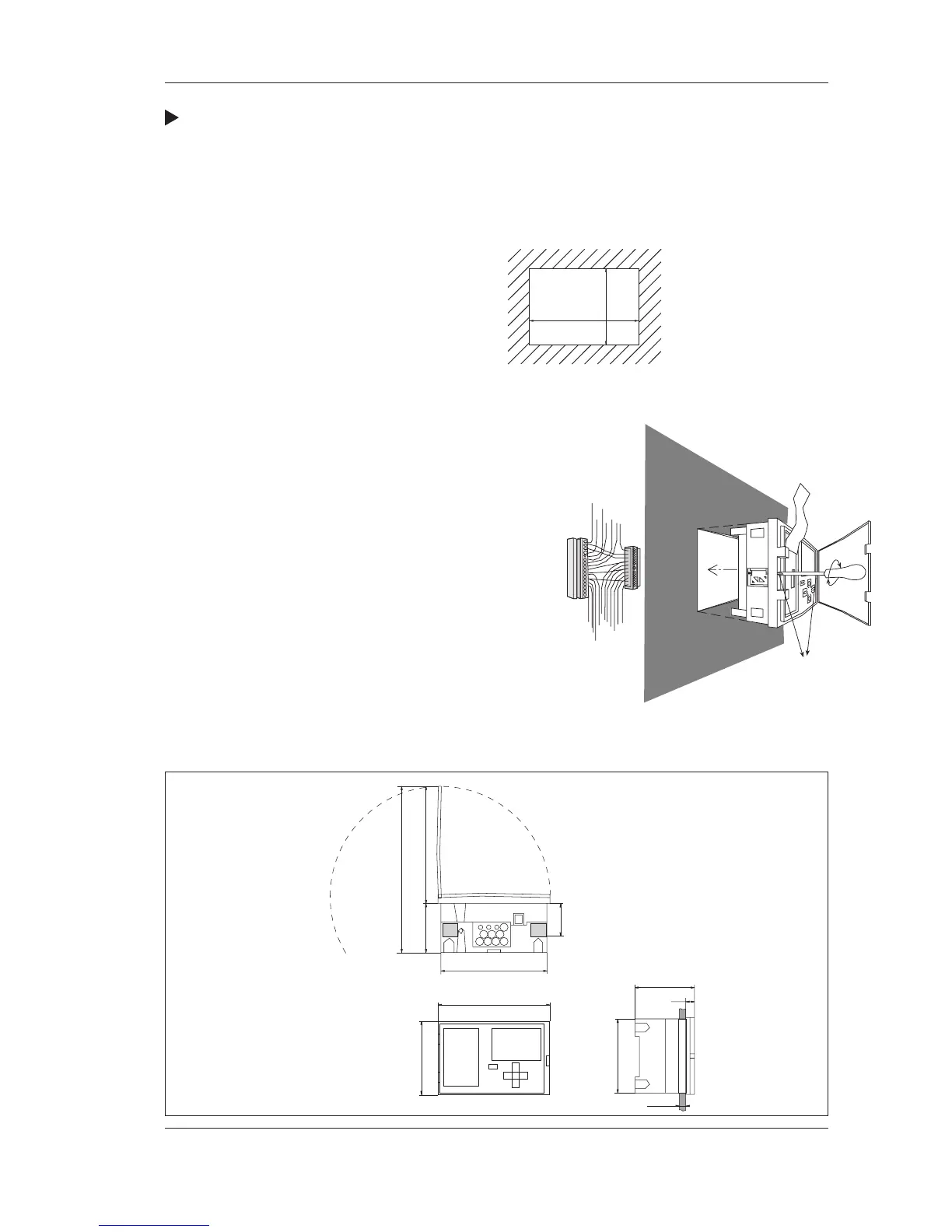
Procedure for mounting controller in a panel:
1 Make an opening in the panel as shown in the adjacent scale
drawing. The maximum panel thickness is 5 mm.
2. Remove the backplate from the electronic part (see above).
Remove the terminal blocks from the backplate.
3. Place the controller in the panel and
lock it in position by tightening the
two locking screws. Seal the holes
using the two gasket sections. It is
not necessary to install the metal
brace when mounting
in a panel.
4. Attach the terminal
blocks to the pins on
the backplate of the
controller. Note that the
terminal blocks are
“coded”, so they cannot
be interchanged.
It is also possible to use the
backplate when mounting the controller
in a panel.
Dimension drawing
20
96
max. 5
91
137
55
76
155
231
96
144
138
92
+1
-0
+0.5
-0
Dimensions in mm



 To Next Page