TAC AB, 1998-10-23 0-004-7614-0 (GB), App:1 (6)
TAC 2413 Handbook Commissioning protocol/List of parameters
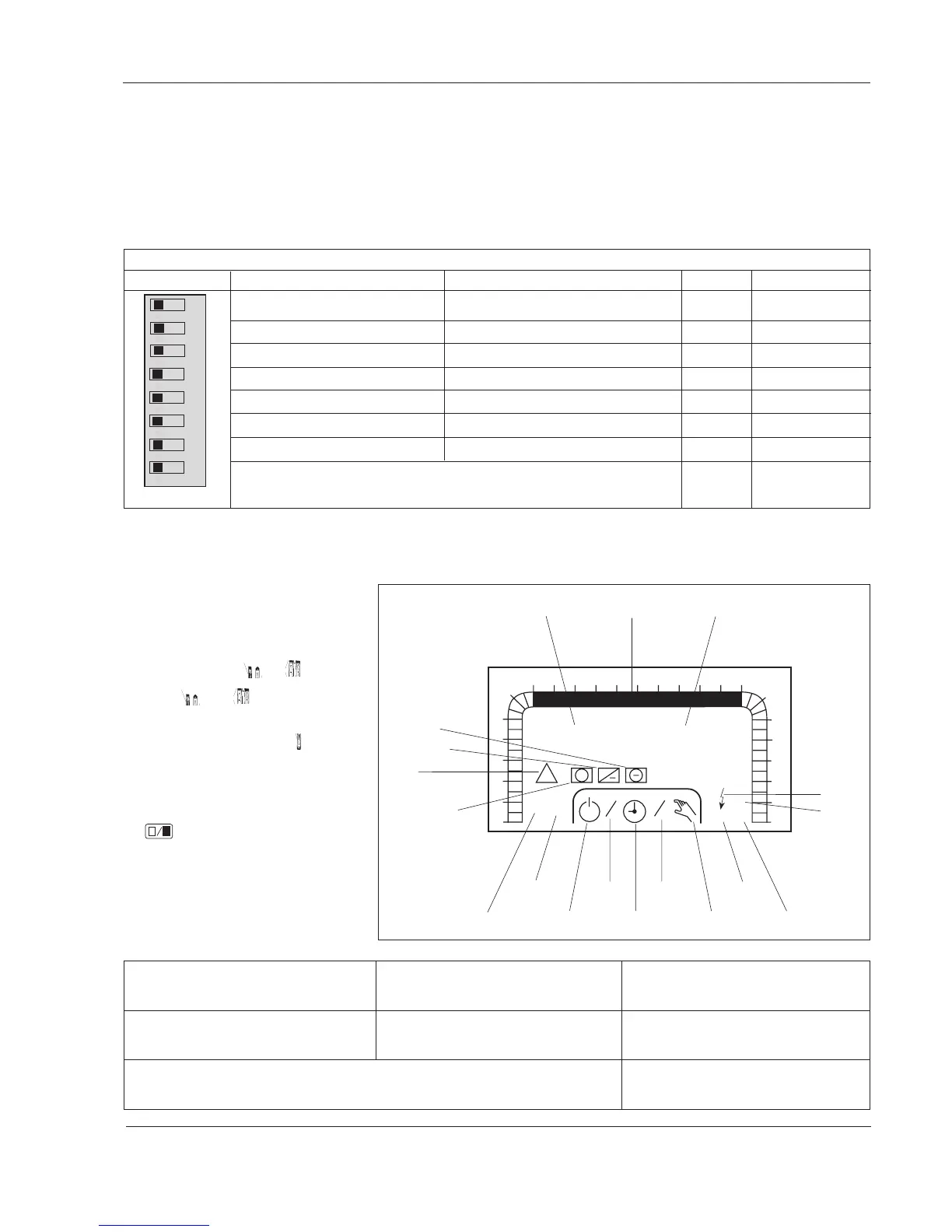
Appendix A: Commissioning protocol/
List of parameters
off on off on Default Change
Supply air control Room/Return air control off
Room control (if 1=on) Return air control (if 1=on) off
HEX Mixed air damper off
HEX at stop = 0% (if 3=off) HEX at stop = 100% (if 3=off) off
Waterborne heating Electric heating off
Waterborne cooling DX cooling (only if 1=on) off
2
–10 V output for heat. and cool. 0–10 V output for heat. and cool. off
Warm start. Resets the hardware, and all the settings except for the date off Switch on
and time are retained. If all settings are to be reset (cold start), see p.13 P--. and off again.
Setting a parameter value
1. Select the parameter number (P
No.) by pressing
or .
2. Press
and at the same
time to get to P 18–P 99.
3. Change the value using
or .
4. Hold the button down for fast
increase/decrease.
5. Confirm by using the enter button
.
This protocol is used during commissioning of the TAC 2413 controller. Note the changed settings in the column labeled “Change”.
This is shown in the display window
1
2
3
4
5
6
78910 121314151617
18
0
23
22
21
20
19
24
TF
TU WE TH FR SA
°C
12:00
P 00
MO
11
1
1
1
2
FF
Dx
Pv
Pk
!
+
+
%
SU
DIP switch
12345678
Parameter number 24 hour time barParameter value
heating coil
supply air fan off timed operation manual pump,
operation cooling coil
return air fan half speed full speed pump,
heating coil
electric
heat
DX cooling
N.B.! If any of the DIP switches is changed when the controller has been put into operation, a cold start should be performed.
Please refer to parameter number P--.
cooling coil
alarm
heat recovery
Date Commissioned by Aggregate designation
Type of controller
Name of the installation
Version of controller Order number
Drawing number



 To Next Page