MONOCHROME LCD CLUSTER PANEL DISPLAY AND LCD SPECIFICATIONS (WITHOUT A CAN)
NORMAL SCREEN
7
6
NORMAL SCREEN 6S3AY00
NORMAL SCREEN
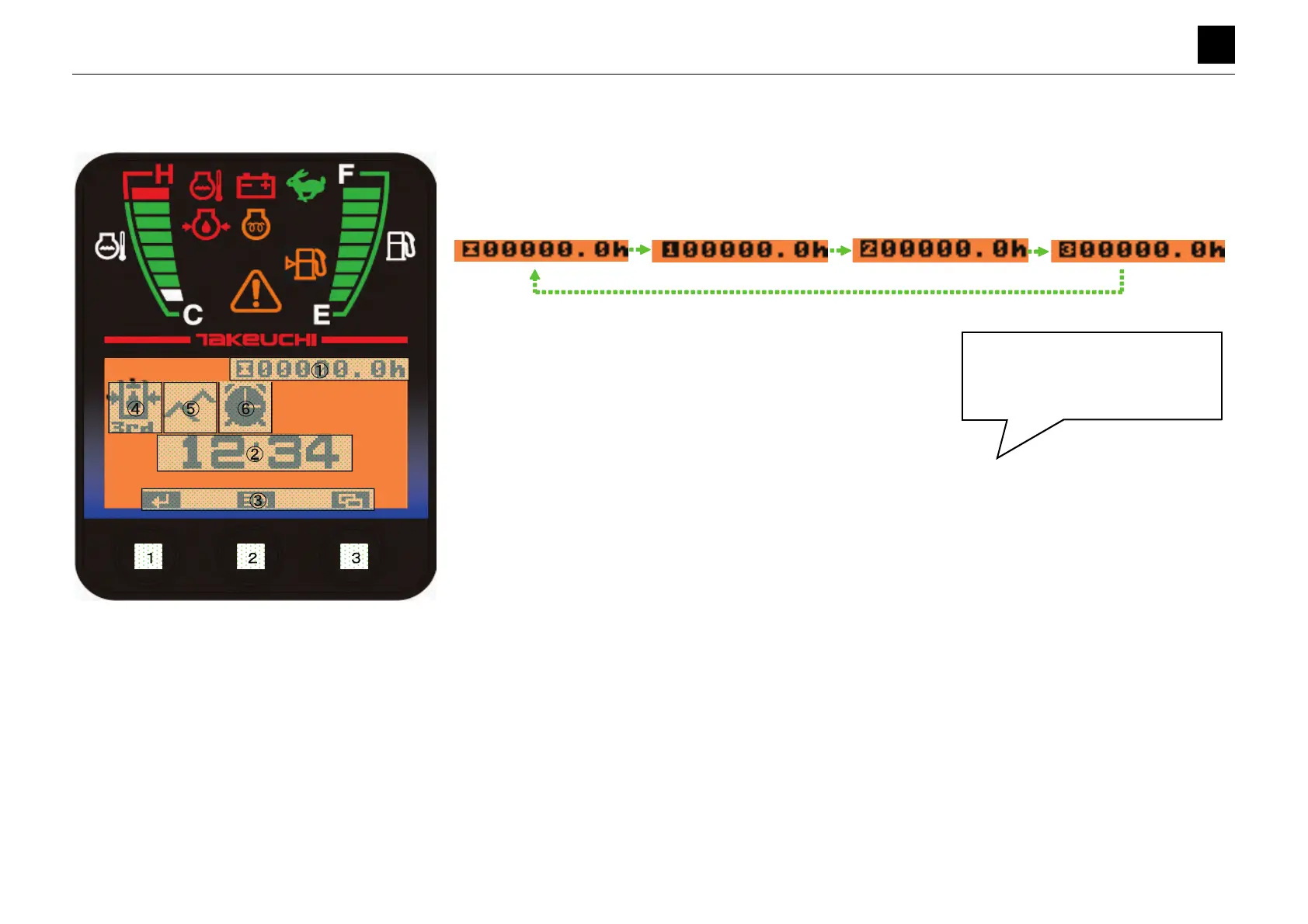
1 Hour meter
• The hour meter begins counting when the input terminal voltages of the alternator and trip meter rise above +3 V.
• Pressing and holding down Button [2] for 2 seconds switches the display to the trip meter.
(Toggles in order of Hour meter to Trip 1 to Trip 2 to Trip 3 to Hour meter.)
• Pressing and holding down Button [3] for 3 seconds resets the trip meter while it is displayed.
* The hour meter displays right after ACC is turned ON.
2 Clock display
• The clock displays as a 24-hour clock.
• Refer to “Setting Screen (Clock)” for details on how to set the time.
3 Switch function display
• The takt switch functions are displayed.
• The display changes on the Normal screen, Setting screen, and Data screen.
• In Normal screen mode: Pressing Button [1] for a short while
⇒ No function, Pressing and holding down Button [1]
for a long time
⇒ No function.
• In Normal screen mode: Pressing Button [2] for a short while
⇒ Turns on the work light, Pressing and holding down
Button [2] for 2 seconds
⇒ Toggles the display to the trip meter.
• In Normal screen mode: Pressing Button [3] for a short while
⇒ Moves the display to the Main menu, Pressing and
holding down Button [3] for 3 seconds
⇒ Resets the trip meter.
4 3rd S pressure warning light
• The pressure switch turns OFF, and the icon displays when the 3rd S pressure drops (The switch turns ON and the
icon OFF when the pressure goes up.)
5 High-altitude mode light
• The icon displays when the high-altitude switch is turned ON.
6 Alarm light
• The icon displays while the alarm function is turned ON.
• Refer to “Setting Screen (Alarm)” for details on how to set the alarm.
• A buzzer sounds for 30 s while the alarm is ON (During the first 15 s, the buzzer turns on and off repeatedly for 0.5 s
each way; during the last 15 s, it turns on and off repeatedly for 0.3 s each way.
• The icon flashes (ON for 0.5 s, OFF for 0.5 s, and so on) while the buzzer is sounding.
• Pressing Button [1] for a short amount of time while the alarm is ON stops the buzzer.
The work light toggles between ON
and OFF with each quick press of
Button [2]. The light relay also tog-
gles ON/OFF at this time.



 To Next Page
 Loading...