MONOCHROME LCD CLUSTER PANEL DISPLAY AND LCD SPECIFICATIONS (WITHOUT A CAN)
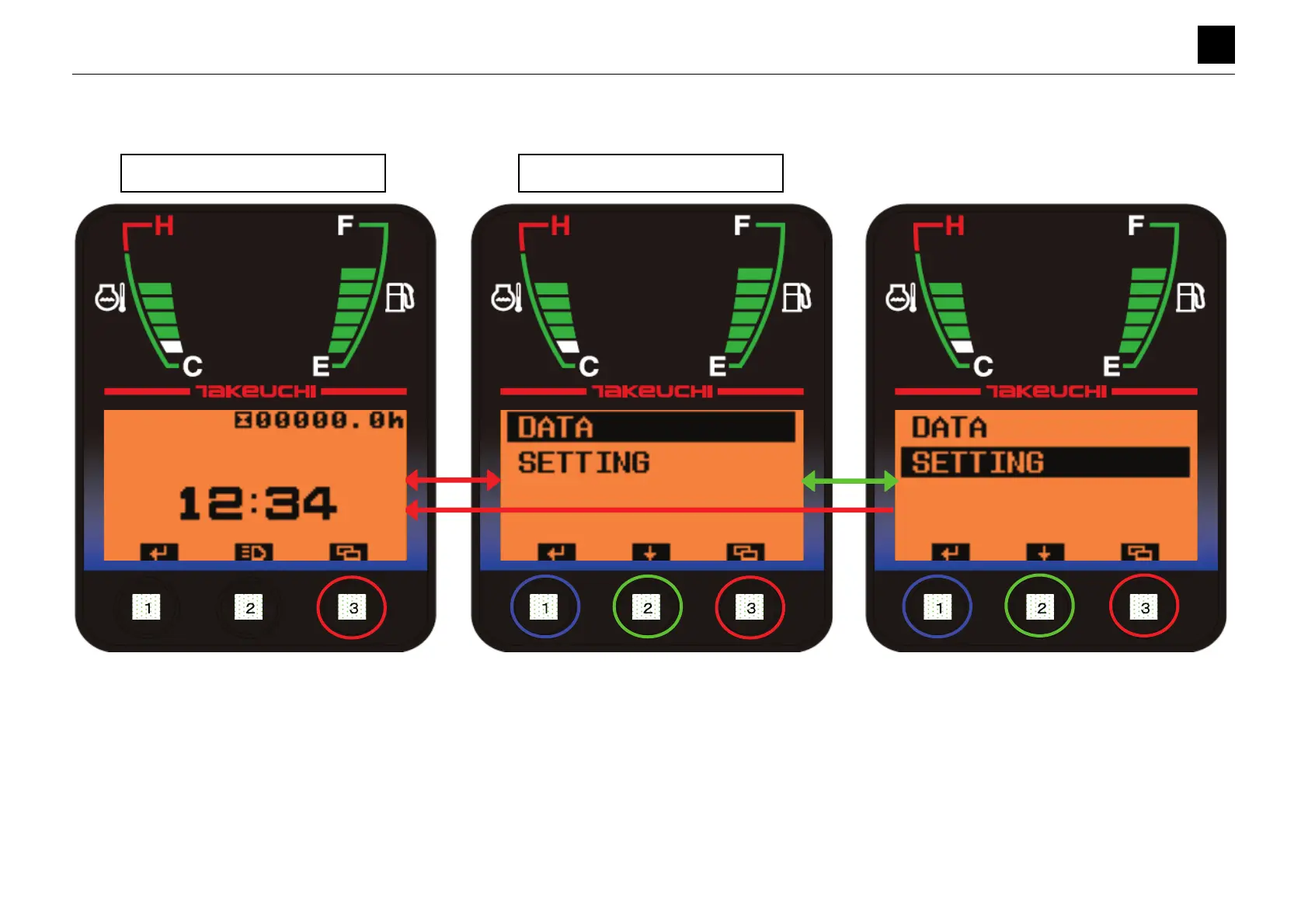
MAIN MENU SCREEN
6
8
MAIN MENU SCREEN 6S3AY00
MAIN MENU SCREEN
• Pressing Button [3] on the Normal screen for a short while moves the display to the Main Menu screen.
• Pressing Button [3] on the Main Menu screen for a short while moves the display to the Normal screen.
• Pressing Button [2] on the Main Menu screen for a short while moves the bar to the next option.
• Pressing Button [1] while [DATA] is highlighted moves the display to the Data Selection screen.
• Pressing Button [1] while [SETTING] is highlighted moves the display to the Settings Selection screen.
Normal Screen
Main Menu Screen



 To Next Page
 Loading...