48
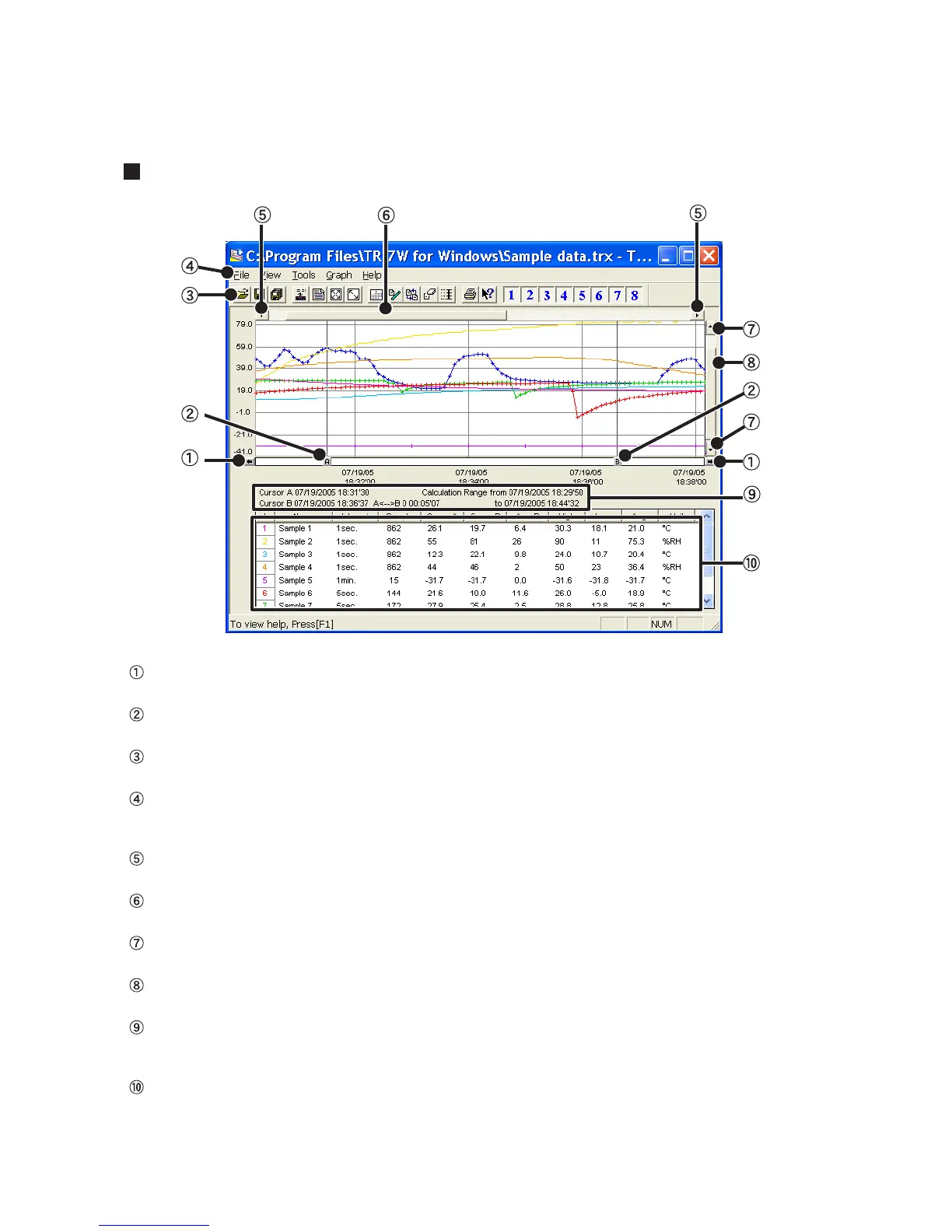
Temperature / Humidity Graph Display Names and Functions
A and B Cursor Movement Buttons
By clicking the arrow buttons, you can simultaneously move the A/B cursors.
A and B Cursor Buttons
Click and drag the A or B button to move the cursor to the left or right.
Toolbar
Buttons appear for frequently used commands.
Menu Bar
Click on the desired menu in the Menu Bar to set or display each function from which you can choose from an array of
commands.
Button for Moving Horizontal Axis
The time axis moves by clicking these arrow buttons.
Horizontal Gauge Bar
By dragging the gauge you can move left and right to the data you want to be displayed.
Button for Moving Vertical Axis
The vertical axis moves up or down by clicking these arrow buttons.
Vertical Gauge Bar
By dragging the gauge you can move up and down to the data you want to be displayed.
A and B Cursor Position Information
The approximate date and time for the A and B cursor positions and the time difference between the A cursor and the
B cursor is displayed.
Channel Info List Display
The detailed data info for each channel 1 to 8 is displayed below the Graph Display.



 To Next Page