54
Reordering Channel Data: [Tools] Menu
You can re-order the data during graph display.
There are two methods to use when re-ordering channels : [Re-order by Dragging a
Channel Number] and [Specify the Channel Numbers to be Moved].
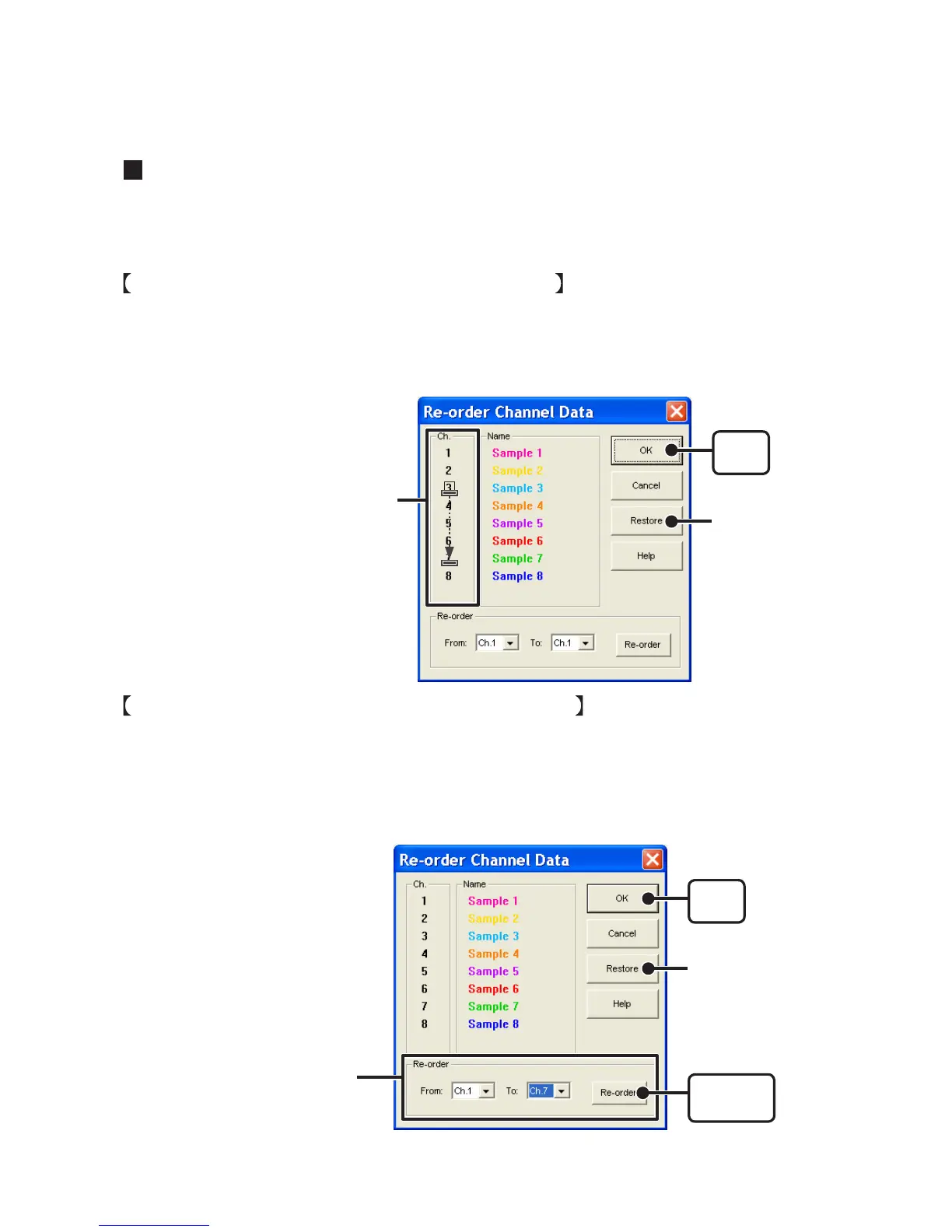
Re-order by Dragging a Channel Number
Drag the channel number you wish to move to the newly desired channel number position and
drop it.
- The [Restore] button is only effective while making changes. After clicking the [OK] button the settings
cannot be restored to the original settings.
[OK]
button
[Restore]
button
Drag the channel number you wish
to move to the desired position.
Specify the Channel Numbers to be Moved
1. Specify the channels to be moved From : (original position) To : (desired position).
2. Click [Re-order] button to complete the re-ordering process.
The [Restore] button is only effective while making changes. After clicking the [OK]
button the settings cannot be restored to the original settings.
If you wish to move Ch.3 to Ch.7
simply set From: Ch.3, To: Ch.7
[
OK
]
button
[Restore]
button
[Re-order]
button



 To Next Page