72
Adjustment Function
By entering the adjustment values beforehand, it is possible to view and
record the adjusted measurement values. There are two methods of
adjustment: adjusting by one point or adjusting by two points. Adjustment for
differences will be based upon the following simple equation Y=aX+b. (X
equals the measured value and Y equals the value after adjustment.)
NOTE:
- Adjustment settings cannot be made while a recording is in session. Please make settings after having
stopped recording.
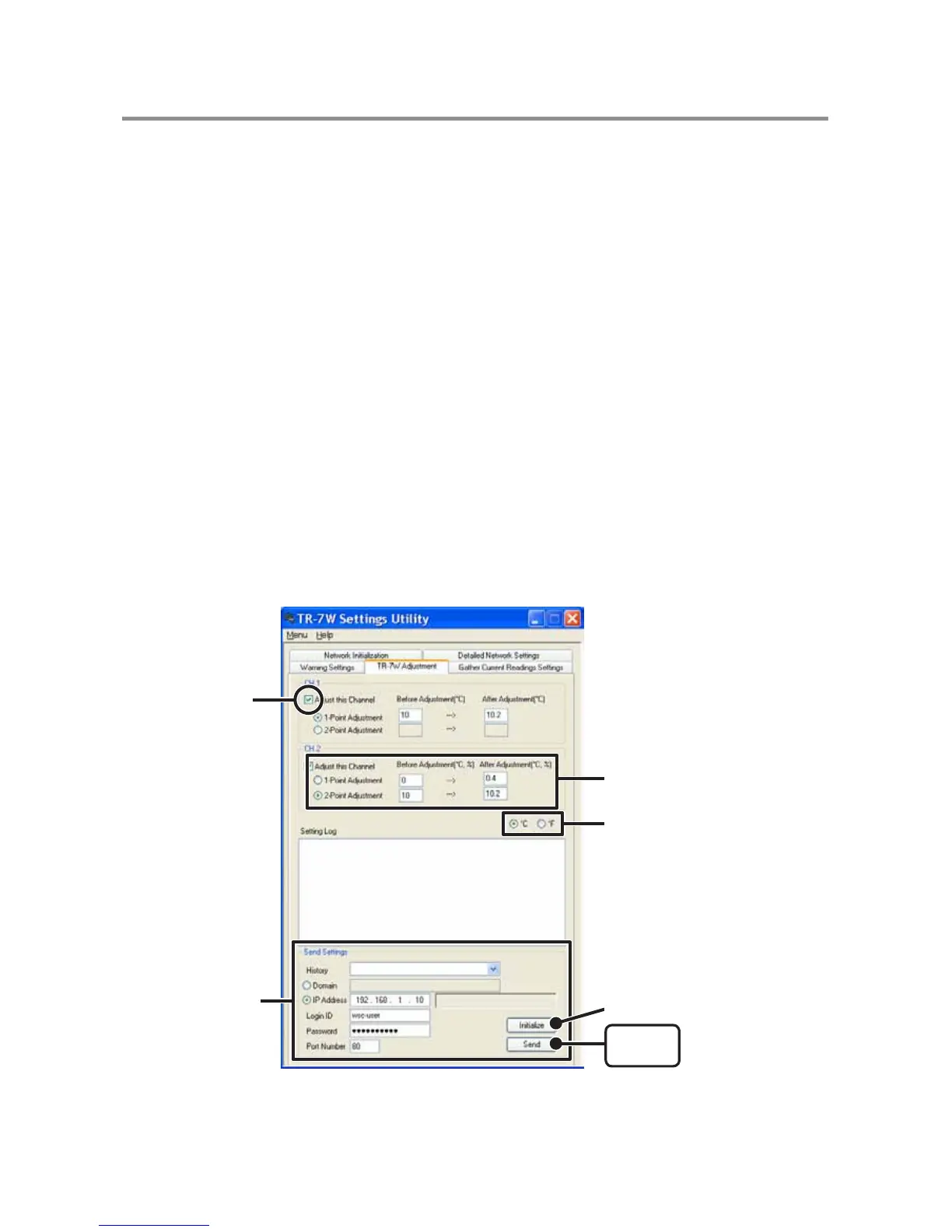
1. Check the channel you wish to adjust.
2. Check either "1-Point Adjustment" or "2-Point Adjustment" and
enter the adjustment values.
NOTE:
- When adjusting at 2 points, make sure the difference in points is at least 10°C.
- When measuring in a wide range and adjusting at 2 points, make sure that the adjustment values reflect
the range you are measuring.
- We cannot guarantee that after carrying out adjustment the measuring accuracy will improve for all
measuring ranges.
Enter the Recipient
Info for the settings.
Check here
Select the method of adjustment
and enter the values.
[Send]
button
[Initialize] button
Select Celsius or Fahrenheit.



 To Next Page