Maintenance, Service, and Repair
Steering Components
Page 5
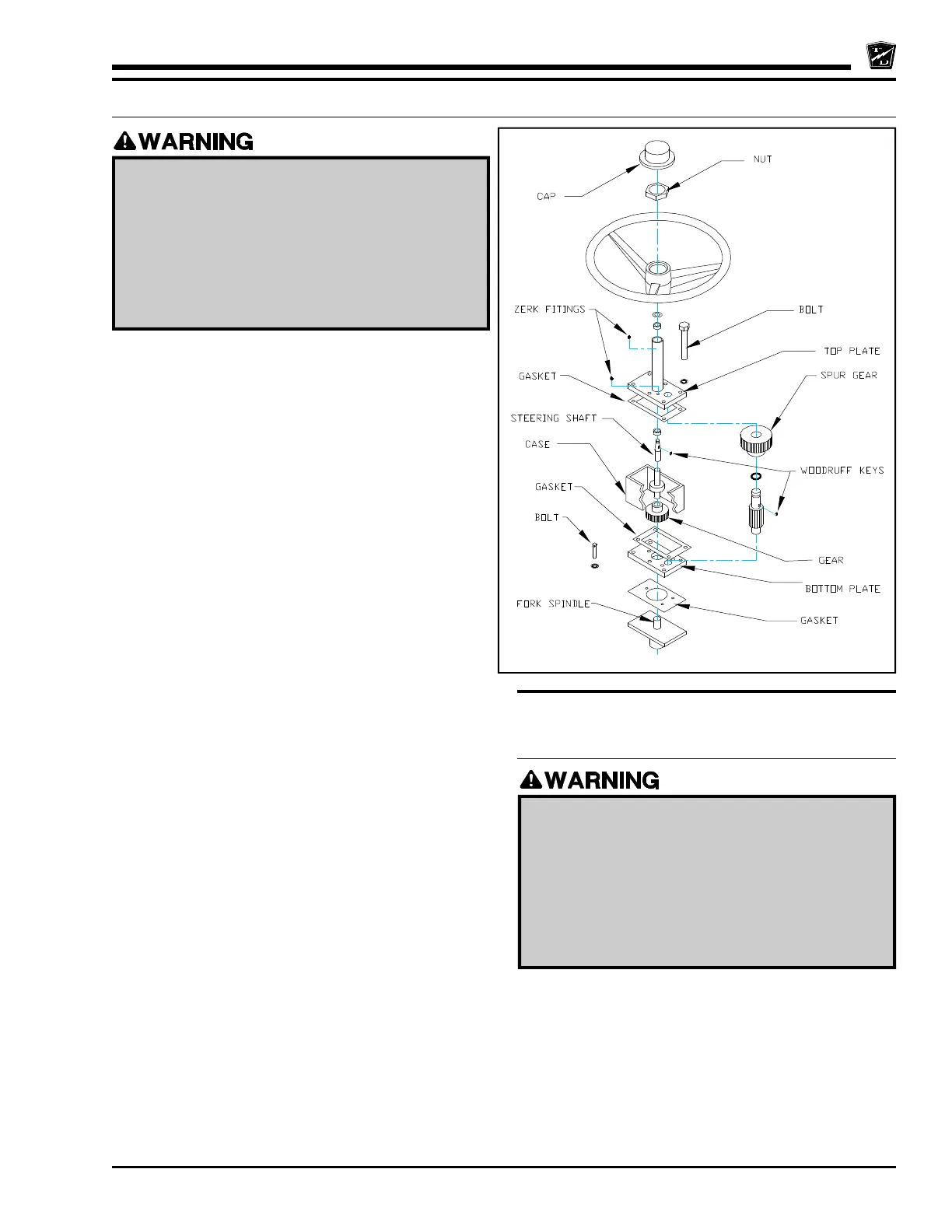
REPLACE THE STEERING GEAR, SS-534
REPLACE THE STEERING
GEAR, SS-536, 546, MX-600
6. Remove the four frame to gear box mounting bolts from
the bottom of the gear and remove the entire gear
assembly from the vehicle.
7. The fork spindle gear will remain on the spindle shaft. A
gear puller may be required to pull the gear off of the
shaft.
6. Remove the steering wheel.
7. Remove the 6 bolts from the top cover.
8. Lift the top cover off the gear box, discarding the gasket.
9. Remove the gear case.
10. Remove the fork spindle gear.
11. Remove and discard the lower gasket.
12. Remove the 3 remaining bolts from the bottom of the
gear box.
13. Thoroughly Clean and inspect all parts.
14. Using new gaskets, reassemble in reverse order.
15. Fill the gear box with grease.
Note: A minor amount of gear lash adjustment can be
accomplished by repositioning the upper and
lower plates. Loosen the mounting bolts so that
they are snug. Lightly tap the upper and/or lower
plate to adjust the gear lash then retighten the
bolts.
SS-534 Steering Gear
Assembly
1. Make sure the start switch is in the “OFF”
position, then remove the key.
2. Place the forward-reverse switch in the center
“OFF” position.
3. Set the park brake.
4. Place blocks under the front wheels to prevent
vehicle movement.
5. Disconnect the battery.
1. Make sure the start switch is in the “OFF”
position, then remove the key.
2. Place the forward-reverse switch in the center
“OFF” position.
3. Set the park brake.
4. Place blocks under the front wheels to prevent
vehicle movement.
5. Disconnect the battery.



 To Next Page