Curtis PMC Troubleshooting
Page 18
STOP
Stop, do not continue. If you reached this point without a solution, then you may have an
unanticipated problem or have made an error during testing. It is important to review the
trouble shooting steps that have led to this point. The tests may need to be repeated.
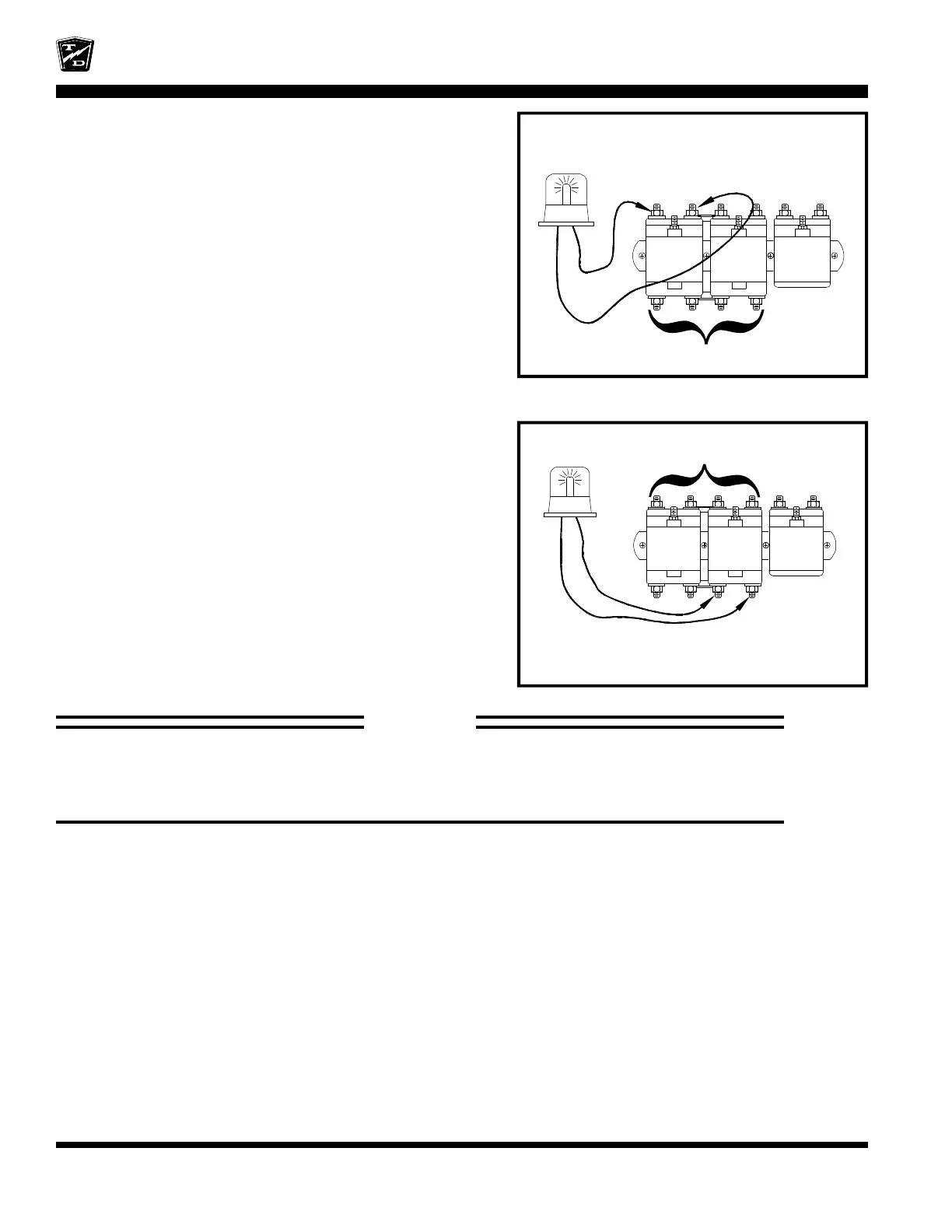
Solenoids are shown for reference only.
The type and position of the forward
solenoid in your truck may be different
FWD/REV
Solenoids are shown for reference only.
The type and position of the reverse
solenoid in your truck may be different
FWD/REV
Set the test light voltage to the same voltage as the battery
volts.
Connect the test light across the Normally Open contacts
of the Forward solenoid. Refer to your vehicles wiring
diagram to identify the position of the forward solenoid.
Close all interlock switches, turn the Key Switch
ON, and place the F&R Switch in forward.
Depress the accelerator pedal fully.
•
If the light comes on then the Forward solenoid
has failed. Stop trouble shooting here and repair
the problem. When the repair is completed,
completely retest the vehicle before lowering the
drive wheels to the ground.
Set the test light voltage to the same voltage as the battery
volts.
Connect the test light across the Normally Closed contacts
of the Reverse solenoid. Refer to your vehicles wiring
diagram to identify the position of the Reverse solenoid.
Close all interlock switches, turn the Key Switch ON,
and place the F&R Switch in Forward.
Depress the accelerator pedal fully.
•
If the light comes on then the Reverse solenoid has
failed. Stop trouble shooting here and repair the
problem. When the repair is completed, completely
retest the vehicle before lowering the drive wheels
to the ground.







 To Next Page