To maintain the isolation of power supply and prevent ground loops, use an
isolated programming source when operating the power supply via remote
analog programming at J1 connector.
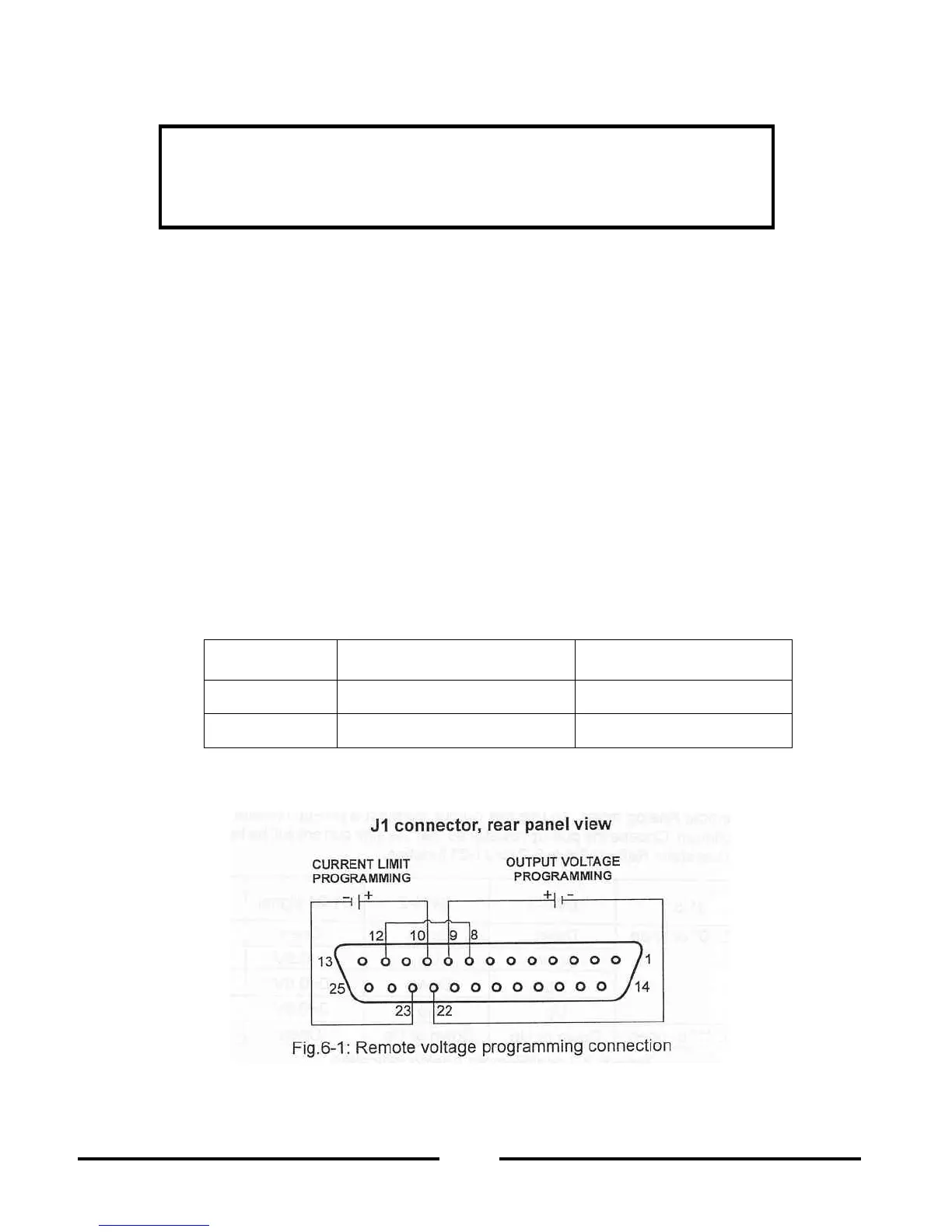
6.4 REMOTE VOLTAGE PROGRAMMING OF OUTPUT VOLTAGE AND CURRENT LIMIT
Perform the following procedure to set the power supply to R
emote Voltage programming:
Turn the power supply switch to Off.
et setup switch SW1 position 1 and 2 to their UP position.
Set SW1 position 3 to select programming voltage range according to Table 6
Ensure that SW1 positions 3 to select programming vol
tage range according to Table 6
Connect a short between J1
Connect the programming source to the mating plug of J1 as shown in Fig.6
correct polarity for the voltage source.
Set the programming sources to the
desired levels and turn the power supply ON. Adjust
the programming sources to change the power supply output.
SW1 positions, 4, 5, 6 and 9 are not required for remote programming. Their setting can be
termined according the application.
trol circuits allow the user to set the output voltage and current limit up to 5% over
rated maximum value. The power supply will operate within the extended range,
however it is not recommended to operate the power supply over its voltage and cu
ing and performance is not guaranteed.
3 setting and programming range













 To Next Page