21
8303460000 Rev A IA672-04-01-Rev. I
6.4. Logging In
To change power supply output or the LAN settings, a user must first log in.
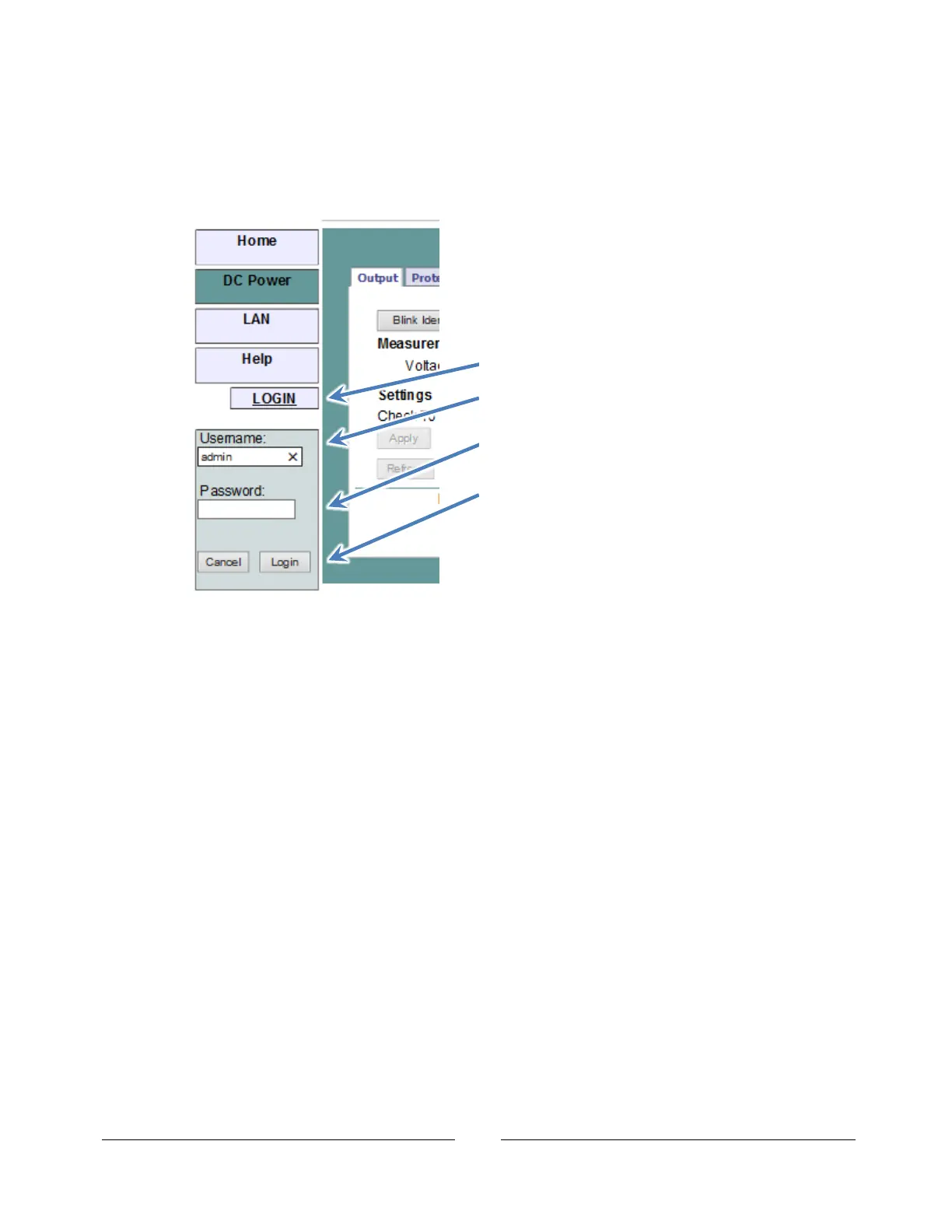
When the DC Power tab or LAN tab (on the left side of the web page) are clicked, a login
box will appear:
The password may be set or removed on the LAN Users web page.
A front panel LAN Reset will clear the password (see section 5.3).
6.4.1. Login Rules
Up to four users may view the web pages of a power supply at the same time.
However, the update rate becomes slower as more web pages are opened.
Only one user at a time may be logged-in to modify the power supply settings.
If an automation program with VISA or socket connection is running, then you may
view the web pages but you cannot login to change any settings.
If a user is logged in, then a VISA or socket connection cannot be opened by an
automation program.
A user may logout by clicking the “Logout” button, by closing the web browser or by
leaving the web browser idle for “LAN Keep-alive” seconds (see section 6.6.3).
1. Click LOGIN button.
2. Enter the user name, “admin”.
(this is the only acceptable name)
3. Enter the password.
The default is blank.
4. Click the “Login” button














 To Next Page