22
8303460000 Rev A IA672-04-01-Rev. I
6.5. DC Power Page
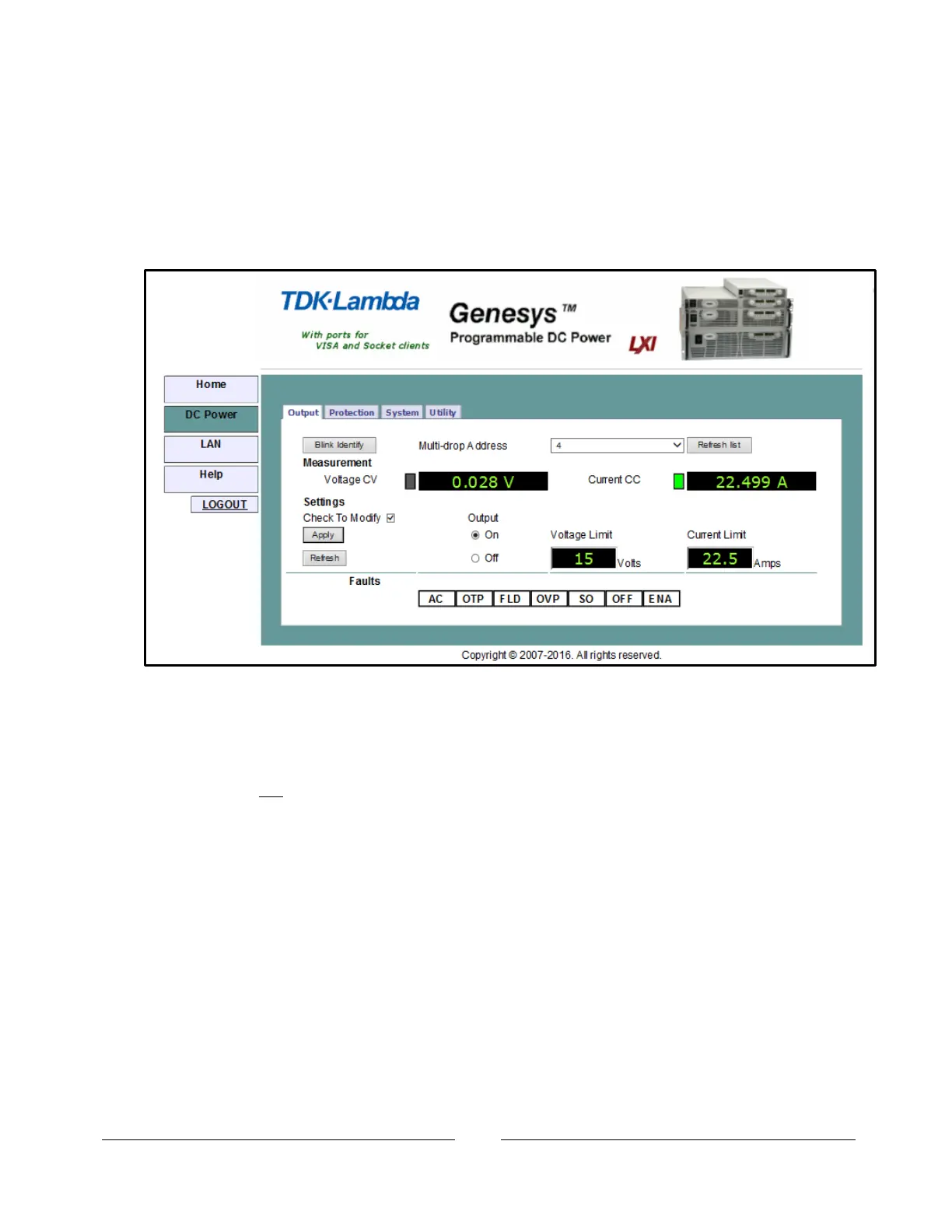
When the “DC Power” tab is clicked, the following web page opens. This page, and its
sub-menus, allow you to operate the power supply and adjust its output settings
6.5.1. DC Power Output Page
When the “DC Power” tab is selected, the “Output” soft front panel (GUI) loads first.
Blink Identify: When this button is clicked, the power supply front panel blinks and the
rear panel LAN LED blinks. This function allows you to quickly identify which power
supply is being communicated to in a rack of instruments.
In a multi-drop chain, only the master LAN power supply will blink.
You do not have to log in as ‘admin’ to use this control.
Blinking may be stopped by: clicking on the button again, touching any front panel
button or knob, or sending the SYST:COMM:LAN:IDLED OFF command (section 11.6.1).
Multi-drop Address: This address is described in section 12.2.2. This address, 0 to
30, Allows you to select one supply in a chain of RS-485 multi-drop supplies. If there
is no multi-drop supplies, only the address from the single LAN supply is available
Refresh List: When this button is clicked, the web page will scan to find connected
multi-drop power supplies and put the discovered addresses into the listbox. This
button only applies to a multi-drop chain as described in section 12.
Measurement: These indicators show the selected power supply’s actual voltage and
current and the operating mode (constant-voltage or constant-current or off).














 To Next Page