48
4.5 Navigating the Main Menu
4.5.1 Introduction
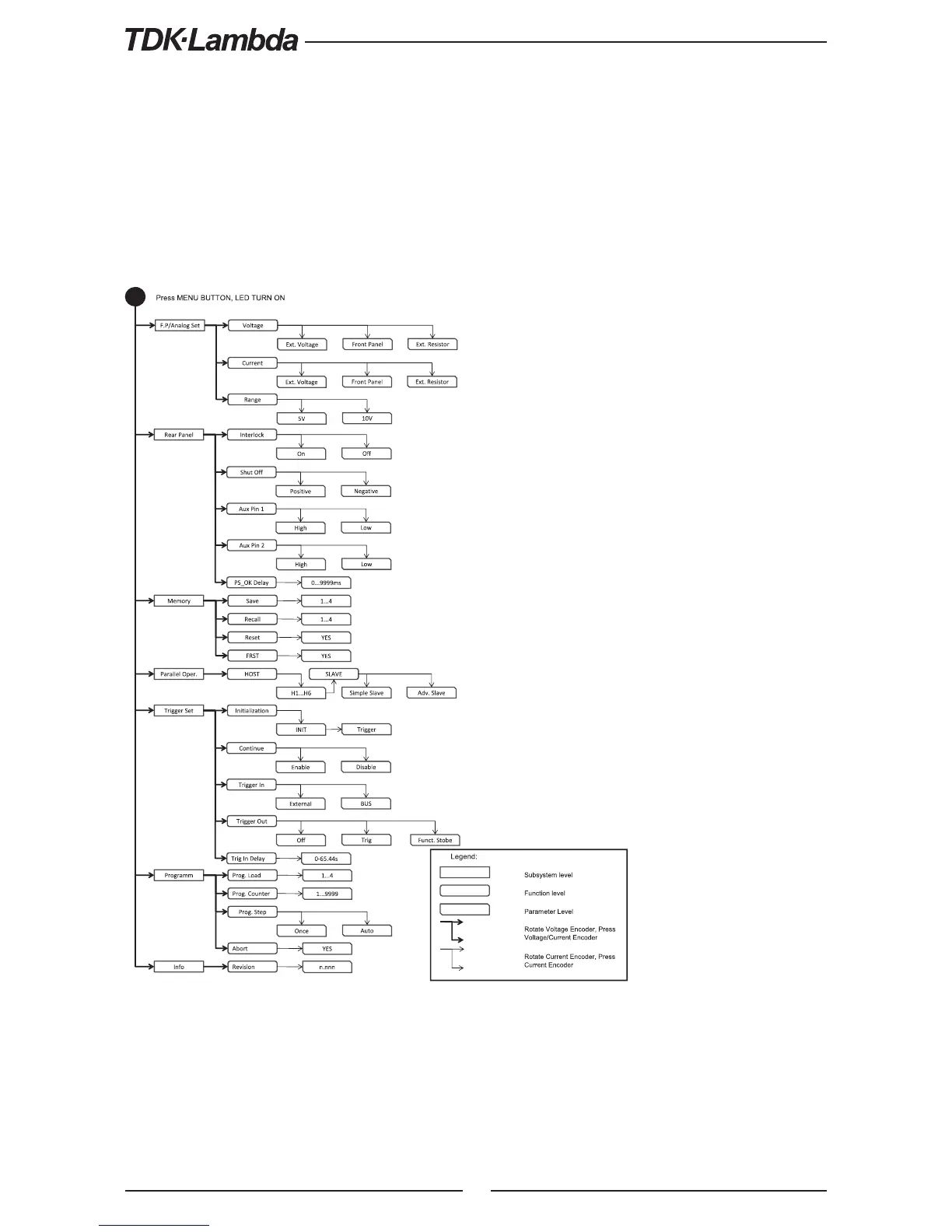
The Main Menu consists of three levels: Subsystem, Function and Parameter. To enter the Menu
press the Menu button. The Menu LED illuminates and the display shows the Subsystem Menu.
Navigate by rotating the Voltage Encoder to scroll through the Subsystem list (first level). Repeat
these actions to navigate the Functions list (second level). In the third level, the Voltage display
shows the function and the Current display shows the parameter. Scroll the parameter list by
rotating the Current Encoder and press to select the desired parameter. When parameter is
accepted, the display blinks once and exits to the previous level.
Fig.4-5: Main Menu diagram
4.5.2 Exiting the Main Menu
There are three ways to exit from Main Menu:
1. Press MENU button three times. MENU LED turns OFF. Display shows present status of
power supply.
2. Press and hold MENU button 3sec. MENU LED turns OFF. Display shows present status
of power supply.
3. No action for 15 sec. MENU LED turns OFF. Display shows present status of power supply.











 To Next Page