116
8.6.2 Wave Execution via Communication PC
1. Load stored data Insert communication command ( Example: WAVE:LOAD 2 )
2. Set COUNTER (How many times program will be repeated if STEP in AUTO mode).
Insert communication command ( Example: WAVE:COUN 2 )
3. Set Trigger IN source (BUS for Command or Front Panel and EXT via Rear Panel J3-8 pin)
Insert communication command (Example: TRIG:SOUR BUS)
4. Set Trigger Initialize Continue mode ( If 1 then after program execution power supply will
be ready for next trigger. If 0 then send INIT command to get to the next trigger. Insert
communication command (Example: INIT:CONT 1)
5. Send INIT command. (Power supply ready for TRIGGER). Insert communication command
(Example: INIT).
6. Send *TRG command or press Current Encoder.
8.6.3 Wave Execution via Front Panel
1. Load stored data MENU -> “ROG” -> “OAD” -> 2
2. Set Trigger IN source ( BUS for Command or Front Panel and EXT via Rear Panel J3.2 pin)
MENU -> “T Ri G ” -> “TR
.
i” -> “BS”
3. Set Trigger Initialize Continue mode (If 1 then after program execution power supply will be
ready for the next trigger. If 0 then send INIT command MENU -> “T ri G ” -> “CONT” -> “ENA” to
get to the next trigger.
4. Set INIT command. (Power supply ready for TRIGGER) MENU -> “T Ri G ” -> “IN IT” -> “IN IT”
5. Exit from MENU and Press Current Encoder to trigger.
8.7 Additional Examples
8.7.1 List Example
TRIG:SOUR BUS Select trigger source external analog signal
0
2
4
6
8
10
0
1 2 3 4 5
Times [S]
Voltage [V]
VOLT:MODE LIST Select sequence mode "LIST"
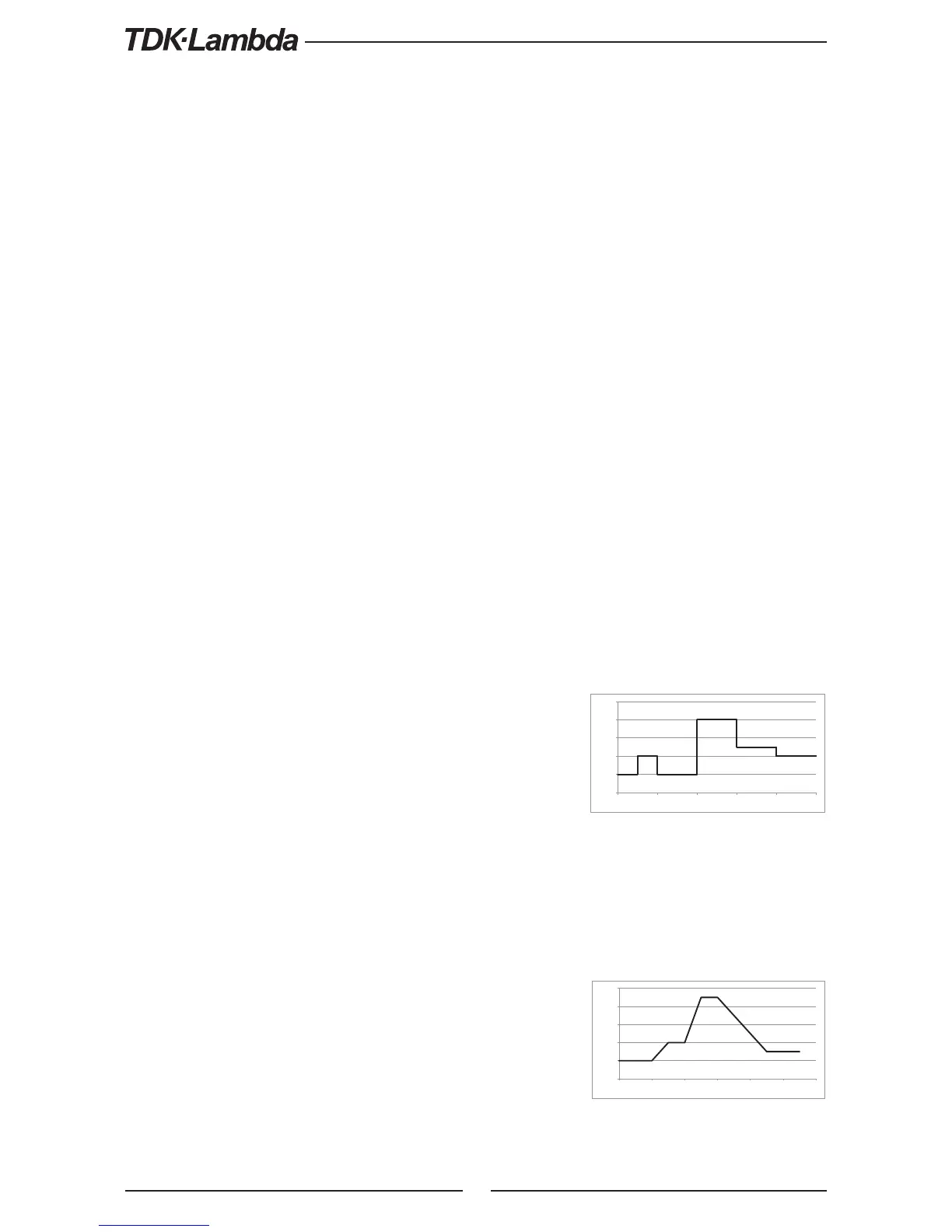
LIST:VOLT 2,4,2,8,5,4 Set voltage values "2,4,2,8,5,4" Volts
LIST:DWEL 0.5,0.5,1,1,1,1 Set dwell values "0.5,0.5,1,1,1,1" seconds
LIST:COUN 1 Set list execution time "1"
LIST:STEP AUTO Set step execution mode "AUTO"
INIT:CONT OFF Trigger subsystem enabled for a single
trigger action
INIT Trigger initializing
*TRG Trigger command
8.7.2 Waveform Example
TRIG:SOUR BUS Select trigger source via communication
interface or front panel
0
2
4
6
8
10
0 1 2 3 4 5 6
Times [S]
Voltage [V]
VOLT:MODE WAVE Select sequence mode "WAVE"
WAVE:VOLT 2,2,4,4,9,9,3,3 Set voltage values "2,2,4,4,9,9,3,3" Volts
WAVE:TIME 0,1,0.5,1,0.5,0.5,1.5,1 Set time values "0,1,0.5,1,0.5,0.5,1.5,1"
seconds
WAVE:COUN 2 Set wave execution time "2"
WAVE:STEP AUTO Set step execution mode "AUTO"
INIT:CONT ON Trigger system is continuously enabled
INIT Trigger initializing
*TRG Trigger command











 To Next Page