EasyManua.ls Logo

TDS TV - Remote Control

Default Icon
59 pages
Print Icon
To Next Page IconTo Next Page
To Previous Page IconTo Previous Page
Loading...
10
Questions? Call 1-866-44-TDSTV or visit tdstv.com.
TDS Logo’d
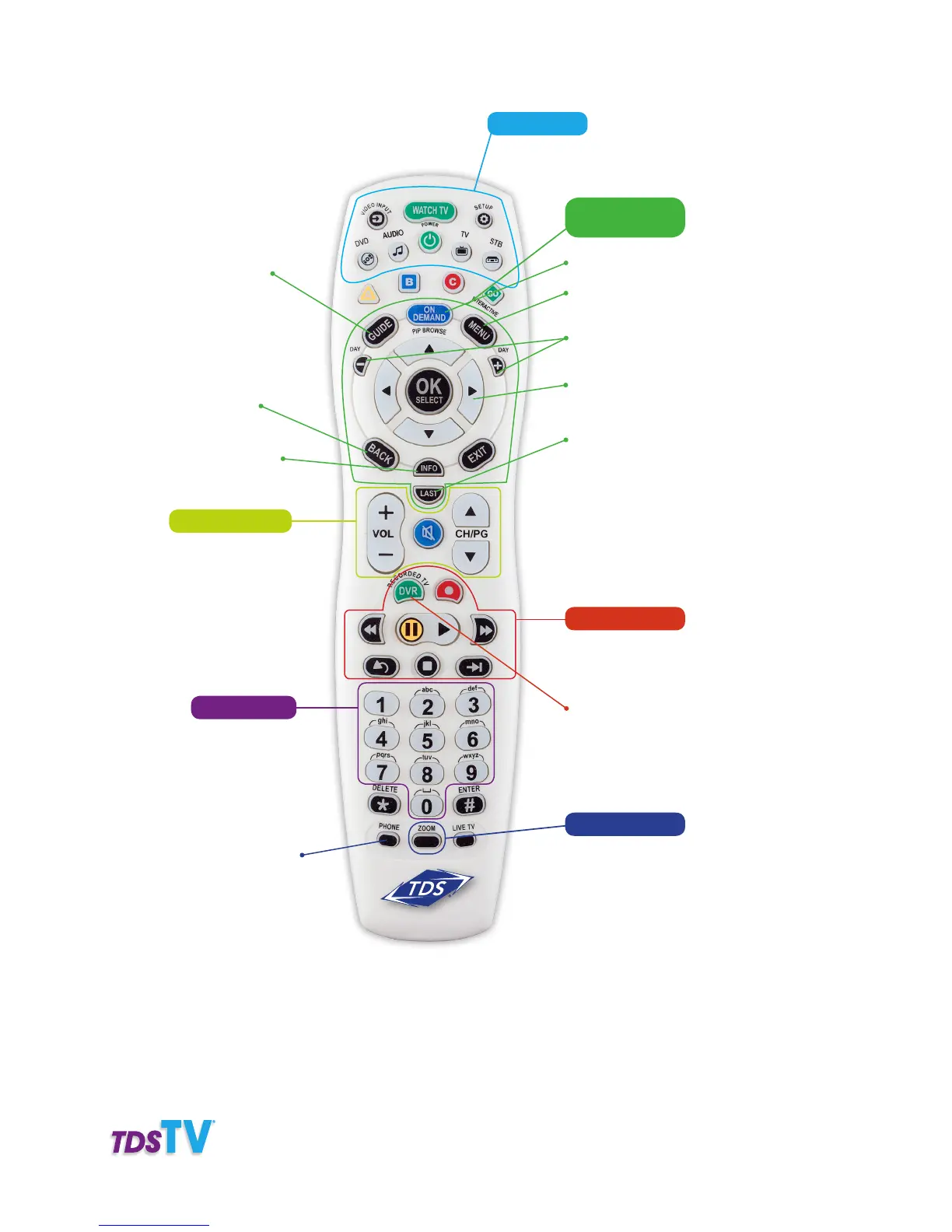
Remote Control
Access Interactive
Program Guide
Program description
and original air date
Access on-screen
voice mail
Returns you to the
previous screen
Access DVR recordings
Power on/off for devices
programmed to work with remote
Device Buttons:
Viewing and
Browsing Buttons:
Access On-Demand Store
Access TDS TV main
menu and features
Advance by day through
the Guide
Navigate through
TDS TV menus with
arrow buttons
Displays last
5 channels viewed
Control Buttons:
Control recordings
and DVR (or other
device) functions
Quick Key:
Access favorites list,
parental controls, and
closed captioning
Numeric Keys:
Enters channel
numbers, text,
parental control
PIN, and voice
mail PIN
Functional Controls:
Adjust volume and
change channels

Table of Contents

Related product manuals